Ansys Assistant will be unavailable on the Learning Forum starting January 30. An upgraded version is coming soon. We apologize for any inconvenience and appreciate your patience. Stay tuned for updates.
Ansys Free Student Software

Ansys Free Student Software

Topics cover installation and configuration of our free student products.

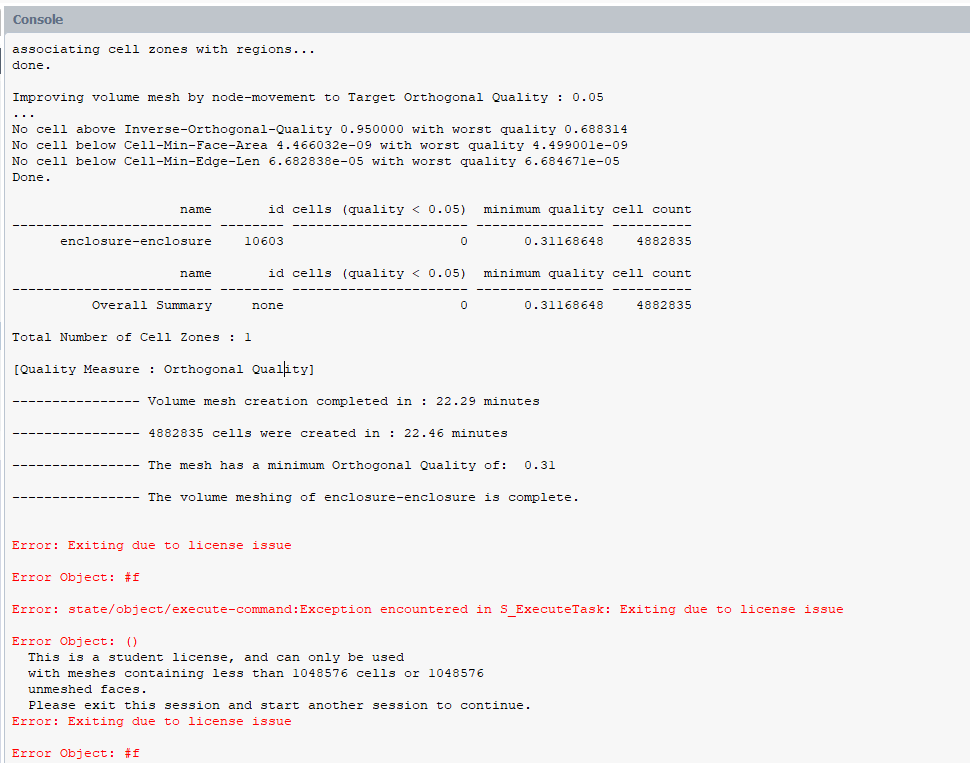
Exiting due to License issue –> after Volume mesh generated

    • labdulal
      Subscriber

      Hello,

      I have an issue in Ansys Fluent. After generating the volume mesh, I am unable to write the mesh file (save it) due to a license issue. Why would this error happen if the volume mesh is already generated? I saw in other posts that the reason if the volume mesh is not generated is because of the huge number of cells, and indeed I fixed that. To save the generated mesh file, what do you suggest I do in this case?

      Thanks.

    • Rob
      Forum Moderator

      You can't save the generated mesh as it exceeds the Student licence limits. Fluent Meshing will check a licence at intervals or on triggers, so you've set the meshing process off within the limits but have then created a 4.8M cell model which exceeds the limits. 

      The options are to restart and use a larger cell size setting to get a smaller cell count or restart on a University machine with a Research licence which allows larger cell counts. 

    • labdulal
      Subscriber

      This makes sense, thank you.

    • Rob
      Forum Moderator

      You're welcome. Student is a learning tool, so limits are balanced between large enough to let you do most applications with coarser meshes but small enough to not replace Research licences. As a reference point, my PhD Fluent mesh was around 97K cells, block hex and took about a week to run for k-e and over a month for RSM, it was a while ago though. 

Viewing 3 reply threads
  • You must be logged in to reply to this topic.
[bingo_chatbox]