TAGGED: floating-point-exception
-
-
December 22, 2025 at 9:53 am
a.iverson9394
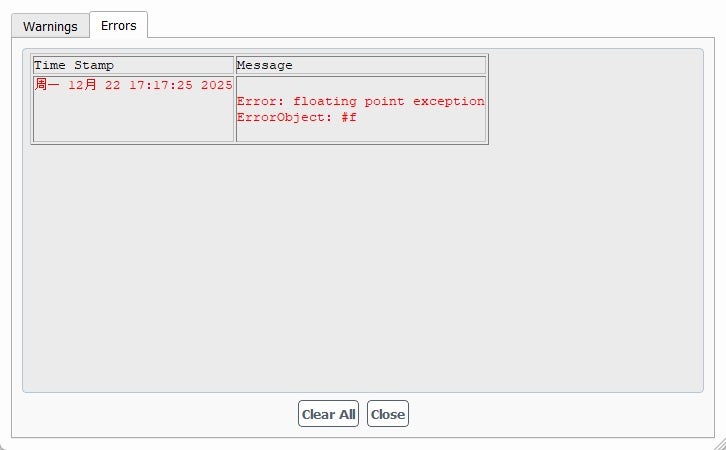
SubscriberI'm running my model using ANSYS Fluent 2025R1 on my desktop and it keeps either go black screen and restart my desktop or show up with the following error message. However, I can run the exact same model on my older lapotop without either of the problem above, but much slower. I used to run my model on 2025R2 on my desktop and it keeps coming up with a black screen and restart my system. My colleagues told my to try their 2023R1 version and I still get the same floating point exception or black screen. How can I resolve this issue as it's been bugging me for over a month and my progress is lagging due to this issue. The only reason I need to run my model on my desktop is because my desktop is brand new and can run my model nearly half the time compared to my laptop, before the 2 issues above keeps coming up out of nowhere for no reasons.

-
December 22, 2025 at 10:48 am
Rob
Forum ModeratorIf the model used to work but doesn't on new hardware with the same solver version it's likely driver or OS related. Win11 seems pretty stable so and it's unusual to install Linux on a laptop so I'd check drivers but also that you're using the "real" graphics card and not the motherboard. I think that's in the Display settings.Â
I see you're about 9 hours ahead, so the Kanji type characters are correct? Are your userID, install and working folder paths all in "English" characters? Do you have any UDFs or scripts active?
-
December 22, 2025 at 2:23 pm
a.iverson9394
SubscriberÂ
Â
Dear Rob,
Thank you for you swift reply. Do you mean my userID for the software ANSYS itself? My install and working folder paths are all in English characters. Since you have mentioned it, I remember changing the language for Non-Unicode programme from English (United Kingdom) to Simplified Chinese, but I can’t remember if the floating point exception error happen before or after I made that change. I’ll have to go back and check tomorrow.
I used this newly built desktop to run the very same model, but with different (but wrong) dimentions for some parts for a whole week before, and it worked fine then. Then I remembered making some adjustments to some parts of the model and made a quick run in a Friday afternoon just before finishing work and headed into the weekend. That model was still working fine on my desktop then, and finally managed to give me some sensible results I was looking for. Then everythink started to go wrong after that weekend.
Just a few more questions.
Â
Â
- If my system is Windows 11 25H2, which version of the ANSYS software should I use? I screenshoted this ‘floating point exception’ error message and asked AI, it said this error could be caused by the compatability issues with latest version of Windows 11 but older version (2023R1 or earlier) of ANSYS, is that true?
- My new desktop desn’t have a ‘real’ graphics card, but only the integrated one from my 2nd Gen Intel Ultra 9 chip from the get go. Is that the main reason for causing the random black screen to happen? My colleague seemed to think it was caused by excessive CPU voltage from an older version of the BIOS, so I updated it to the latest then ran a system stress test for 10 consective minutes while allowing the motherboard (ASUS ROG one) to AI overclock the CPU with AI management of the fan speed (ASUS Armoury Crate). The temperature for those cores seemed fine during the stress test, with no core having a temperature higher than 80℃.
-
December 22, 2025 at 3:10 pm
Rob
Forum ModeratorWe're running Win11 of uncertain version with no issues, and other than graphics drivers I understand there aren't many issues. So check the path and userID. The solver language shouldn't be an issue, it's just the paths etc: the solver is fine with local language just not on the operating system side!Â
Was working and now won't sounds more like hardware/OS than the Fluent solver. But, Floating Point is usually a solver divergence so I don't understand why that would cause a black screen or crash. That AI result isn't likely useful; it's possible the LLM has conflated a couple of errors. Can you run any Fluent models? Best test is to find a tutorial on the Help, https://ansyshelp.ansys.com/public/account/secured?returnurl=/Views/Secured/main_page.html?hl=f and try to run that. Are you running Fluent as standalone or from Workbench?
No idea on the new hardware, as with most of the physics staff I'm the cause of IT issues not the solver of!Â
Â
-
December 22, 2025 at 3:50 pm
a.iverson9394
SubscriberStill not sure what userID you are talking about? Is it my MS account or machine ID for Windows/system like 'Gaming-PC-2020' in the following screenshot?

I'm runing Fluent as standalone because that's the one I can change my working directory to where I want to save my case and data and make sure the path is in English only, as shown in
this screenshot.I'll try a tutorial from the link tomorrow.
-
-
December 22, 2025 at 4:00 pm
Rob
Forum ModeratorThat looks fine. Typically the problem comes if "Alver" is written in nonEnglish characters.Â
-
- You must be logged in to reply to this topic.
-
4678
-
1565
-
1386
-
1241
-
1021
© 2025 Copyright ANSYS, Inc. All rights reserved.