-
-
February 13, 2024 at 3:45 pm
nuaman.m.kutty
SubscriberHi everyone,
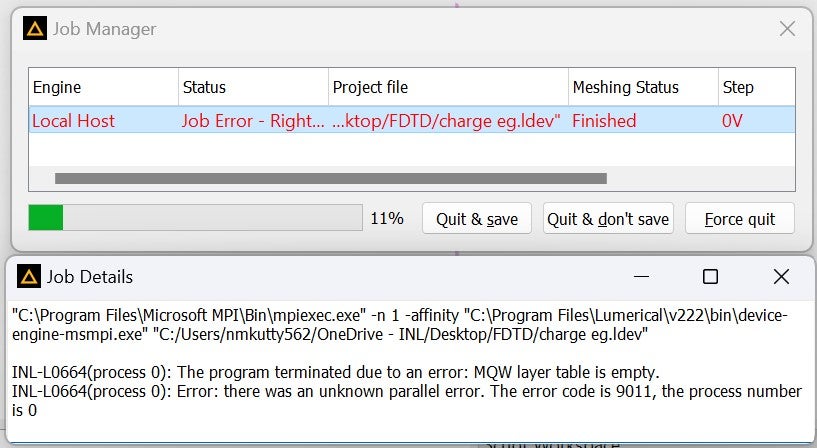
I am ending up with an error with the example file Micro-LED (https://optics.ansys.com/hc/en-us/articles/360053540493-Micro-LED) while running the charge simulation. `The error is The program terminated due to an error: MQW layer table is empty. `Error: there was an unknown parallel error. The error code is 9011, the process number is 0´. Below is the screen shot for the error. -
February 13, 2024 at 7:34 pm
Amrita Pati
Ansys EmployeeHi Nuaman,
I downloaded and ran the CHARGE simulation from the link you have shared. I was able to run it without any error. If you edit CHARGE object and then go to MQW tab followed by Layers tab, do you see a table like this:

Also, since this is a coupled CHARGE-MQW simulation, the MQW domains should be "MQW region" in the General tab of CHARGE.
Regards,
Amrita-
February 14, 2024 at 9:44 am
-
-
February 14, 2024 at 5:30 pm
Amrita Pati
Ansys EmployeeHi Nuaman,
Thanks for sharing the screenshot! I will recommend you to make sure that all the other files are in the same directory. Would you be able to download the folder, unzip it, and run "Horng2018.ldev" without making other changes?
Regards,
Amrita -
February 14, 2024 at 5:37 pm
nuaman.m.kutty
SubscriberHi,
I checked and all the files are in the same directory. I also tried unzipping the file and running the simulation. Still its the same.
Will it be related to the solver version ? I am using 2022 R2.4
-
February 14, 2024 at 5:47 pm
Amrita Pati
Ansys EmployeeHi Nuaman,
That's a good point. CHARGE MQW coupled simulation was introduced in 2022 R2.1, but it has gone through multiple feature updates since then. I will suggest downlading the most recent release (2024 R1.1). We always encourage users to install the most recent release so that not only can they use the newest features but also because we don't provide support for older releases.
Please let me know if you continue to face the issue.
Regards,
Amrita -
February 14, 2024 at 5:55 pm
nuaman.m.kutty
SubscriberHi,
I am a bit confused whether the latest version will work with the license that I have now. Could you please let me know if there will be any problem if I updates the solver?
-
February 14, 2024 at 6:32 pm
Amrita Pati
Ansys EmployeeYou will have to coordinate with your IT/license server admins - verify if you are running the Ansys License Manager 2024 R1.
But if you are unable to do that, I will recommend you to install 2023 R2.3. That is because this should run on old license and I think that was the release, last major features additions were done to coupled CHARGE MQW. Just to be careful, make sure you keep the current relase while installing the newer releases. So that in case it is not working you can continue to access the older release. When you install the newer release, at one point it will ask you if you want to keep the older release. By default, the option is selected such that the older relases get deleted. I will recommend you to be careful at each step of the indtall until you see this option. I can't find a screenshot of the window, that would have made things a bit easier, but it should still be very straightforward if you read the messages in each step of the install

-
February 16, 2024 at 10:56 am
-
February 20, 2024 at 8:04 pm
Amrita Pati
Ansys EmployeeHi Nuaman,
Now if you have multiple versions of software in your computer, make sure that you wait a couple minutes before opening different versions of the software. You can close all solvers, wait a couple minutes and then open the simulation file with the newer version.
Regards,
Amrita -
February 21, 2024 at 9:30 am
nuaman.m.kutty
SubscriberHi Amrita,
I closed everything related to ansys from task manger and then restarted the pc. Still It´s showing the same error.
Is there any specific configuration settings that I can make changes?
Also is there a way to solve the example file using the mqw and charge solver seperately? Please let me know how to do it.
Regards,
Nuaman -
February 29, 2024 at 11:24 am
nuaman.m.kutty
SubscriberHi Amrita,
Could you please letme know if it is possible to solve seperately? how to extract the data in the required from MQW solver and how to compile it with charge solver? -
February 29, 2024 at 7:26 pm
Amrita Pati
Ansys EmployeeHi Nuaman,
We have an example on Electro-absorption modulator that can guide you on how to do coupled and uncoupled CHARGE-MQW simulations. I haven't looked at the details in a while but please have a look and let me know if you have questions. The CHARGE MQW uncoupled simulation is supposed to be in the Appendix Section.
-
- The topic ‘error code is 9011: MQW layer table is empty. CHARGE solver’ is closed to new replies.
-
4763
-
1565
-
1386
-
1242
-
1021
© 2026 Copyright ANSYS, Inc. All rights reserved.