Ansys Assistant will be unavailable on the Learning Forum starting January 30. An upgraded version is coming soon. We apologize for any inconvenience and appreciate your patience. Stay tuned for updates.
Fluids

Fluids

Topics related to Fluent, CFX, Turbogrid and more.

Element size per zone when using Offset Surface refinement region

TAGGED: 

    • cesarj.95plus
      Subscriber

      Dear support,

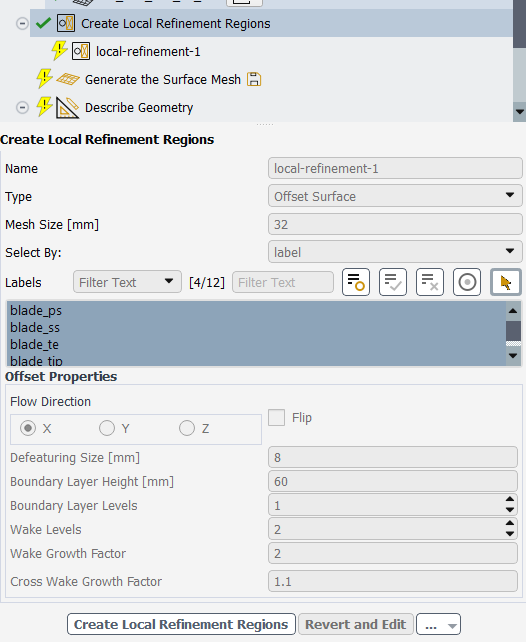
      I have a question regarding the element size set on each of the regions of the local refinement region when using Offset Surfaces. If I have the surfaces settings like the image that you have below, how can I calculate exactly the element size on each of the 4 regions (2 boundary layer and 2 wake)?

      I have tried to find my answer in the car example from https://ansyshelp.ansys.com/public/account/secured?returnurl=/Views/Secured/corp/v252/en/flu_ug/tgd_user_workflow_guided_tasks_create_bodies_of_influence_wtm.html?q=body%20of%20influence but even if it specifies the element size per region, it doesn't specify the refinemet used and the impact on the element size.


      Thanks in advance!

    • abhiroy
      Subscriber

      Hello, when local refinement is defined Fluent creats a Body of Influence (BOI) region and mesh size is the maximum allowable cell size within that BOI region 

    • cesarj.95plus
      Subscriber

      Hello, but this local refinement region creates multiple bodies of influence (BOIs), 3 in this case (1 boundary layer+ 2 wake bodies) and there is only one option for sizing, set to 32mm. So which is the local sizing applied on each BOI?

    • abhiroy
      Subscriber

      Hello, when you select multiple faces it will create single refinement region. If you want to create seperate refinement region add seperate local refinement then you will be able to define different sizings for different refinement zones. 

Viewing 3 reply threads
  • You must be logged in to reply to this topic.
[bingo_chatbox]