Ansys Assistant will be unavailable on the Learning Forum starting January 30. An upgraded version is coming soon. We apologize for any inconvenience and appreciate your patience. Stay tuned for updates.
General Mechanical

General Mechanical

Topics related to Mechanical Enterprise, Motion, Additive Print and more.

element birth and death technic

    • hasanilkerceliker
      Subscriber

      Hello,
      I need to perform paint removal on a composite material. The birth and death technique was used in the study, but I have never used it before. How can I do it ? 

    • ErKo
      Ansys Employee


      Search this forum and the internet and there are many posts on this topic. E.g.:


      /forum/forums/topic/how-to-use-simulation-results-temperatur-to-control-birth-and-death-elements/

      All the best


      Erik


    • hasanilkerceliker
      Subscriber

      Hello,
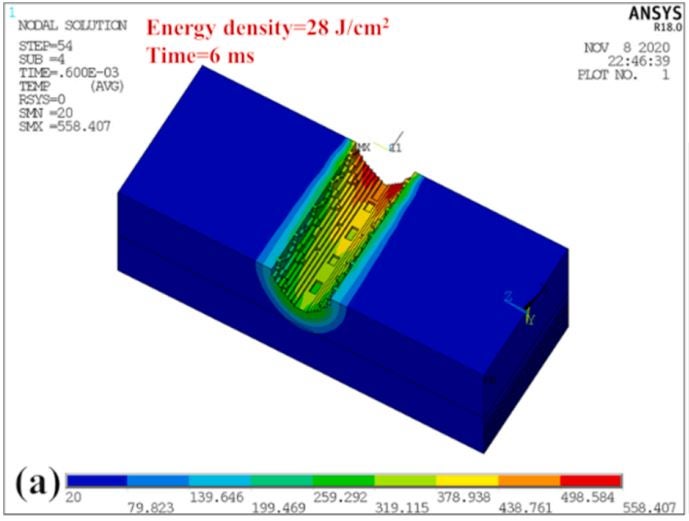
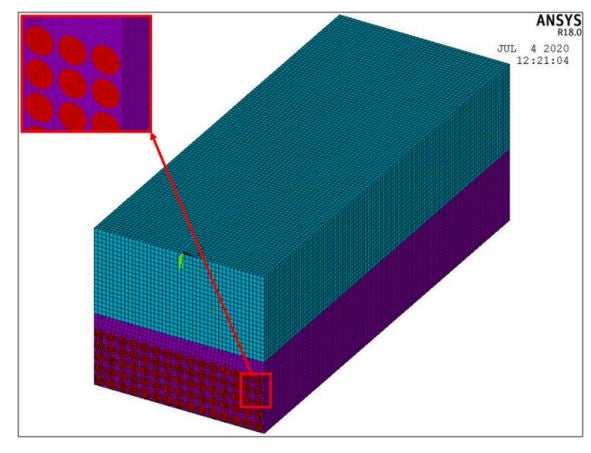
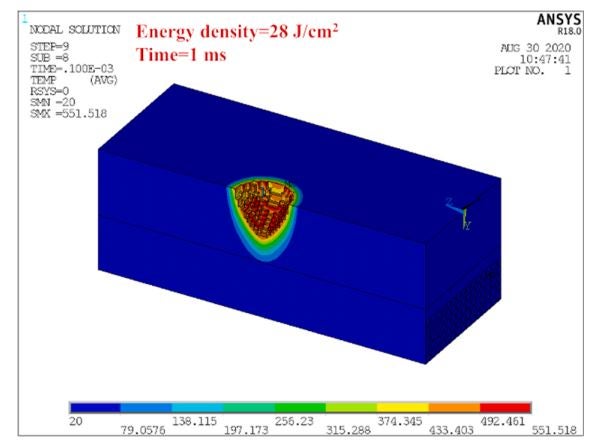
      The result of the analysis that I have been working on and trying to achieve is given above. I don't know how to enter my entries into the system. I would be very happy if you could help me with this subject.

    • mrife
      Ansys Employee

      Hi hasanilkerceliker

      Please give more details - are you modeling in Workbench Mechanical or Mechanical APDL?  What is the criteria to kill the elements?

    • hasanilkerceliker
      Subscriber

      What I want to do is this:
      I have 3 different materials together with CFRP, epoxy resin and paint. There is resin on CFRP and paint on them. It is desired to apply 7,14,21,28,35 and 42 W energy with laser cleaning. This will also be simulated with the element death method. Modeling needs to be done via APDL. With the given laser energy, the paint on the surface will be removed. I will use this work in my doctoral study. But how can it be done? I do not know this. I would be very happy if you could help with this. In addition, I have mechanical properties related to 3 different materials. But I don't know how I can use some data.

    • mrife
      Ansys Employee

      hasanilkerceliker The link that Erik provided above shows how to do this, generally speaking, in MAPDL.  There is one big thing to keep in mind: when running MAPDL in SMP parallel mode the results are kept in memory, while in DMP parallel they are not (until read in with the SET command during post processing).

      So let's say your criteria for killing the elements is "A" (you've not yet defined that).  Then some psuedo APDL to solve this would be:

      /solu

      *do,...  loop over time in some time increments

      apply load

      solve

      select nodes that meet "A", then elements attached to those selected nodes.  Maybe unselect from this set the nodes/elements that have loads or boundary conditions applied if needed.

      ekill elements

      select everything

      *enddo....close do loop

      The node selection can be by result if running SMP parallel.  Test out a simple model that uses same physics.

    • hasanilkerceliker
      Subscriber

      The value you denote as "A" here is the value I need to formulate here. Did I get it right?

    • vangapandu goutham
      Subscriber

      so I have this very small doubt 

      my solution keeps on showing the error that the element is highly distorted (* I have tried reducing the mesh size and increasing the load steps to 10k)

      should I need to use this element of birth and death technique


      here is my model script


      /clear
      /prep7
       
      !keypoints
      k,1,0,0,0
      k,2,0,1.72,0
      k,3,0,4.72,0
      k,4,0,16.5,0
      k,5,0,19.5,0
      k,6,0,20,0
      k,7,0,22,0
      k,8,8,22,0
      k,9,8,20,0
      k,10,8,19.5,0
      k,11,8,16.5,0
      k,12,8,4.72,0
      k,13,8,1.72,0
      k,14,8,0,0
      k,15,8.5,22,0
      k,16,8.5,20,0
      k,17,8.5,19.5,0
      k,18,8.5,16.5,0
      k,19,8.5,4.72,0
      k,20,8.5,1.72,0
      k,21,18,22,0
      k,22,18,20,0
      k,23,18,19.5,0
      k,24,18,16.5,0
      k,25,18,4.72,0
      k,26,18,1.72,0
      k,27,25.4,19.5,0
      k,28,25.4,16.5,0
      k,29,25.4,4.72,0
      k,30,25.4,1.72,0
      k,31,100,19.5,0
      k,32,100,16.5,0
      k,33,100,4.72,0
      k,34,100,1.72,0
       
       
      !element type
      allsel
      et,1,183,,,1
       
      a,1,2,13,14
      a,2,3,12,13
      a,3,4,11,12
      a,4,5,10,11
      a,5,6,9,10
      a,6,7,8,9
      a,9,8,15,16
      a,10,9,16,17
      a,11,10,17,18
      a,12,11,18,19
      a,13,12,19,20
      a,20,19,25,26
      a,19,18,24,25
      a,18,17,23,24
      a,17,16,22,23
      a,16,15,21,22
      a,24,23,27,28
      a,25,24,28,29
      a,26,25,29,30
      a,30,29,33,34
      a,29,28,32,33
      a,28,27,31,32
       
       
      !material properties 
      !Stainless steel 303
      mp,ex,1,193000
      mp,prxy,1,0.25
       
      !Hysol EA 9394 Adhesive
      mp,ex,2,4068
      mp,prxy,2,0.37


      !need to add stress and strain values
       
      !E-QXM 3608 glass laminate
      mp,ex,3,18850
      mp,ey,3,18850
      mp,ez,3,18850
      mp,prxy,3,0.3
      mp,pryz,3,0.3     
      mp,prxz,3,0.3
      mp,gxy,3,7230
      mp,gyz,3,7230
      mp,gxz,3,7230
       
      !Vinyl ester balsa core 
      mp,ex,4,2800
      mp,ey,4,83
      mp,ez,4,32
      mp,prxy,4,0.014
      mp,pryz,4,0.011
      mp,prxz,4,0.65
      mp,gxy,4,140
      mp,gyz,4,76
      mp,gxz,4,45
       
      !Vinyl-ester glass composite
      mp,ex,5,3710
      mp,prxy,5,0.28
       
       
      /NERR,9999999999
       
       
      AESIZE,ALL,2
      allsel
      amesh,all,all
       
      SHPP,ON 
       
      allsel
      asel,s,,,1,6,1
      asel,a,,,7,16,9
      esla
      emodif,all,mat,1


      asel,s,,,8,11,1
      asel,a,,,15
      esla
      emodif,all,mat,2
       
       
      asel,s,,,12,14,2
      asel,a,,,17,19,2
      asel,a,,,20,22,2
      esla
      emodif,all,mat,3
       
       
      asel,s,,,21
      esla
      emodif,all,mat,4
       
       
      asel,s,,,13,18,5
      esla
      emodif,all,mat,5
       
       
      !allsel
      et,2,186
      emodif,all
      type,2
       
      !To clear 2d plane elements and extrude 
      allsel
      extopt,aclear,1
      eextrude,axis,0,,,90,,
       
       
      allsel
      eplot
       
      !load conditioning
       
      allsel
      nsel,r,loc,y,21.9,22
      d,all,uy,9
       
      allsel
      nsel,r,loc,y,1.62,1.72
      csys,5
      nsel,u,loc,x,0,50.8
      d,all,all
      csys
       
       
      !Symmetry
      allsel
      nsel,r,ang,zx,0
      d,all,uz,0
       
      allsel
      nsel,r,ang,zx,-90
      d,all,ux,0
       
      allsel
      eplot
       
      /solu
      antype,static,new
      CNVTOL,F,1000000,0.001,2,,
      NROPT,AUTO
       
      OUTRES,all,all
      NLGEOM,ON
      AUTOTS,AUTO
       
      nsubst,100,100,100
      neqit,100
       
      allsel
      solve
       
       
      !!All the dimensions are in mm and Mpa

    • hasanilkerceliker
      Subscriber

      Normally I have to give the laser intensity with the adiabatic boundary conditions and the formula you see in the picture. So where am I doing wrong?

      /solu
       
      ALPHAP=89000
       
      q=((2*(1-RP)*ALPHAP*EXP(-ALPHAP*Y)*EP*(-T^2/TAU^2))*(((-2*(X^2)+(Z^2))/RB^2))/(TAU*PI*RB^2)
       
      *do, 
       
      apply load
       
      solve
       
      ekill elements
       
      select everything
       
      *enddo....close do loop
Viewing 8 reply threads
  • The topic ‘element birth and death technic’ is closed to new replies.
[bingo_chatbox]