TAGGED: ekill, ekill-elements
-
-
October 6, 2022 at 1:46 pm
Luke.dykstra
SubscriberHello All,
I was hoping that someone has come across a way to deactivate elements within a model once they hit a specific stress level. For example, when lifting a generator subbase fuel tank the lift lugs used are pushed to the limit of failure (UTS). Am I able to deactivate these elements exceed this stress value? Other option is that the welds are linked to the tank stiffeners via bonded contact is there a process where elements within the bond contact are able to be killed per a specificied stress value? I have looked at the birth and death commnad in workbench but that is predetermined based on a load step. I am not exactly sure how I woudl do that on a load step basis as additioanl elements may need to be ddeactivated as teh solution progresses with the specified load step. I am using Workbench 2020 but am open to inserting APDL commands.
Thank you for any insight and feedback on this manner. Let me know if additioanl detail is needed.
-
October 6, 2022 at 11:36 pm
peteroznewman
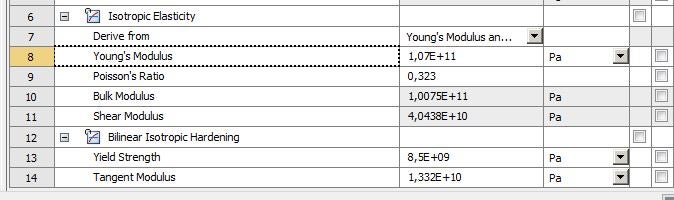
SubscriberI suggest you use a Plasticity material model to prevent elements from carrying more stress than some limiting value. This is much simpler than using EKILL. The simplest plasticity material model is Bilinear Isotropic Hardening. Only two inputs are required: Yield Strength and Tangent Modulus. If you set the Tangent Modulus to 0, then the element will never carry more stress than the Yield Strength.
When you use Plasticity, you have to turn on some things under Analysis Settings. Turn on Auto Time Stepping and set the Initial and Minimum Substeps to 100, and the Maximum Substeps to 1000. Turn on Large Deflection.
-
October 7, 2022 at 1:18 pm
Luke.dykstra
SubscriberThannk you very mych for the reply. I definetely see where you are coming from in terms of looking at this when the yield strength is the limiting factor. How do you suggest this be achieved when teh ultimate tensile strength is to be considered and as the failure critieria? I already have this model setup with the isotropic bilinear cureve for the material since i am intersted in the stresses and behavior AFTER it yields.Â
Would a tri-linear or other curve work and set the values after the UTS to 0? I will conitnue to investigate but apprecaite any feedback that you woudl have.
Thank you again.
-
-
October 7, 2022 at 6:34 pm
peteroznewman
SubscriberDon't use Ultimate Tensile Strength as the failure criterion when using a Plasticity material model.
Use Elongation at Break as the failure criterion and compare it with Total Strain.
-
January 11, 2023 at 8:40 am
Riccardo Petrelli
SubscriberPeter please, you are the only one who can save me, can you leave me an email contact?
-
January 11, 2023 at 8:52 am
-
-
January 11, 2023 at 11:27 am
peteroznewman
SubscriberRiccardo,
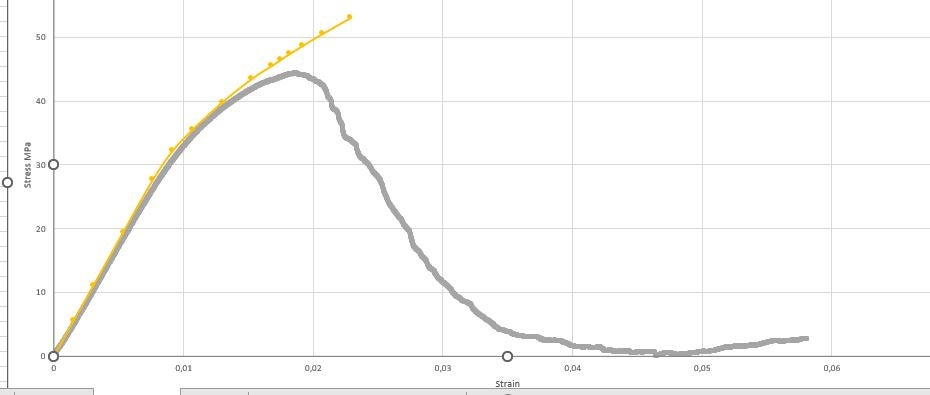
The laboratory test measured compression force and displacement as the raw data from the sensors. That is what you should try to reproduce. Get that raw data if you can. Typically, the Force is converted to Engineering Stress by dividing by the Initial cross-sectional area. The displacement is converted to Engineering Strain by dividing by the Initial Gauge Length.
For a Plasticity material model, the Engineering Stress and Engineering Strain have to be converted to True Stress and True Strain. Did you do that? Are you using a Plasticity model, which one? When Ansys solves a model, the output is True Stress and True Strain. What have you done to plot the yellow curve?
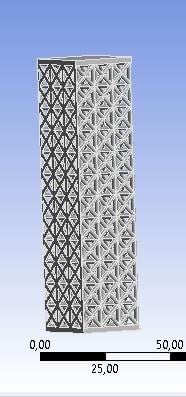
What is this material? How is it possible that the force could drop to zero? Do you have images of the test setup and the sample shape before, during and after the test?
Â
-
January 11, 2023 at 11:33 am
Riccardo Petrelli
SubscriberÂ
Thankyou for the reply, the yellow curve was traced, for the stress obtaining the reaction force at the base of the specimen divided by the area and the deformation as a change in length divided by the initial length
Â
-
January 11, 2023 at 11:50 am
-
-
January 11, 2023 at 11:35 am
-
January 11, 2023 at 4:10 pm
peteroznewman
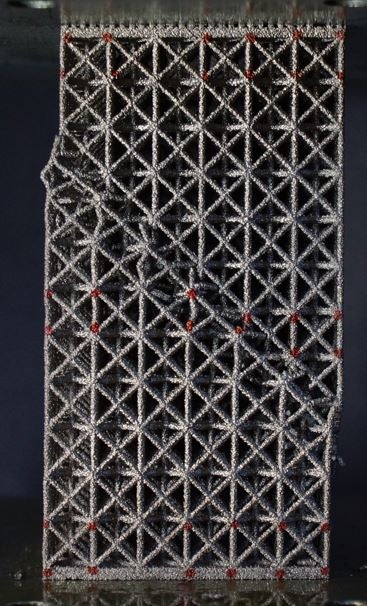
SubscriberPlease reply with photos of the sample after the compression test.
-
January 11, 2023 at 4:17 pm
-
-
January 11, 2023 at 4:20 pm
Riccardo Petrelli
Subscribermaterial is Ti6Al4V
-
January 11, 2023 at 4:31 pm
peteroznewman
SubscriberYou can see that beams in the structure failed along a max shear plane and the structure lost all stiffness.
You could simulate that if you create a geometry that has a small flaw in the geometry that will seed this mode of failure.
If you have perfect geometry, that mode will not be initiated and you will just get uniform compression.
-
January 11, 2023 at 5:23 pm
Riccardo Petrelli
SubscriberIsn't there a way to see beam failure without inserting geometric defects?
-
January 11, 2023 at 5:24 pm
-
January 12, 2023 at 12:12 pm
Riccardo Petrelli
SubscriberIn your script ekill command if i want to insert ESTIF command, where do i do?
-
January 12, 2023 at 1:30 pm
peteroznewman
SubscriberThere is an automatic way to introduce defects into the structure. Perform an Eigenvalue Buckling analysis. The solution will have a buckled shape. The Static Structural model linked to that can include a small fraction of that buckled shape at the start of the analysis.
I didn't write the ekill script, it was given to me. I don't know where to put the ESTIF command. Open a new Discussion and ask that question there so Ansys staff might reply.
-
February 6, 2023 at 1:30 am
CamMinhTri.Tien
SubscriberÂ
It works. In my case, I just needed to uncheck the distrubuted option. Thanks everyone.
Â
-
- The topic ‘EKILL or Other Command for Deactivating elements with a Certain Stress’ is closed to new replies.

-
5859
-
1906
-
1420
-
1305
-
1021
© 2026 Copyright ANSYS, Inc. All rights reserved.