-
-
May 4, 2020 at 1:55 am
farrmi
SubscriberHello,
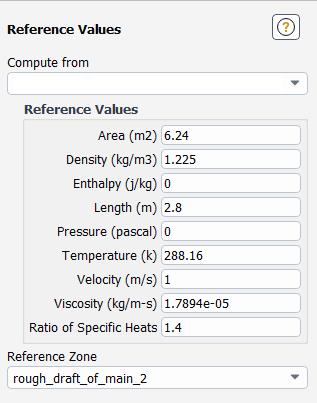
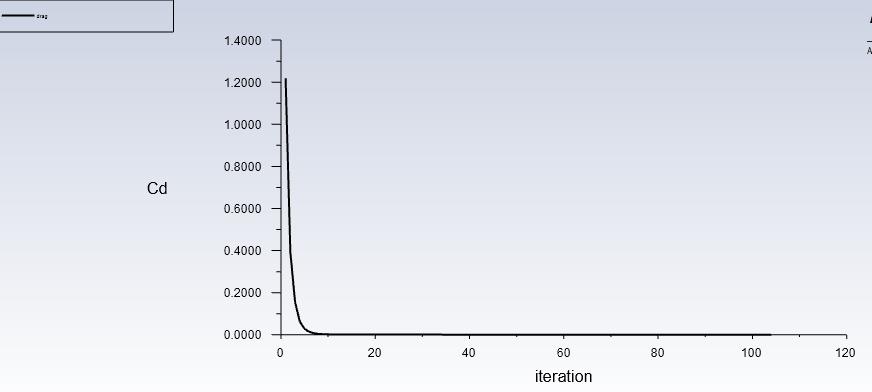
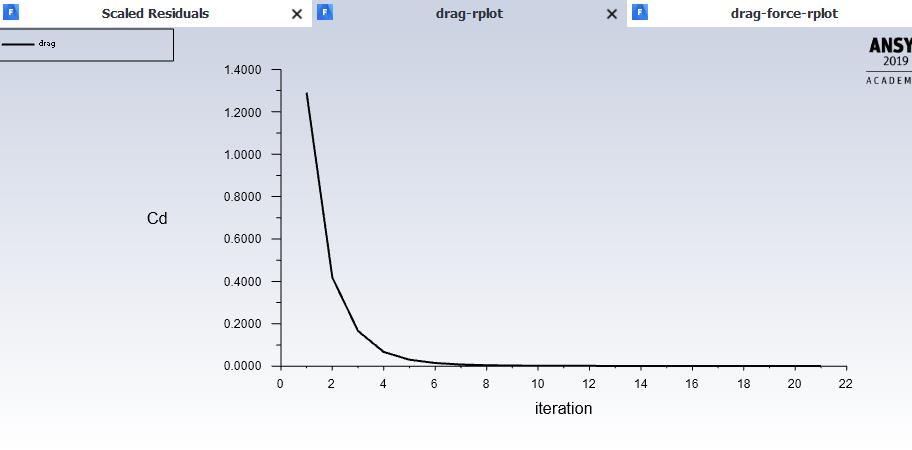
I am working on a CFD analysis in Fluent for an annular parachute to calculate its coefficient of drag. I have set up the coefficient of drag report and plot so I can see live results as the simulation is run. I put the surface area and diameter of the parachute into the reference value section, but I am not getting the correct results. The coefficient of drag goes almost immediately to zero when it should be around 2.2. I have watched several tutorials and none of them helped. I think the error may be in the reference value or boundary condition sections, but I'm not sure. Any help would be greatly appreciated!Â
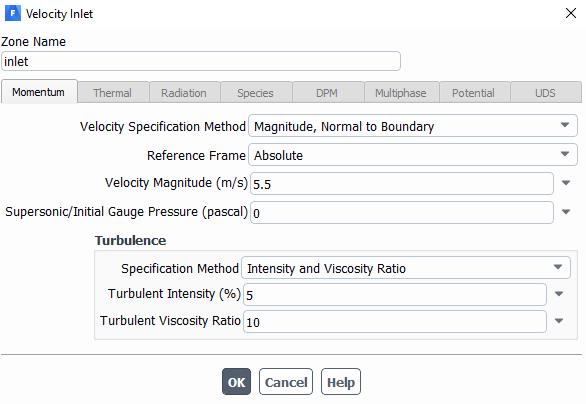
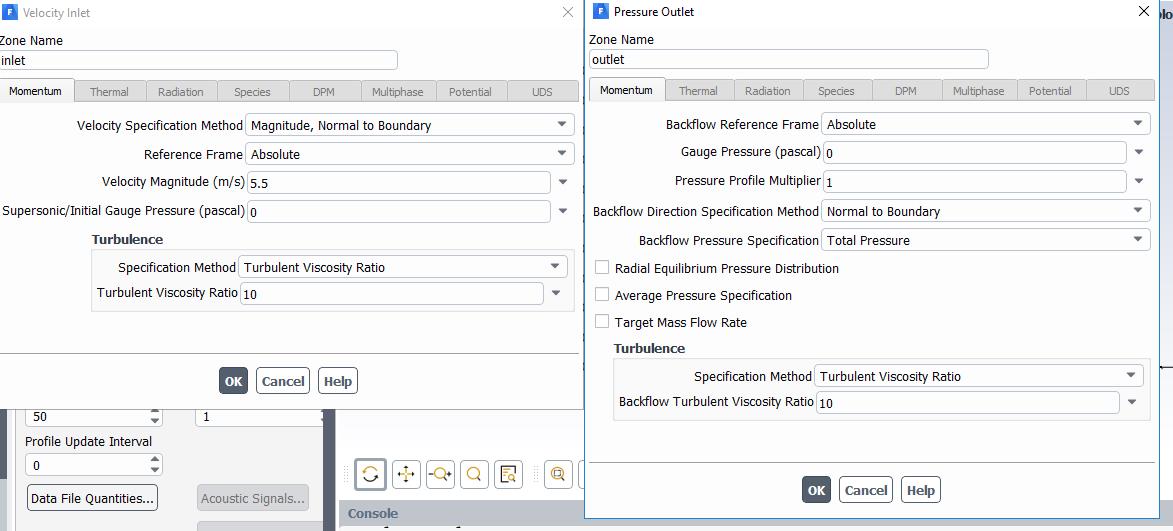
The parachute is traveling at a constant 5.5 m/s. I have included screen shots of the reference values and boundary conditions I currently have as well as the coefficient of drag plot.
Â
-
May 4, 2020 at 8:27 am
DrAmine
Ansys EmployeeSo the coefficient is near zero but the force report is correct right? The Area is used as reference area for drag caclulation as well as the density and the velocity reference there. Double chec
-
May 4, 2020 at 6:29 pm
farrmi
SubscriberHello Amine,
I just checked and the Drag Force report appears to be doing the same thing as the drag coefficient. For the reference values, I would want the area to be the surface area and the length to be the diameter of the parachute, correct? The parachute is oriented in the y-axis direction and I chose that orientation when I set up the report. Could it be a pressure issue? The pressure in the wind tunnel remains constant so I left the default values as the pressure values. Thanks for your help!
Best, MikaylaÂ
-
May 4, 2020 at 9:09 pm
Karthik Remella
AdministratorHello,
Is your solution fully converged? Please ensure that you have a good convergence on the model?
Also, how is your inflation mesh? Please ensure you have sufficient number of layers to capture the viscous effects?
What is the value of drag force you are getting from the simulation? Pressure and Viscous.
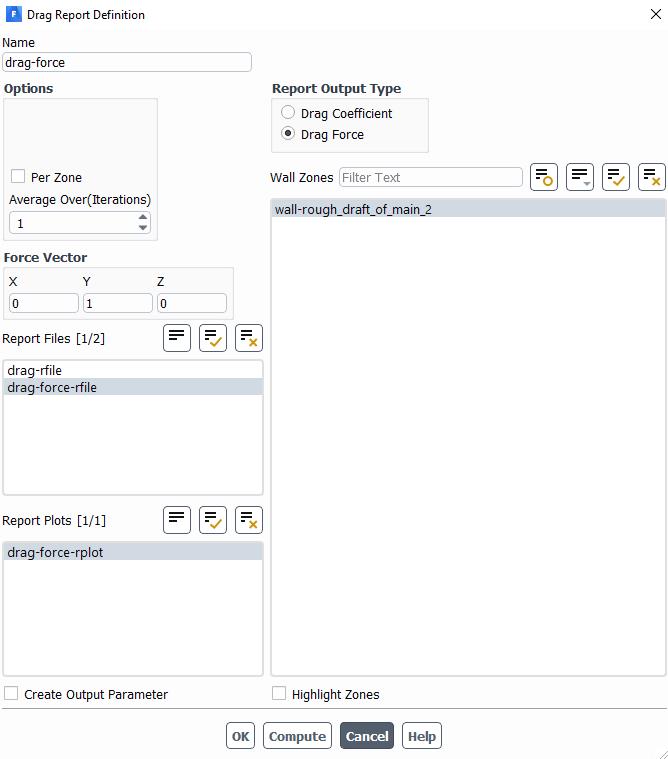
Also, how are you calculating this force? Could you please share a screenshot of how you are setting up this monitor?
Thank you.
Best,
Karthik
-
May 4, 2020 at 9:10 pm
RK
Ansys EmployeeHello,Â
Can you please insert an image of your computational domain and the dimensions so that we could get a better picture? You might also want to lower the values of Turbulent Intensity and Viscosity Ratio and try again.Â
Regards,
RahulÂ
-
May 5, 2020 at 12:39 am
farrmi
SubscriberHello Karthik,
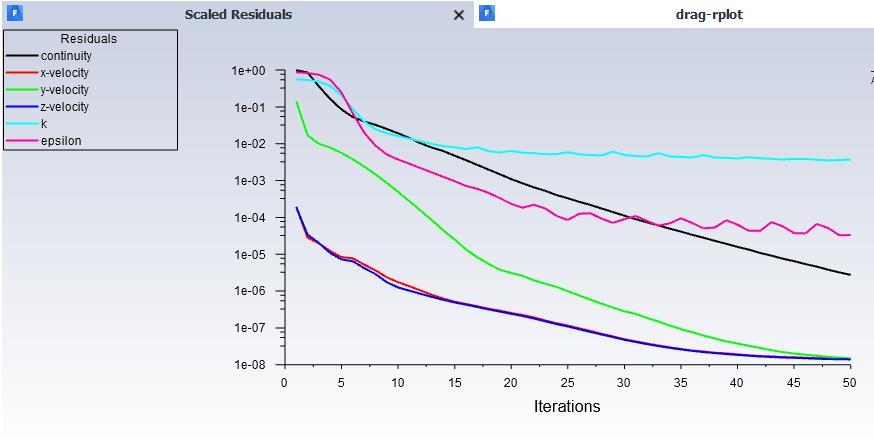
The solution is not fully converged which is another problem I have run into. I have provided the residual plot below. My inflation mesh has 10 layers. If I used much more than that I got the following error:
Error: FLOAT: invalid argument [1]: wrong type [not a number]
Error Object: inf.
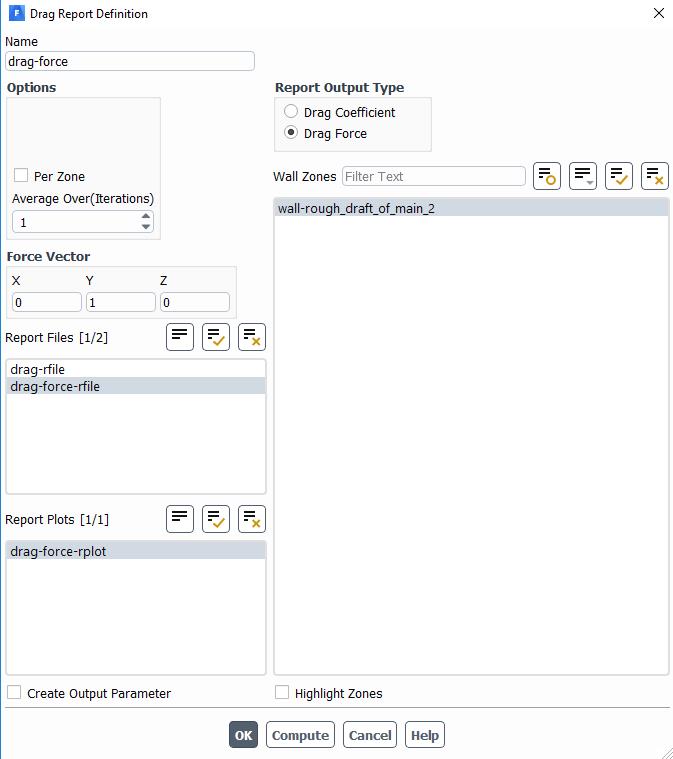
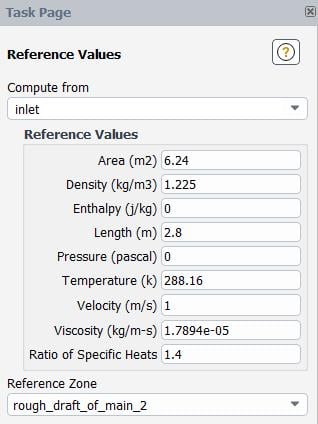
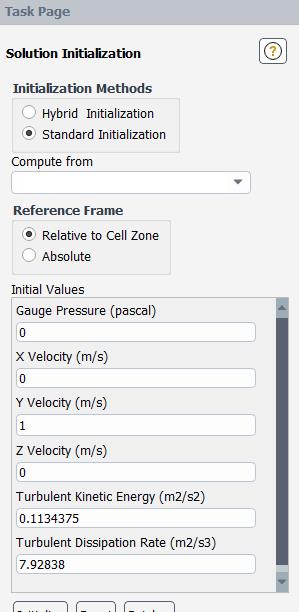
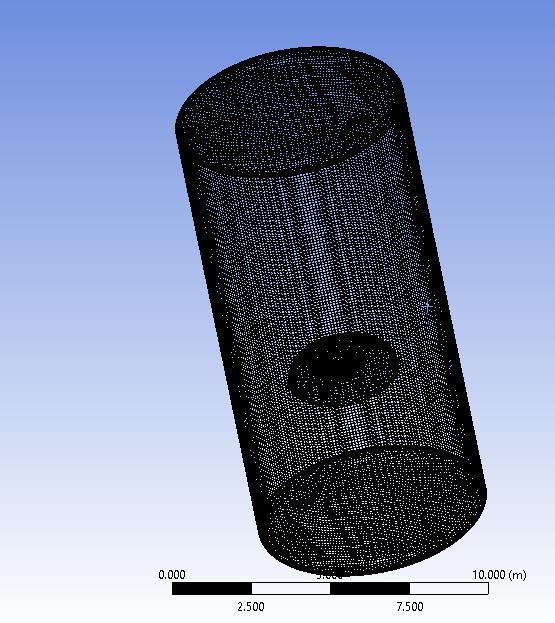
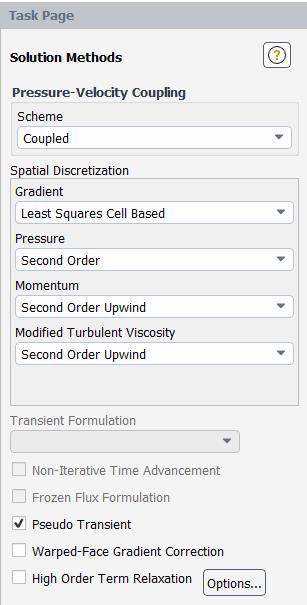
To calculate the drag force, I am just setting up a report to calculate it. The force would be in the y-direction. The final force is 0.00071295011, which is part of the reason why the drag coefficient went to zero. I have provided the report window with my selection below as well as the updated reference values, initialization window, and the meshed model.Â
-
May 5, 2020 at 1:18 am
farrmi
Subscriber Hello Karthik and Rahul,
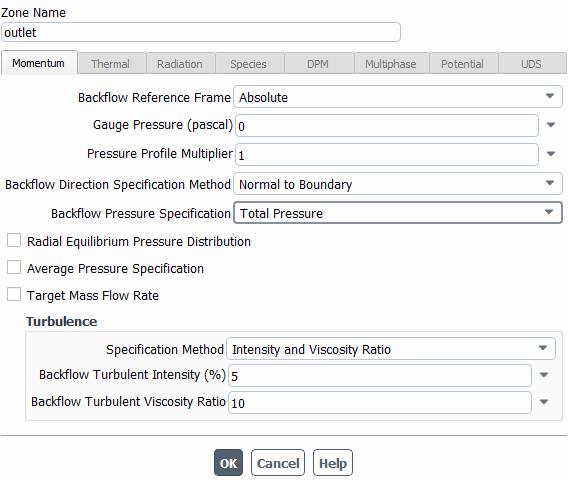
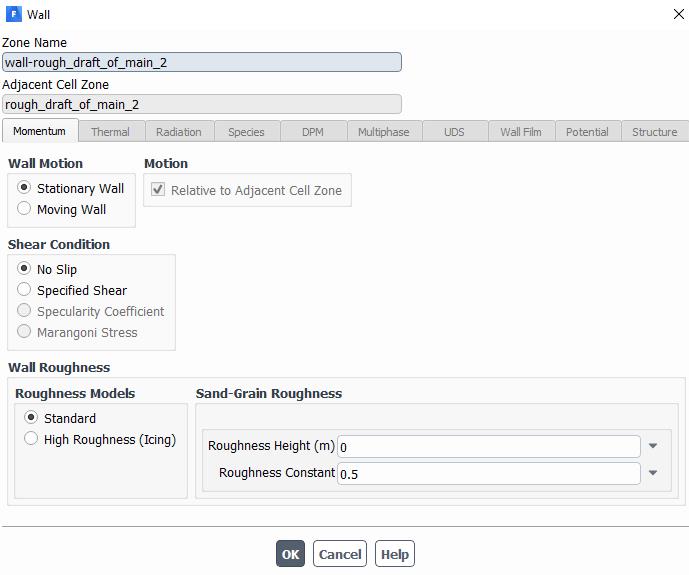
The solution is converged to a high convergence value. I have provided the residual plot below. The inflation mesh has 10 layers. If I used more than that I got an error when the calculation was performed. As far as calculating the drag force, I just created a report using the drag force option. I have provided the report window below. For boundary conditions, the wall of the wind tunnel was set to a shear wall with symmetry. I have provided updated screenshots below. I tried changing the turbulent ratio and it didn't seem to help. Â
Thank you for all your help!
- MikaylaÂ
-
May 5, 2020 at 5:41 am
DrAmine
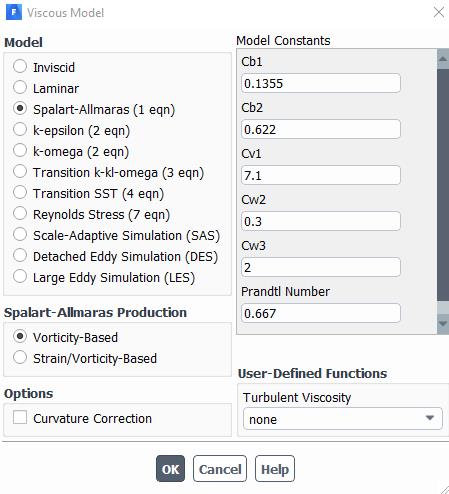
Ansys Employeeare the reference values correct: velocity, density and area? Why SA turbulence model? -
May 5, 2020 at 5:52 pm
farrmi
SubscriberHello Amine,
So maybe I am confused on what the reference values should be. As of now, I selected the parachute as the reference zone. Since I selected this, I put in the value for the parachute surface area for the area and the parachute diameter for length. All other values I was not sure of so I left them with the default setting. Was this correct? Or did I need to change all the values to match those of the parachute? I also was unsure what I should compute from so I chose the inlet since that was what every tutorial I watched selected.Â
Thanks, MikaylaÂ
-
May 5, 2020 at 8:48 pm
RK
Ansys EmployeeHello,Â
On the initialization page, are these the values you get after initialization from the inlet? If yes, then you have to check your reference values.Â
-
- The topic ‘Drag Coefficient Goes Immediately to Zero’ is closed to new replies.
-
6279
-
1906
-
1457
-
1308
-
1022
© 2026 Copyright ANSYS, Inc. All rights reserved.


.jpg?width=690&upscale=false)
.jpg?width=690&upscale=false)

.jpg?width=690&upscale=false)


.jpg?width=690&upscale=false)

.jpg?width=690&upscale=false)