

-
-
March 30, 2022 at 7:44 am
kadirkadir
SubscriberMarch 30, 2022 at 1:32 pmRK
Ansys EmployeeHello,
What is the full error message you get? Which Ansys software are you using?
March 30, 2022 at 6:48 pmSubscriberCant you see the pictures ? its already written there
April 1, 2022 at 12:47 amRebeca
SubscriberHello I'm having the same problem! I'm using 'Ansys Student 2021 R1' and the full error message was: "System.DllNotFoundException: N├úo ├® poss├¡vel carregar a DLL 'cclapilt.dll': N├úo foi poss├¡vel encontrar o m├│dulo especificado. (Exce├º├úo de HRESULT: 0x8007007E)". Meaning: It's not possible to load the DDL 'cclapilt.dll': It was not possible to find the specified module. (HRESULT: 0x8007007E exception).
So I can define the geometry, the mesh and the setup, but then I can't open the file on the CFX solver.
Thanks in advance for the help!
April 4, 2022 at 5:19 pmSubscriber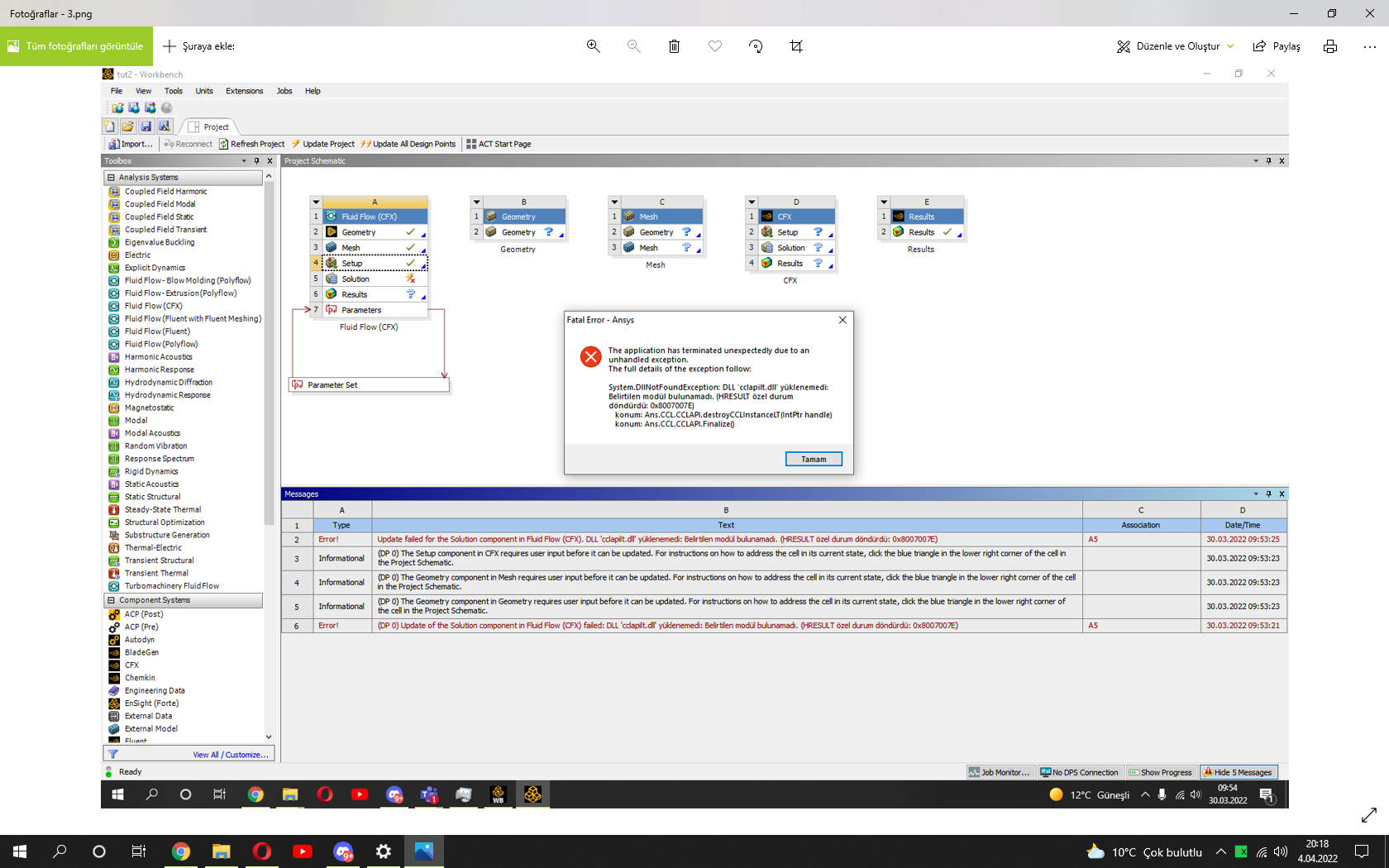 Please i need to fix that problem its an emergency
April 4, 2022 at 5:24 pmGeorge Karnos
Ansys EmployeeApologies...
Can you post the output from opening a DOS Command prompt window and typing in:
set PATH
please copy the output and paste it here as we are not permitted to open files.
April 4, 2022 at 5:27 pmSubscriberPath=C:\Program Files (x86)\Common Files\Oracle\Java\javapath;C:\WINDOWS\system32;C:\WINDOWS;C:\WINDOWS\System32\Wbem;C:\WINDOWS\System32\WindowsPowerShell\v1.0\;C:\WINDOWS\System32\OpenSSH\;C:\Users\Oem\AppData\Local\Microsoft\WindowsApps;
PATHEXT=.COM;.EXE;.BAT;.CMD;.VBS;.VBE;.JS;.JSE;.WSF;.WSH;.MSC
April 4, 2022 at 6:28 pmSubscribercan you inform me as soon as possible ?
April 5, 2022 at 11:41 amAnsys EmployeeTry the following:
Edit your PATH environment variable so that it starts with
C:\WINDOWS\system32;C:\WINDOWS;C:\WINDOWS\System32\Wbem;C:\WINDOWS\System32\WindowsPowerShell\v1.0\;C:\WINDOWS\System32\OpenSSH\;C:\Users\Oem\AppData\Local\Microsoft\WindowsApps;
move the beginning: C:\Program Files (x86)\Common Files\Oracle\Java\javapath;
to the end
Also, Try renaming the directory C:\Users\username\.cfx to .cfx_old
April 5, 2022 at 12:35 pmAnsys EmployeeChecked with Colleagues:
I think this issue is likely machine-specific one rather than general ANSYS product issue.My guess is that some system files that cclapilt.dll depends on are either missing or corrupt on the customer's machine.
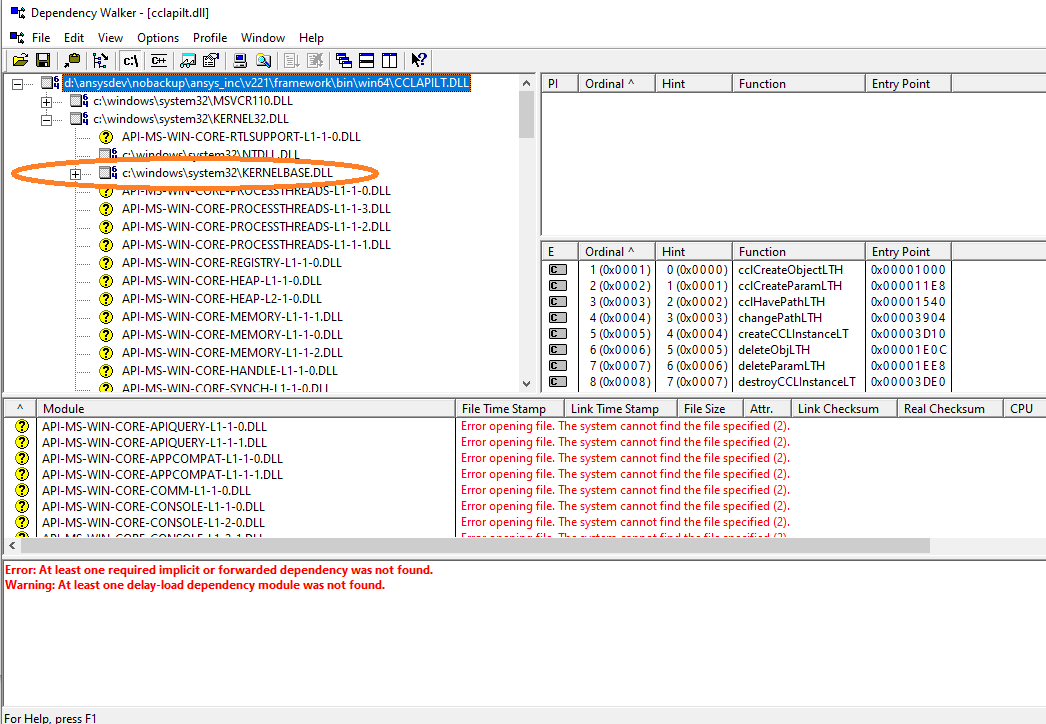
You can find out more about missing dependencies, using, for instance,a free dependency check tool called Dependency Walker (http://www.dependencywalker.com/). Simply download and run it, click File->Open and select the cclapilt.dll from ANSYS installation, the dependencies will be shown as in the screenshot below. If KERNELBASE.DLL is missing, it will be marked with a question mark. You can see that this file exists on my computer under C:\Windows\System32\.
April 5, 2022 at 5:30 pmMangeshANSYS
Ansys EmployeeHello
Please try Installing MS VC++ Redistributable for Visual Studio 2012 Update 4 from https://www.microsoft.com/en-us/download/details.aspx?id=30679
Viewing 10 reply threads- The topic ‘dll error..’ is closed to new replies.
Innovation Space Trending discussions
 Top Contributors
-
peteroznewman
 6369
6369 -
scabo
 1906
1906 -
Dennis Chen
 1457
1457 -
javat33489
 1308
1308 -
Shyam Prasad V Atri
1022
Top Rated Tags
© 2026 Copyright ANSYS, Inc. All rights reserved.
Ansys does not support the usage of unauthorized Ansys software. Please visit www.ansys.com to obtain an official distribution.
-


The Ansys Learning Forum is a public forum. You are prohibited from providing (i) information that is confidential to You, your employer, or any third party, (ii) Personal Data or individually identifiable health information, (iii) any information that is U.S. Government Classified, Controlled Unclassified Information, International Traffic in Arms Regulators (ITAR) or Export Administration Regulators (EAR) controlled or otherwise have been determined by the United States Government or by a foreign government to require protection against unauthorized disclosure for reasons of national security, or (iv) topics or information restricted by the People's Republic of China data protection and privacy laws.

 You are navigating away from the AIS Discovery experience