Fluids

Fluids

Topics related to Fluent, CFX, Turbogrid and more.

Display Issue with ANSYS AQWA Objects

    • Chelsea Yu
      Subscriber

      Hi everyone,

      I've run into a snag while working with ANSYS AQWA on one of my computers, and I'm hoping someone here can shed some light on the issue.

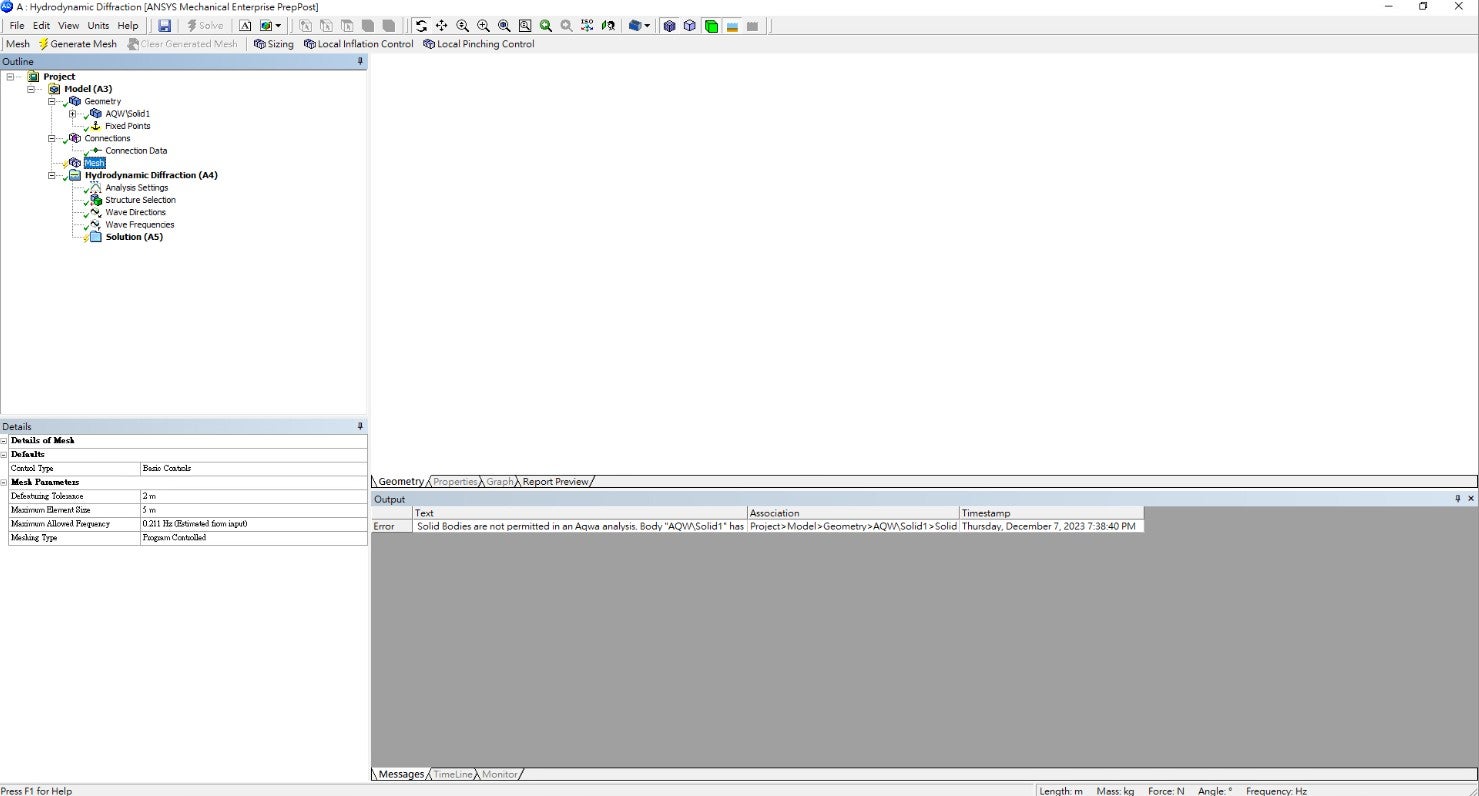
      The problem is that when I'm using ANSYS AQWA, the objects I input in windows like DesignModeler don't show up. Strangely, when I save the file and open it on another computer, everything displays correctly. This makes me think the issue isn't with the objects themselves.

      I've double-checked that all ANSYS settings on both computers are the same, but the object display problem persists on one machine. Any ideas on how to troubleshoot and fix this so that objects show up as they should?

      I appreciate any assistance or suggestions you can offer. Thanks a bunch!

      Best, Yu

    • Mike Pettit
      Ansys Employee

      Hello,

      From the error in the Messages window, it looks like you have created a solid geometry in DesignModeler. Aqwa can only deal with thin surface bodies and/or line bodies, so the solid is automatically suppressed when the geometry is imported.

      In DesignModeler you should use a Thin/Surface operation with 'FD1, Thickness' set to 0, and re-import the geometry. In SpaceClaim, you should Detach one of the faces, move the surface bodies into a new component, then set the component's 'Share Topology' option to 'Share', and re-import.

      I hope this helps!

      Mike

    • Chelsea Yu
      Subscriber

      Hello Mike,

      Thank you for your prompt response and guidance. I've created the model in Rhino and imported it, and interestingly, it opens without any issues on another computer. Therefore, I suspect that the problem with displaying my objects in the windows of this particular computer might be related to the computer or its software settings.

      Do you have any insights or suggestions regarding the computer or software settings that could be causing this discrepancy? I appreciate your assistance.

      Best regards,
      Yu

    • Mike Pettit
      Ansys Employee

      Hello Yu,

      Please try expanding AQW\Solid1 in the Outline tree, then right-click on the suppressed body (marked with an x) and Show or Unsuppress. You will still need to modify the geometry so that it is not a solid before you will be able to run any Aqwa analysis.

      If this doesn't work - maybe the graphics card on your machine does not support the relevant version of the OpenGL graphics library used in the Aqwa Workbench editor. Try comparing the graphics card specifications between the two machines, I guess they're different. If this is the problem, I'm afraid there is not much we can do except recommend using a different machine.

      Please let me know how it goes!

      Mike

    • Chelsea Yu
      Subscriber

      Hello Mike,

      Thank you for your prompt response. I tried your suggestion to Show or Unsuppress AQW\Solid1, but I still can't see the object despite it being in a visible state. It seems the issue may be related to the graphics card, as the specifications differ between the two machines. If it's indeed a graphics card problem, using a different machine might be the only solution.

      Thank you for all your assistance.

      Yu

    • Mike Pettit
      Ansys Employee

      Hello Yu,

      Would you be able to share any details (manufacturer and model) of the graphics card that does not work with Aqwa Workbench? This would be very useful to us in development!

      Also, do you use any other Workbench editors (e.g. Mechanical), and if so have you observed the same problem there? From your previous message I understand that the geometry already appears in DesignModeler?

      Thanks, Mike

Viewing 5 reply threads
  • The topic ‘Display Issue with ANSYS AQWA Objects’ is closed to new replies.