The smart variables are binary data, so it normally would not be useful to see a bunch of hexadecimal values. If you save this script with this data, it must be saved as .scscript or .dscript type to retain the data. It can't be saved as plain text type file. You can see an XML conversion of the data if you highlight the script, then right click and select "Copy W/Metadata":
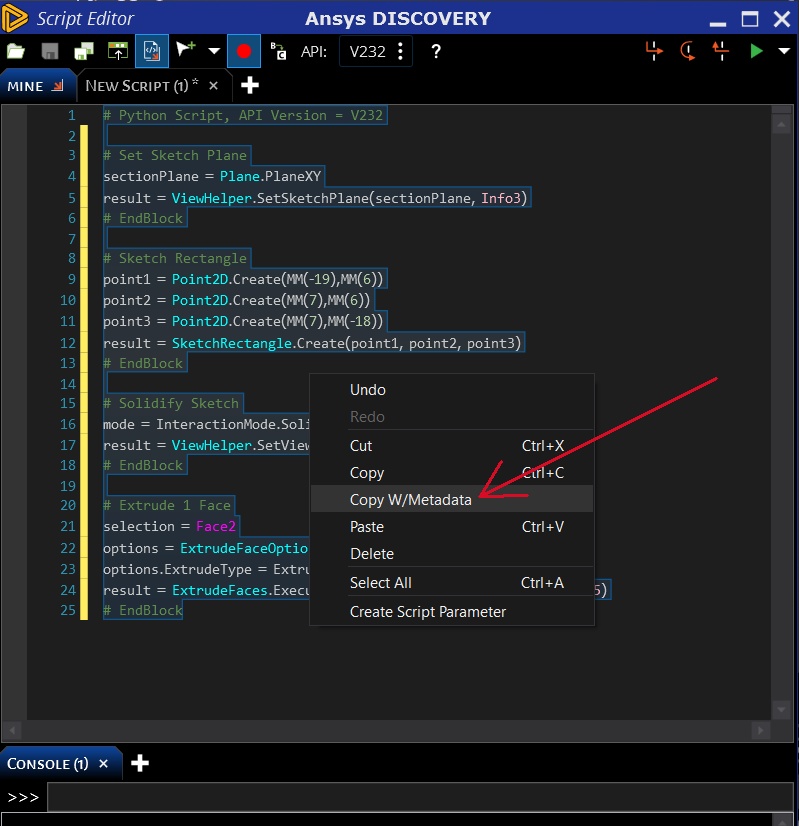
You will need to paste the contents to a text editor to see that data. If you save that script as a .scscript or .dscript type, then load into back into the Discovery script editor, it will interpret this XML data back to binary data, so you won't see it. It will then look just like any other script with recorded metadata variables.
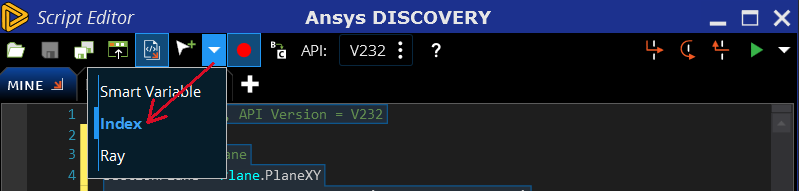
The metadata selections are very much tied to the current model identifications. To make the script more readable, editable, and portable to different models, set the selection type to index:
You can make scripts even more robust by using a bottom-up creation method, meaning to create curves ("layout curves" in sketch mode), then surfaces, then solids, so you can keep the entities saved as variables are each creation function. You can get the list of entities from each creation function (that record a "result" return variable) with commands like these:
result.CreatedPlanes
result.CreatedCurves
result.CreatedBodies
result.CreatedFaces


















 You are navigating away from the AIS Discovery experience