

-
-
August 28, 2020 at 3:20 pm
rouzbeh
SubscriberHi,
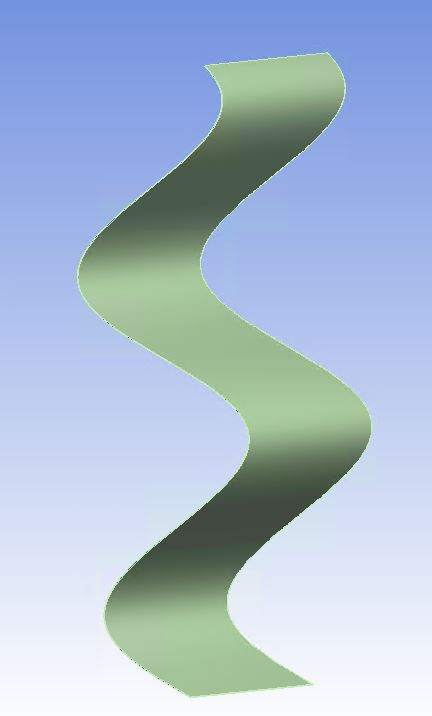
I wish to create a surface with a certain thickness by extruding a a sinusoidal profile (like the image below).
August 28, 2020 at 9:52 pmpeteroznewman
SubscriberUse SpaceClaim. Use the Equation tool to create a sinusoidal surface.n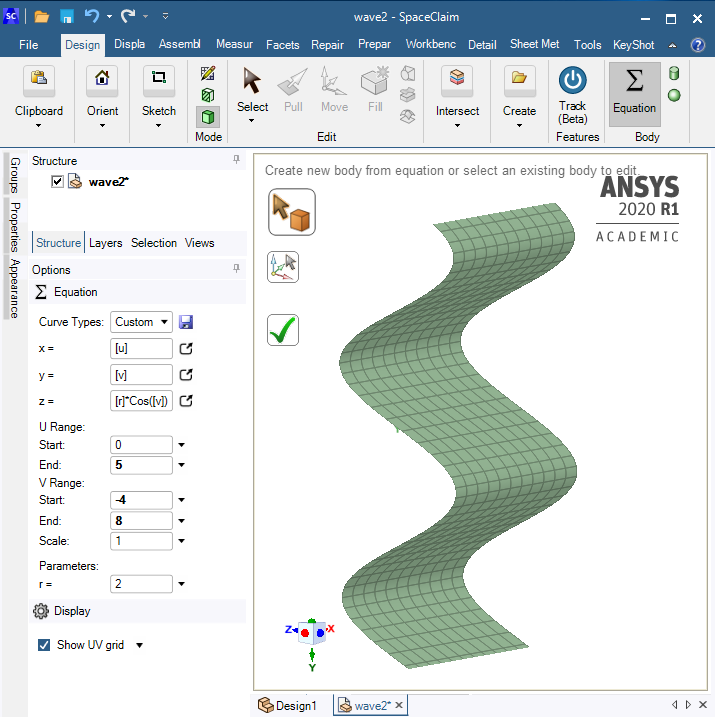 Use the Pull tool to add thickness.n
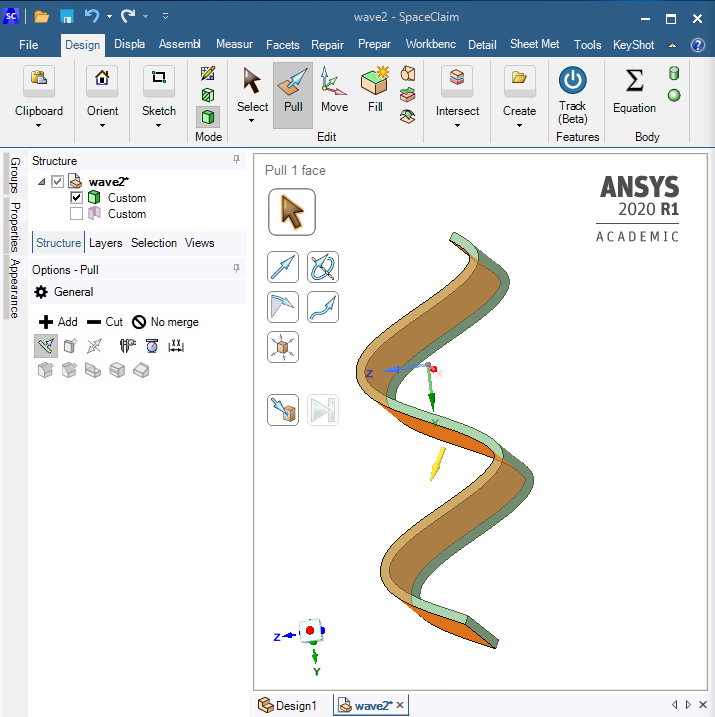 August 31, 2020 at 12:43 pmSubscriberthank you very much Peter.nI did not use SpaiceClaim bevor. I am trying now to make my Geometry using SpaceClaim. In my Geometry this sinusoidal spring is inside a container. I didn't find out how to make a tengent constraint between the lines of container in the sketch and the sinusoidal curve. if there are gaps between container and spring, then I will get the problem in contact of Static structural.n
 thank you in advancen n
August 31, 2020 at 4:54 pmSubscriberYou know what the amplitude of the sinusiod is and its axis, so just use dimensions to put the lines in the right place relative to that axis.nAfter you mesh, there may be a tiny gap between the nodes and elements at the tangent point. Use the Adjust to Touch setting in the Frictional Contact Details to close that tiny gap.nSeptember 1, 2020 at 1:55 pmSubscriberI have 32 cases to study, I wanted to set a tangent constraint and for each case just modify the amplitude, in order to save the time. so do you mean the only way is using dimensions to put the line in the place?nSeptember 1, 2020 at 4:24 pmSubscriberI am facing a problem by meshing, using SpaceClaim. I used always sweep method to generate solid-shell elements. but after using SpaceClaim I get an Error .nI appreciate your help very muchn
thank you in advancen n
August 31, 2020 at 4:54 pmSubscriberYou know what the amplitude of the sinusiod is and its axis, so just use dimensions to put the lines in the right place relative to that axis.nAfter you mesh, there may be a tiny gap between the nodes and elements at the tangent point. Use the Adjust to Touch setting in the Frictional Contact Details to close that tiny gap.nSeptember 1, 2020 at 1:55 pmSubscriberI have 32 cases to study, I wanted to set a tangent constraint and for each case just modify the amplitude, in order to save the time. so do you mean the only way is using dimensions to put the line in the place?nSeptember 1, 2020 at 4:24 pmSubscriberI am facing a problem by meshing, using SpaceClaim. I used always sweep method to generate solid-shell elements. but after using SpaceClaim I get an Error .nI appreciate your help very muchn n
September 1, 2020 at 8:26 pmSubscriberSweep is not necessary on a rectangular surface with Face Meshing. You should get Quad elements without a Sweep. Delete the Sweep Method.nSeptember 2, 2020 at 7:09 amSubscriberthank you peter,naccording to my slender geometry I need SOLSH190 elment, if I use just Face Meshing to get Quad elements, the elements are not Solid shell anymore, are they? nRegardsnSeptember 2, 2020 at 8:44 pmSubscriberYou have very thin walled parts. Do not use solid geometry and do not mesh with solid elements is my recommendation. If you must use solids for some reason, such as a non-uniform wall thickness, then SOLSH190 is the best choice.nUse surface models. You can extract a midsurface from a uniform wall thickness solid, or just start with surfaces and don't use solid geometry at all. When you bring surface geometry into Mechanical, you mesh it with quad shell elements like SHELL281 quadratic elements. The surfaces are assigned the thickness as a property, along with a material.nAugust 10, 2023 at 3:39 am
n
September 1, 2020 at 8:26 pmSubscriberSweep is not necessary on a rectangular surface with Face Meshing. You should get Quad elements without a Sweep. Delete the Sweep Method.nSeptember 2, 2020 at 7:09 amSubscriberthank you peter,naccording to my slender geometry I need SOLSH190 elment, if I use just Face Meshing to get Quad elements, the elements are not Solid shell anymore, are they? nRegardsnSeptember 2, 2020 at 8:44 pmSubscriberYou have very thin walled parts. Do not use solid geometry and do not mesh with solid elements is my recommendation. If you must use solids for some reason, such as a non-uniform wall thickness, then SOLSH190 is the best choice.nUse surface models. You can extract a midsurface from a uniform wall thickness solid, or just start with surfaces and don't use solid geometry at all. When you bring surface geometry into Mechanical, you mesh it with quad shell elements like SHELL281 quadratic elements. The surfaces are assigned the thickness as a property, along with a material.nAugust 10, 2023 at 3:39 amKawshik
SubscriberCan I import the structure in lumerical fdtd and change its dimension according to my drawing in lumerical? Actually I've to put that structure into a rectangle
Viewing 9 reply threads- The topic ‘Design modeler- Surface with a sinusoidal profile’ is closed to new replies.
Innovation Space Trending discussions
 Top Contributors
-
peteroznewman
 6304
6304 -
scabo
 1906
1906 -
Dennis Chen
 1457
1457 -
javat33489
 1308
1308 -
Shyam Prasad V Atri
1022
Top Rated Tags
© 2026 Copyright ANSYS, Inc. All rights reserved.
Ansys does not support the usage of unauthorized Ansys software. Please visit www.ansys.com to obtain an official distribution.
-


The Ansys Learning Forum is a public forum. You are prohibited from providing (i) information that is confidential to You, your employer, or any third party, (ii) Personal Data or individually identifiable health information, (iii) any information that is U.S. Government Classified, Controlled Unclassified Information, International Traffic in Arms Regulators (ITAR) or Export Administration Regulators (EAR) controlled or otherwise have been determined by the United States Government or by a foreign government to require protection against unauthorized disclosure for reasons of national security, or (iv) topics or information restricted by the People's Republic of China data protection and privacy laws.

 You are navigating away from the AIS Discovery experience