Ansys Assistant will be unavailable on the Learning Forum starting January 30. An upgraded version is coming soon. We apologize for any inconvenience and appreciate your patience. Stay tuned for updates.
General Mechanical

General Mechanical

Topics related to Mechanical Enterprise, Motion, Additive Print and more.

Define Mode II Cohesive zone material in Workbench

    • SULUN SHI
      Subscriber

      In the ModelI cohesive zone material settings, under Mode II Dominated Bilinear CZM Law, I can only define the maximum stress and the slip at completion of deboning.

      However, I also want to define the tangential cohesive stiffness. How to define it in the Workbench? Any APDL command?

    • Raman Babu
      Ansys Employee


      Please use the commands below.
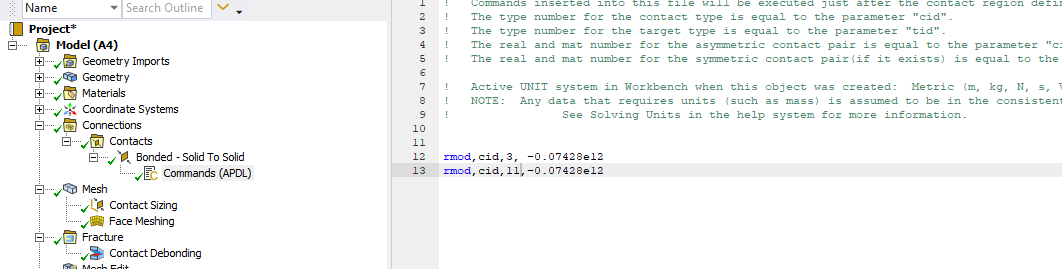
      RMODIF, CID,3 & RMODIF, CID,11 are used to modify the normal and tangential stiffness through commands of your contact region for debonding. 
      you can start with the following command under the contact and change the normal/tangential stiffness. (Mode II debonding is mainly governed by the tangential stiffness. hence, you can start by reducing the tangential stiffness and run the simulation.

      Regards,

      Raman Babu

       

Viewing 1 reply thread
  • You must be logged in to reply to this topic.
[bingo_chatbox]








