-
-
February 19, 2020 at 11:06 am
alfredr
SubscriberHi,
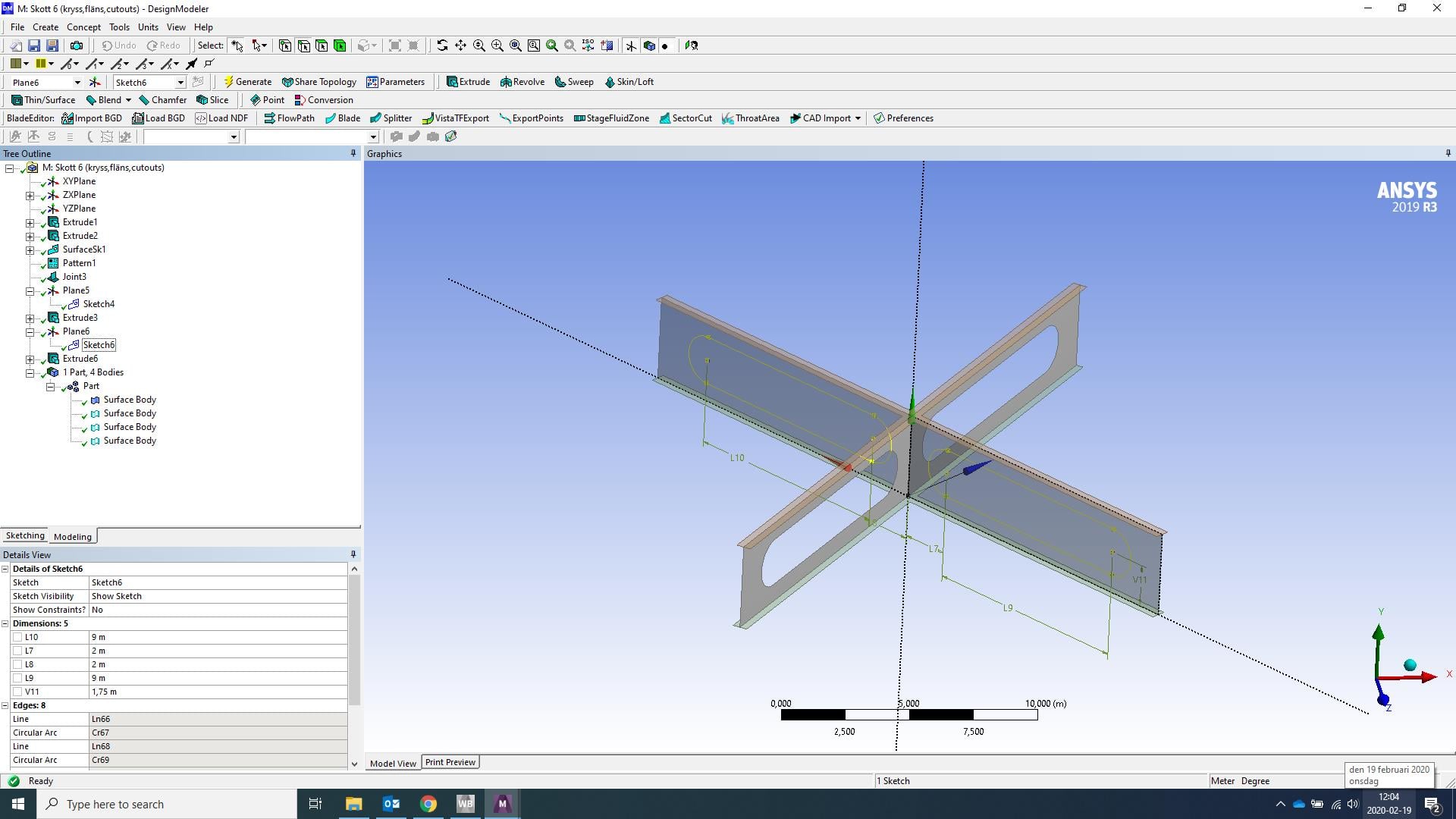
I'm working on a simple X-shaped surface body in design modeler (see attached picture). I want to create cutouts in the webs of the structure. I create planes from faces and draw sketches of the cutouts onto the face I want to cut. I do it once for the first web, use extrude (cut material) and apply it on the first sketch, containing two oval shapes. It seems to work perfectly.
When I try to do it on the other web I repeat the process (plane from frace, sketch, extrude cut). But nothing seems to happen! I don't get any errors or so, but a cutout isn't generated.Â
Grateful for any kind of help!

-
February 19, 2020 at 11:16 am
Rob
Forum ModeratorStaff are not permitted to open/download attachments.Â
If you're using extrude+cut move the plane the extruding sketch is on to be offset from the surface you want to cut from. If they overlap you may find the cut "misses" the target face.Â
-
February 19, 2020 at 12:11 pm
alfredr
SubscriberI've actually tried doing that, but it doesn't seem to do the trick. Any other suggestions?
-
February 19, 2020 at 12:13 pm
alfredr
Subscriber When creating my surfaces that I'm now trying to cut through, it seems like the second one (the one I can't seem to cut through) was created as a frozen. Could that be the problem?
-
February 19, 2020 at 12:29 pm
Keyur Kanade
Ansys EmployeeCreate a sketch on the same plane. Create a surface from sketch.Â
Then you can use projection option.Â
-
February 19, 2020 at 12:43 pm
alfredr
Subscriber I'm sorry, I don't understand. All I want to do is to cut through a surface. How would creating a projection help me in doing so?
-
February 19, 2020 at 12:46 pm
-
February 19, 2020 at 1:11 pm
Rob
Forum ModeratorPossibly, frozen and unfrozen components behave differently. Unfreezing may not be a good idea (you get automatic booleans) so try imprint & face delete too.Â
-
February 19, 2020 at 2:01 pm
alfredr
SubscriberI managed to solve it (probably not the best way to go about it). I unfreezed the surface I wanted to cut through. I could only do so by selecting "freeze others", otherwise I got an error warning for illegal T-surface bodies. Afterwards, I could create the cutout as wished.
-
February 19, 2020 at 4:47 pm
Rob
Forum ModeratorThat works too. The T-surface is because you can't unite surfaces in the same way you do volumes. kkande and I are both CFD users so don't use surfaces like that.Â
-
- The topic ‘Creating cutouts through a surface’ is closed to new replies.
-
6535
-
1906
-
1463
-
1311
-
1022
© 2026 Copyright ANSYS, Inc. All rights reserved.