-
-
February 15, 2018 at 11:49 am
-
February 16, 2018 at 8:12 am
vganore
Ansys EmployeeFor generating shell elements, you could convert your solid bodies into surface bodies. See this tutorial:
https://www.youtube.com/watch?v=d4kZ7ikTaT8&index=2&list=PL0lZXwHtV6OnLuLpKZyZ34NVmKnR4APEm
-
February 16, 2018 at 11:26 am
arct
SubscriberI did this. Actually, I created surface model already in inventor, so midsurfacing wasn't needed. All I want to achieve, is something like this:
Continuus surface mesh, as shown above. This mesh was made in hypermesh.
Â
The problem is, that when I solve this model as it is, I do not get propper stress propagation. This construction is welded, so stress distribution should be continuous, but it is not.
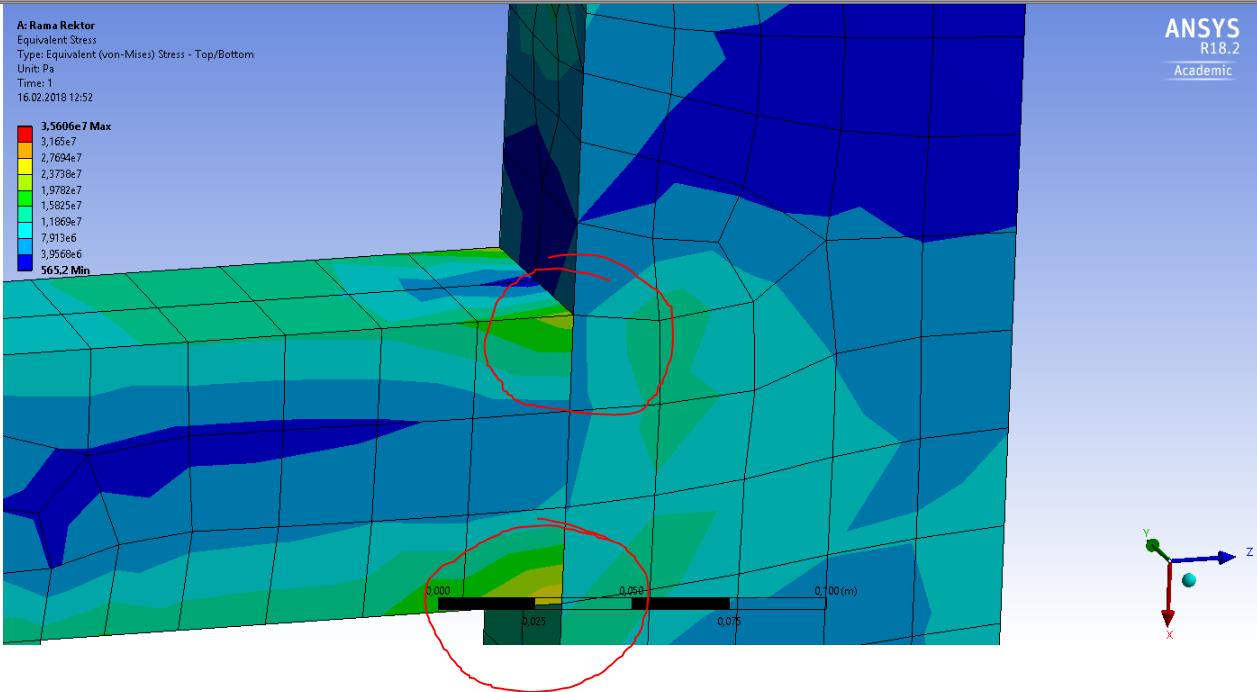
-
February 16, 2018 at 11:42 am
vganore
Ansys EmployeeWould you be able to share your geometry?Â
-
February 16, 2018 at 5:35 pm
arct
SubscriberSure.
https://files.fm/u/2j5xtj8b -
February 16, 2018 at 6:00 pm
peteroznewman
Subscriber I haven't looked at your geometry as I was creating a small example that has two bodies that have been meshed, and a mesh connection connects them. There are two ways to plot the stress, Average Across Bodies set to No, which is the default, and Average Across Bodies set to Yes, which is what you want.
You can upload files to posts if they have a .wbpz or a .zip file extension and are < 120 MB. There are many other valid extension.
Â
-
February 18, 2018 at 2:24 pm
arct
SubscriberI think this solves the problem. Thanks!
-
- The topic ‘Continuus meshing on surface’ is closed to new replies.
-
6014
-
1906
-
1425
-
1308
-
1021
© 2026 Copyright ANSYS, Inc. All rights reserved.










