-
-
February 21, 2018 at 8:09 am
emirdegirmenli
SubscriberDear all,
I am trying to conduct Vibro-acoustic analysis by using Acoustic ACT. to get best results, 'Share Topology' is recommended, especially bodies are contacted with the acoustic body. I modeled a musical instrument which includes solid and shell elements according to this method and It really works, results are compatible experimental data. And next step I have been trying to add a bridge, which is the part of musical instruments where the strings are fixed, on the surface (soundboard) but I couldn't manage. When I share all geometry I couldn't select surface to contact body. If I share geometry except for bridge solid, I can select surface but 'Multiple' is written in the box and it doesn't allow contact. How can I solve this problem? Best
Emir
-
February 21, 2018 at 1:30 pm
peteroznewman
SubscriberDear Emir,
When Share Topology is working, the elements share nodes at common faces and there is no need for contact.
Without Share Topology, you would use contact and it would be between the sheet and the bridge, which would be in separate components.
I can take a closer look if you Attach the workbench project archive (and say which version of ANSYS you are using).
Regards,
Peter
-
February 21, 2018 at 2:25 pm
emirdegirmenli
SubscriberThank you Peter, I attached archive file. I am using R18.0 version.
-
February 21, 2018 at 5:17 pm
peteroznewman
SubscriberWhen your shell elements are at the midplane and the solid elements are t/2 distance away, you have to use contact.
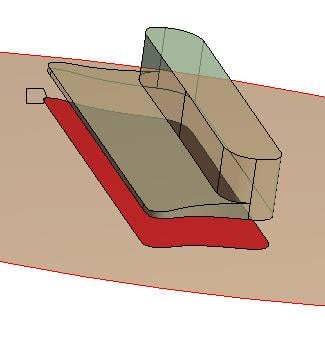
There is a way to project the curves from the solid onto the shell to divide the face so the contact can be limited to the appropriate area. Below is an illustration with a 4 mm thick shell or a 2 mm gap.
-
February 22, 2018 at 9:52 am
emirdegirmenli
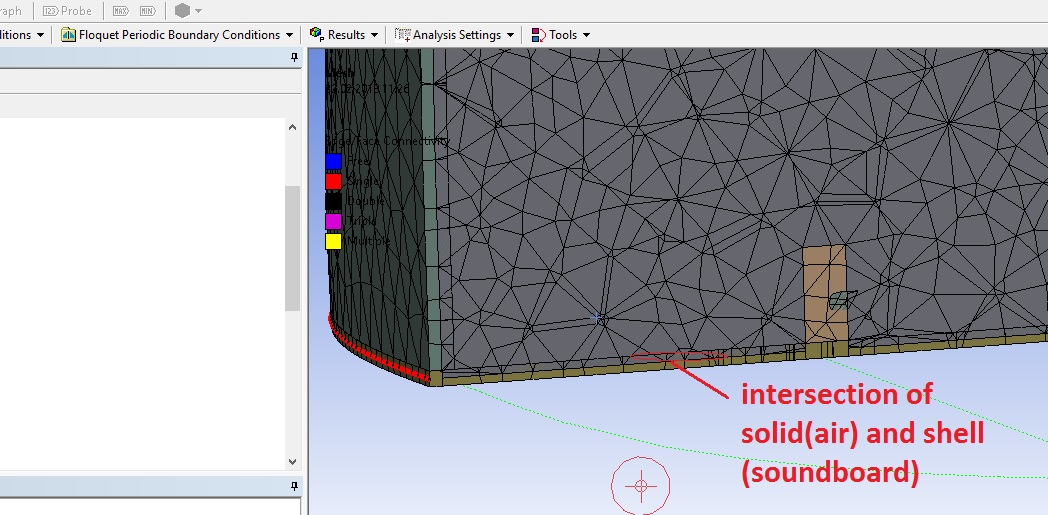
SubscriberThank you Peter, You are right, If I use shell element with "middle" offset type and I move it t/2 distance away, faces isn't split and I can contact bridge and soundboard. but, I have faced a different problem. all surfaces of geometry contact with air (solid) inside, so I am using share topology to contact surfaces and air as recommended for vibro-acoustic analysis. in this case, intersection mesh area is formed ;as you can see and mesh quality reduces. If I separate, they aren't bounded by using share topology. As a result, If there is any way to solve bridge and soundboard contacting problem by using shell element "bottom or top" offset type, ? think it will be very useful for vibro-acoustic analysis. Best
Emir
-
February 22, 2018 at 2:18 pm
peteroznewman
SubscriberEmir, it is just a visual artifact that is part of rendering the shell thickness.
In your previous model, the soundboard offset was set to bottom, so when the graphics renders the thickness it shows on the outside.
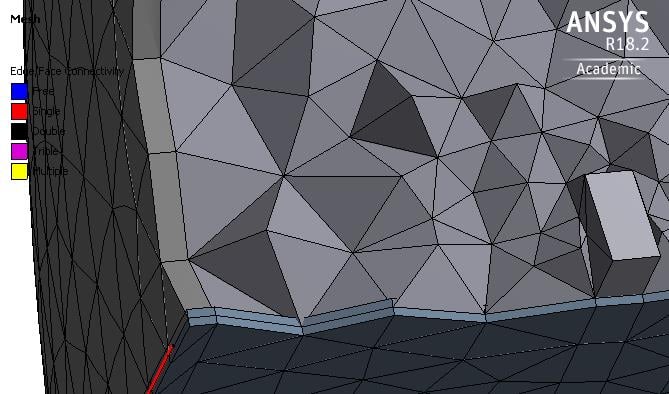
When you changed the soundboard offset to middle, the nodes all moved out by t/2, including the air. If you uncheck on the View menu Thick Shells and Beams, you will see a clean connection of elements between the air and the soundboard. There are no new elements. Below is the image for when that is unchecked.
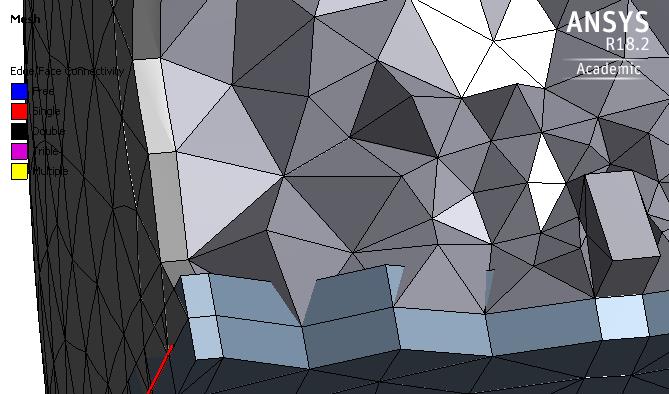
Below is the image with checked.
Below is the image if I change the soundboard thickness to 8 mm.
I hope this clarifies the meshing.
Best regards,
Peter
-
April 6, 2018 at 8:58 am
deepmech.maurya
Subscriberhi emi
how you select the shell element element in your model i saw your model you are working on workbench.
there is programme itself selecting element how you can say it is shell element.
regards
deepak
-
April 6, 2018 at 1:26 pm
peteroznewman
SubscriberHi Deepak,
Surface bodies are meshed with shell elements, solid bodies are meshed with solid elements. The distinction between surface and solid bodies is very clear in the Geometry branch of the Outline in Workbench as they use different icons.
Regards,
Peter -
April 7, 2018 at 6:02 am
deepmech.maurya
Subscriberhello sir
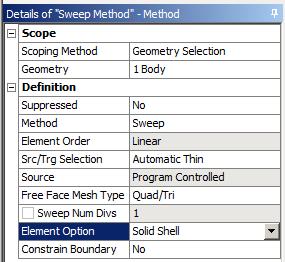
i agree with your point but there is solid shell element solsh190 is there which we can use for thicker body also.
But when i am using commands in ansys workbench to use this element it override the command and still using solid186 element.
thank you
-
April 7, 2018 at 12:57 pm
-
April 7, 2018 at 2:26 pm
deepmech.maurya
Subscriberthank you sir
i am going to try this.
it works
thank you sir
-
- The topic ‘Contact Problem Between Solid and Topology Shared Surface’ is closed to new replies.

-
6279
-
1906
-
1457
-
1308
-
1022
© 2026 Copyright ANSYS, Inc. All rights reserved.