TAGGED: ansys-transient-thermal, apdl, apdl-commands
-
-
February 27, 2024 at 7:22 pm
Admin Admin
SubscriberHi,
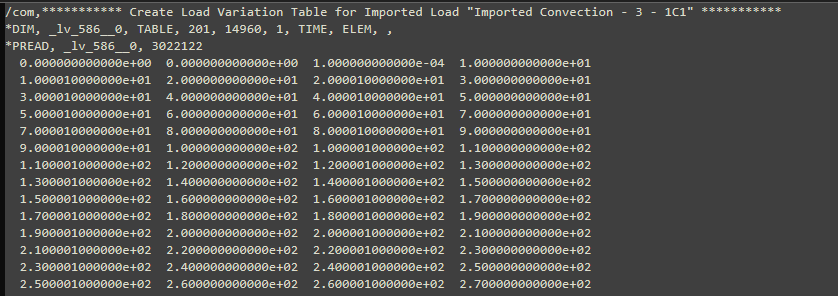
I've run a transient thermal simulation in Mechanical which imports a convective thermal load from an external .csv file. I've created a command snippet that automates the importing of the thermal load in order to be able to parameterise the scale factors applied to the film coefficients and temperatures as part of a response surface optimisation I'd like to do. I wrote the input file (.dat) out to get the apdl code for the above process of applying scale factors to the film coefficients and temperatures. However, I noticed that these scale factor have already been applied and the thermal loads calculated in the tabular data within the input file meaning I'm not able to parameterise the scale factors as inputs. Below is a snapshot of the imported load as it appear in the input file.
Does anyone know how I can create a table within a command snippet that replicates the imported convective load tabular data within the GUI?
Many thanks,
Jason
-
February 29, 2024 at 2:08 pm
Chandra Sekaran
Ansys EmployeeWhy don't you just use that input file to change the scale factors on the fly during the optimization process? Then whatever the output is (above snapshot) you just use it to applyl the load.
-
March 1, 2024 at 6:23 am
Admin Admin
SubscriberHi Chandra,
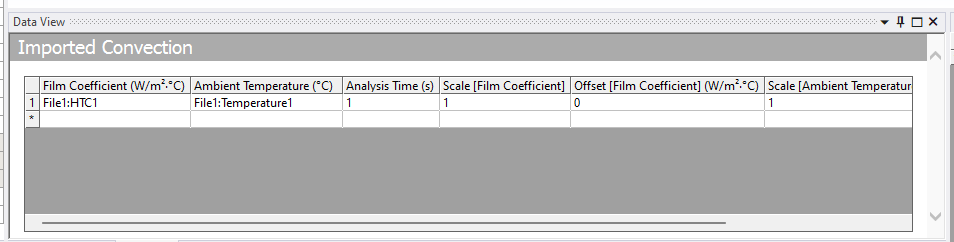
Thanks for your reply. My issue is the scale factors don't appear anywhere in the input file. When Ansys writes the input file it has already applied the scale factors to obtain the scaled thermal loads table I showed in the snapshot. In addition, there's no way in the GUI to toggle "P" against these scale factors in order to parameterise them (see below) so I can't work out how I pass them from Workbench to Mechanical and vice versa.
Thanks,
Jason
-
- The topic ‘Command Snippet APDL Code for Importing Convective Load Table’ is closed to new replies.

-
6465
-
1906
-
1458
-
1308
-
1022
© 2026 Copyright ANSYS, Inc. All rights reserved.