-
-
March 23, 2020 at 9:32 am
Katala
SubscriberHello everyone,
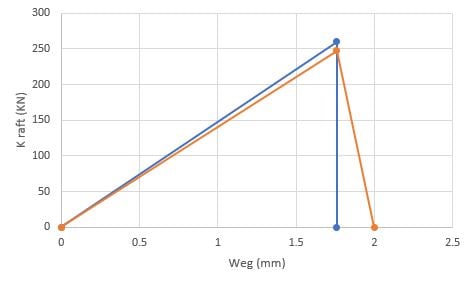
I have a Experiment that i want to simulate in Ansys. Under you can see the Force- Sliding Grapf of Experiment.
I took the Fmax and divided by the area so i calculated the maximum Stress. --->Â Â 262,83/(0,9*31)= 9,42 MPa this is my max tangential Stress. I took from the Grapf also the tangential slip 1,76mm.
Â
Cohesive Zone Model with Contact Debonding Mode 2
Inputs:
Maximum equivalent tangential contact stress= 9,42 MPa
Tangential slip at the completion of debonding= 1,76 mm
Artificial damping coefficient= 0,1 s
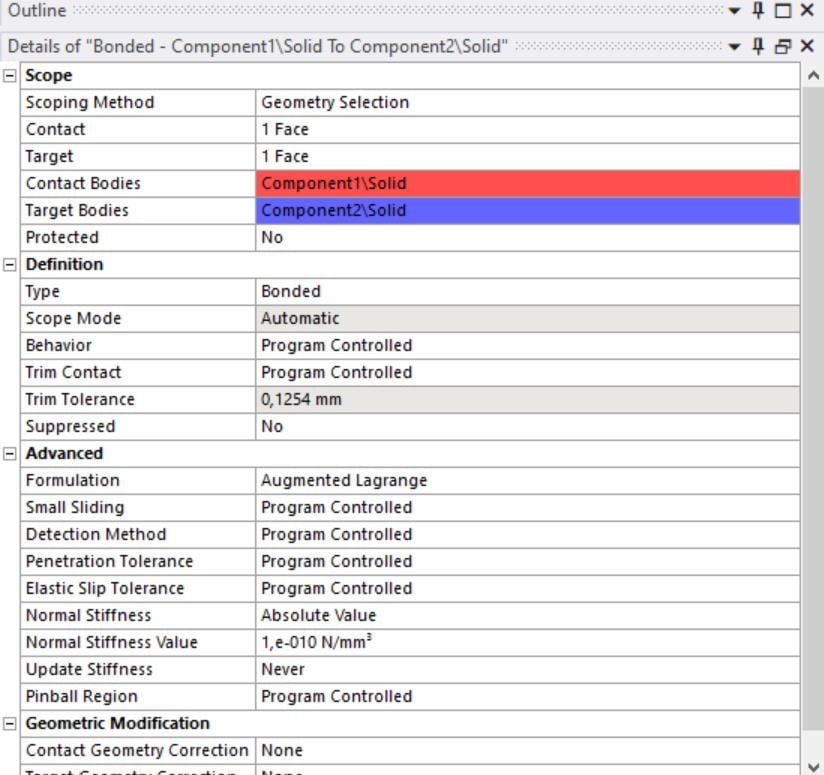
 I calculated the tangential stiffness with F/(A*x) and change the K stiffness with this value. K=5,36 N/mm^3

The picture above ist the Force-Sliding Distance Grapf as a Result. As you can see at the 1,76mm Sliding Distance i become the maximum Force with a bit error but actual problem is after damage i cant make the stiffness zero. So i cant do a line to Zero Force like the Experimental Data.
Â
Can anyone please help me.
Best Regards
Katala

-
March 23, 2020 at 10:35 am
Mirghani
Subscriber
Hi.
Your finite element results have a good agreement with the experimental data. in my opinion this is acceptable (but you have to put both the graphs in one chart above each other so we can see better, I think it will look like the attached which is very good). back to your problem in case you want to have better results>>> in your simulation did you add post debonding frictional sliding??, if you consider this additional type of contact in your simulation then you can delete it or (suppress it) and tun the simulation again in order to have zero stiffness after debonding . Also depending on the slope comparison of your (Experimental vs FEM results) you can play with the tangential stiffness and/or the CZM parameters of your contact region in order to have a better fit between your experimental and FEM results.Â
you can refer to the posts Here and Also Here for your reference
-
March 23, 2020 at 11:08 am
Katala
Subscriber -
March 23, 2020 at 12:00 pm
Mirghani
Subscriber Hi
Â
As I told you you can play with the tangential and/or normal stiffness through commands and also the CZM parameters of your contact region in order to have zero stiffness after debonding (In my opinion its a very good agreement but if you want more accuracy then you have to do more trials). you can start with the following command under the contact and change the normal/tangential stiffness. (Mode II debonding is mainly governed by the tangential stiffness >>>hence, you can start by reducing the tangential stiffness to the range (-120 N/mm3 to 200 N/mm3) and run the simulation. (Trials >>>> check your solution with different values and see how the curve is responding to the tangential stiffness values). then if no change in results you can change the CZM parameters one by one and see how this can affect your chart (but I think the main issue is with the tangential stiffness)
Â
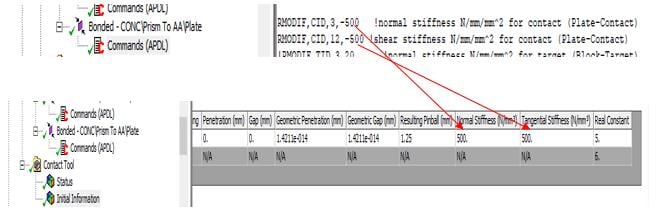
Command to change Normal/Tangential Stiffness (-ve sign in the command is very important)Â
RMODIF,CID,3,-2e7Â Â Â !normal stiffness N/mm/mm^2 for contactÂ
RMODIF,CID,12,-160Â Â !shear (Tangential) stiffness N/mm/mm^2 for contactÂ
Also you can change the tangential stiffness by changing the normal stiffness form ansys interface
Â
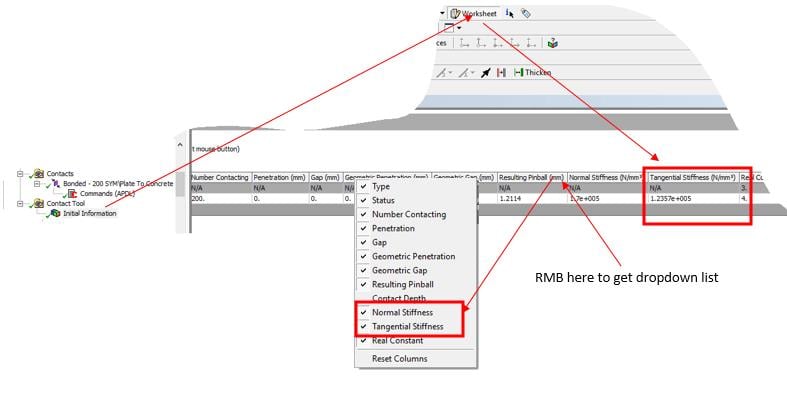
In both ways above you can then check your contact stiffness by inserting "initial Information" under the contact tool. you can right click on any text on the table head for ex. penetration and then a popup menu will show up all you have to do is to tick normal and tangential stiffness in order to add them to the status table.Â
Â
Â
Â
-
- The topic ‘Cohesive Zone Model’ is closed to new replies.
-
6159
-
1906
-
1442
-
1308
-
1022
© 2026 Copyright ANSYS, Inc. All rights reserved.