Ansys Assistant will be unavailable on the Learning Forum starting January 30. An upgraded version is coming soon. We apologize for any inconvenience and appreciate your patience. Stay tuned for updates.
Fluids

Fluids

Topics related to Fluent, CFX, Turbogrid and more.

Changing the Fluid in “Cell Zone Conditions” with the TUI Console

TAGGED: 

    • Andi_the_Engineer
      Subscriber
      Hello,nhow can I change the Material/Fluid with the Tui in an easy way? I have about 80 Cell Zones which are Air and they need to be Water.nIf i enter /define/boundary-conditions/fluid the Tui shows me zone id/name [Fluid_zone_79]. If I follow the questions the TUI asks me if I want to change the Fluid Air, where I can write Water.nSo for one Fluid it seems to work.nIf i enter a * and press Enter, I don't get the option to choose all materials. In the manual * stands for all, so what do I miss? At the beginning I changed them all by hand but that takes to long.nIs there an easier way?nRegardsnAndreasn
    • Karthik Remella
      Administrator
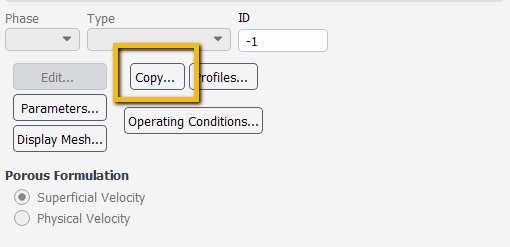
      Hello,nIf this is the only setting you need to change, you could use the 'Copy' option under Cell Zone Conditions. nnThank you.nKarthikn
    • Andi_the_Engineer
      Subscriber
      Perfect, thank you. nI didn't know this feature exist.nRegardsnAndreasn
Viewing 2 reply threads
  • The topic ‘Changing the Fluid in “Cell Zone Conditions” with the TUI Console’ is closed to new replies.

[bingo_chatbox]