-
-
April 23, 2019 at 12:28 pm
Max4
SubscriberHi,
I have a transient simulation and I want to change the boundary condition from Mass Flow Outlet to Pressure Outlet when a limit value of pressure in a cell zone is reached.
I have already written a Scheme-File for changing a boundary condition as function of time but not as function of a value.
I have read this in order to change the BC.
 - You need a RP Variable
 - You need an UDF to set that variable to True or False / 1 or 0 depending of the condition
 - You need then a calculation activity which checks for that variable and change the boundary condition
 - You need another UDF to adjust the boundary if RP Varriable is true or 1..
Â
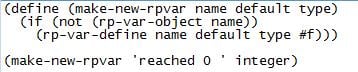
I have created the following Scheme for defining a RP Variable named "reached", which defines if the pressure at the outlet is reached or not.
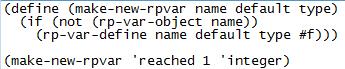
 In a UDF i have to set the variable to True or False depending on the condition. In a UDF I can access the value of the RP Variable by using RP_Get_Integer. I have seen that I can change the value of the variable by using rpsetvar in the Text Interface. For the UDF, can I use RP_Set_Variable("...", int)?

Moreoever how can I access the pressure at the outlet for defining the UDF? I think that I have to use the ID number of the face and the face macro F_P(f, t). Is it right?
Â
Regards,
Maxime
-
April 23, 2019 at 3:59 pm
DrAmine
Ansys EmployeePressure variable is available on boundary so just use the face macro to access it. For setting the Rampant variable use what you mentioned. Whenever you want to get the variable on scheme side add % to the rpgetvar (%rpgetvar...) -
April 24, 2019 at 5:51 am
Max4
SubscriberThank you for the answer. I have yet the following questions:
1. What kind of macro should I use for the UDF? How can I set in the UDF that I want the pressure at this boundary (i.e. outlet)?
2. "You need then a calculation activity which checks for that variable and change the boundary condition" -> Is it mandatory to use this if I can acess the pressure at outlet directly?
3. "You need another UDF to adjust the boundary if RP Varriable is true or 1"Â -> I thought it was only possible to adjust the boundary conditions with by using Scheme?
4. Where can I hook both UDF?
Â
Regards,
Maxime
-
April 24, 2019 at 11:05 am
Rob
Forum ModeratorYou'll need the UDF to trigger the scheme when the face pressure hits your criterion. You'll also need scheme to set the boundary once you've changed it's type. There may also be a pure scheme approach, but not something I've seen done.Â
-
April 24, 2019 at 11:10 am
DrAmine
Ansys Employee1/DEFINE_PROFILE to set the the total pressure at inlet
2/No but is another way
3/That could be an ADJUST which sets the flag or even the DEFINE_PROFILE.Â
Â
Â
-
April 24, 2019 at 2:05 pm
Max4
SubscriberThanks for the answers.
1/ At the outlet I want to know the static pressure, so why I have to use a DEFINE_PROFILE to set the total pressure at the inlet?
2/ Then it will be easier to access directly the static pressure at the boundary using the face macro F_P(f, t). But how can I define that the F_P(f, t) is for the face outlet?
-
April 24, 2019 at 2:36 pm
DrAmine
Ansys EmployeeBecause you confused me Max..
Â
1/Just using DEFINE_ADJUST / ON_DEMAND or any to get access into it
2/You need to access the correct thread corresponding to the outlet. All that stuff is in the documentation
Â
-
April 24, 2019 at 2:49 pm
-
April 24, 2019 at 2:50 pm
DrAmine
Ansys EmployeeYes.
-
April 25, 2019 at 6:30 am
DrAmine
Ansys EmployeePlease mark this as Is Solved.
-
April 25, 2019 at 9:58 am
Max4
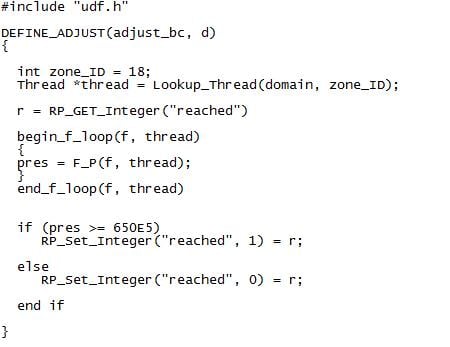
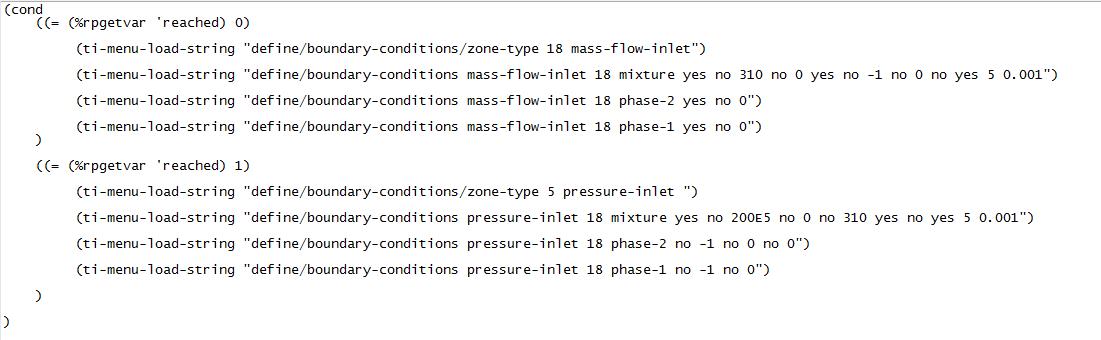
SubscriberI have wrote the following UDF and Scheme.
1. I have define a RP variable named "reached" which defines when the pressure at the outlet is reached: Where do I hook this Scheme?
2. I have write a UDF to access the pressure on the face and change the value of the RP variable by using RP_Set_Integer("..") if the criterion is reached. Where do I hook this UDF?
3. I wrote a Scheme in order to change the BC according to the value of the RP variable (1 or 0). This Scheme will be load in the Calculations Activities.
Is the method the right one and the functions correct from your point of view?
Â
Regards,
Maxime
-
April 25, 2019 at 11:48 am
DrAmine
Ansys EmployeeMax: This is an open communtiy and i think I need to remind you that we from ANSYS do not debug or comment on any UDF or Schemes. If we are provindin hints than this is pure goodwill.
Â
1/You can add it into you .fluent file (on Windows platform under C:Usersyourname)
2/Function Hooks: Check the Manual for that
3/I won't comment on the commands but the workflow seems consistent
Â
Try using the most actual release
-
April 25, 2019 at 11:57 am
-
April 25, 2019 at 1:19 pm
Rob
Forum ModeratorAdd some comments into the UDF and see what's reported on the screen: it's the best way to test logic loops.Â
-
April 25, 2019 at 1:46 pm
DrAmine
Ansys EmployeeNow it is wrong.
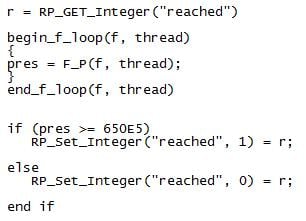
RP_Get_Integer (No capital letters)
RP_Set_Integer is correct but the " = r" is wrong. And now start debugging as highlighted by my colleague
-
April 25, 2019 at 1:53 pm
Max4
SubscriberThank you.
With RP_Set_Integer("..") I change the value of the integer. But how should I then affect the change of the variable into the Scheme?
-
April 25, 2019 at 2:05 pm
DrAmine
Ansys EmployeeIt set the rp value from C-Side. The changes are committed as soon as you iterate and you are using the % thing.
-
April 25, 2019 at 2:10 pm
Max4
SubscriberSo I have just to write: RP_Set_Integer("reached", 0) to directly affect the value from C-Side? In the Scheme I use the %rpgetvar.. so it may be ok.
Is it then mandatory to write "RP_Get_Integer ("reached")" at the beginning of the UDF or it's useless.
Â
-
April 25, 2019 at 2:28 pm
DrAmine
Ansys EmployeeYou need to decide that..
I will recommend checking the existence of a rp-variable in C-Side: Again check the documentation for that.
-
April 25, 2019 at 2:46 pm
Max4
SubscriberDecide if it´s usefull? For me the UDF has to access the value of the RP variable so using RP_Get_Integer(..), but I don´t know how to define it in the UDF.
What kind of rp-variable have I to check? In the Scheme I check if a rp-variable named "reached" already exists.
Regards,
Maxime
-
April 25, 2019 at 6:46 pm
DrAmine
Ansys EmployeeYou are already getting and setting values. So can check for the existence of the variable by using a boolean which is documented . Check 3.6 there.
-
April 26, 2019 at 6:55 am
Max4
SubscriberThe values are changed and assigned during the simulation. By check the existence of the variable, do you mean the " r " if I use " r = RP_Get_Integer("..")"?
In my UDF, can I just write "RP_Get_Integer("..")" so that the if loop can affect the change on this variable if the condition is met?
Regards,
Maxime
-
April 26, 2019 at 7:23 am
DrAmine
Ansys EmployeeI mean what is documented in the Customization manual Chapter 3.6
-
- The topic ‘Changing boundary condition’ is closed to new replies.
-
6520
-
1906
-
1463
-
1310
-
1022
© 2026 Copyright ANSYS, Inc. All rights reserved.