-
-
January 30, 2018 at 7:38 am
Walaikorn
SubscriberHello everyone!
I have been practiced using Ansys software for 2 months.
Now, I am trying to simulation jet cross flow and I have the problem in the step of calculation process in CFX-Solver. The error was showed in this picture.
Â
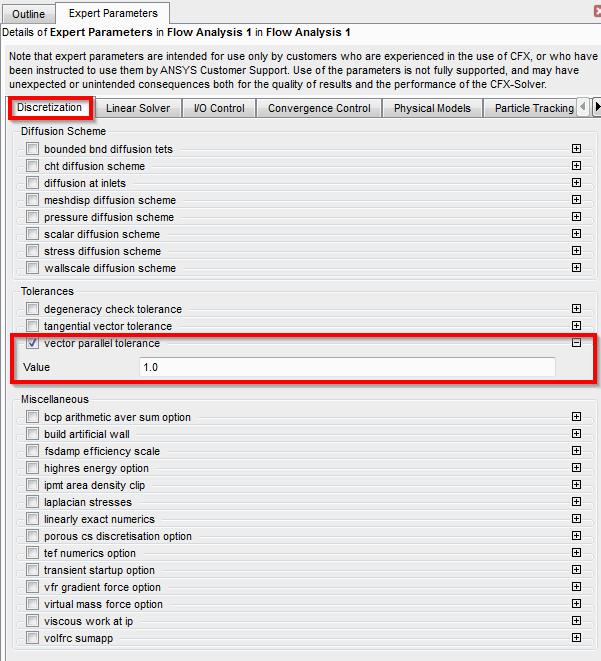
I have already checked and regenerated meshing but it's not work. For the recommend Of changing the parameter of vector parallel tolerance, I haven't seen and found where is this setting. If you know that, please help me to fix it.
I think that the problem that the symmetry is not parallel to the plane is about this points (In the pictures) because the symmetry vectors are not parallel to the others.
Do you have any idea to help me solve this problem?
Â
Thank you in advance
-
January 30, 2018 at 3:58 pm
raul.raghav
SubscriberDid you create the mesh using ICEM-CFD? Can you share the workbench archive file so that we can take a look at it?
-
January 31, 2018 at 4:01 am
Walaikorn
SubscriberThank you for your reply.
I didn't use workbench in this simulation. I used ICEM-CFD to create mesh, this is the simple meshing and the mesh quality is equal 1(maximum).
These pictures are the step of meshing.
Geometry
Blocking
Meshing
Meshing (top)
Meshing (front)
Mesh Quality
Â
ProcessÂ
   I create geometry and meshing in ICEM-CFD --> define parameters by CFX-Pre --> calculation by CFX-Solver --> postprocessing in CFD-Post
Â
If you need more information, please let me know.
Â
Thank you so much.
-
January 31, 2018 at 5:24 pm
raul.raghav
SubscriberI could help you better if I had access to the icem-cfd project. Can you zip the project folder and attach it here?
If you'd like to give it a shot, I have a couple of suggestions which might be of help to you:
1. The points in your geometry might not be exactly located on the symmetry plane, due to which the CFX shows "symmetry-vectors" that are not parallel. When the blocking is complete and it is projected on to the symmetry plane, it is not exactly projected on the symmetry plane due to which you might have the issue. You might want to associate faces with the surfaces manually and then try exporting it to CFX.
2. You'd have to rebuild the surfaces with a lower tolerance and then try the blocking.
-
February 1, 2018 at 4:06 am
Walaikorn
SubscriberThank you very much for your recommend. I appreciated that.
IÂ will recheck again follow by your suggestion.
One more question, how can I setting the tolerance in the program?
Â
Thank you in advance.
Walaikorn
-
February 2, 2018 at 4:32 pm
-
February 4, 2018 at 10:50 am
Walaikorn
SubscriberI am so appreciated for your helping.Â
Thank you very much.
-
- The topic ‘CFX-Solver error’ is closed to new replies.
-
4633
-
1540
-
1386
-
1225
-
1021
© 2025 Copyright ANSYS, Inc. All rights reserved.