Ansys Assistant will be unavailable on the Learning Forum starting January 30. An upgraded version is coming soon. We apologize for any inconvenience and appreciate your patience. Stay tuned for updates.
Ansys Free Student Software

Ansys Free Student Software

Topics cover installation and configuration of our free student products.

Can’t open older files with the newest version of the student software

    • Ole Lorenzen
      Subscriber

      I just installed the newest student software and wanted to open a file from my professor. When trying to open it, I get the following message:"Legacy project files can no longer be opened in this version of Electronics Desktop. Please use release 2022 R2 or earlier to convert the project to current format."

      I am confused because I thought that the Ansys programs had forward compatibility. Can anyone help me with this issue?

      Thanks in advance 

    • Mrinmoy Bharadwaj
      Ansys Employee

      Are you trying to open a design in 2023 R1 or 2023R2?
      Assuming that the answer to the above question is "yes", this is the answer to that:
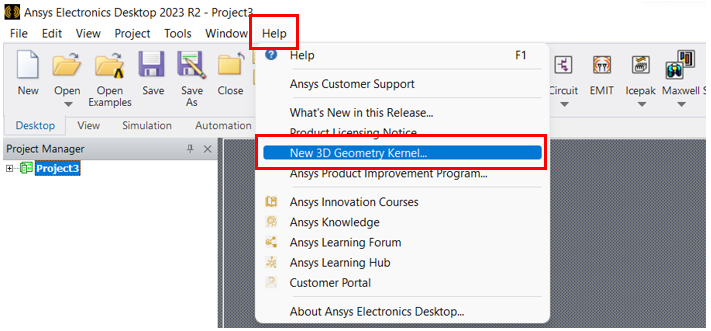
      Before trying to open the file in the 2023R1 or 2023R2 version, kindly go through the "New 3D Geomerty kernel..." document under the "Help" tab as show below:

      This will help you to migrate your project to the new version.


      Hope this is helpful.

Viewing 1 reply thread
  • The topic ‘Can’t open older files with the newest version of the student software’ is closed to new replies.

[bingo_chatbox]