Ansys Assistant will be unavailable on the Learning Forum starting January 30. An upgraded version is coming soon. We apologize for any inconvenience and appreciate your patience. Stay tuned for updates.
Preprocessing

Preprocessing

Topics related to geometry, meshing, and CAD.

Can’t Generate Mesh – Nothing related with the mesh quality!

    • Burak Kılıç
      Subscriber


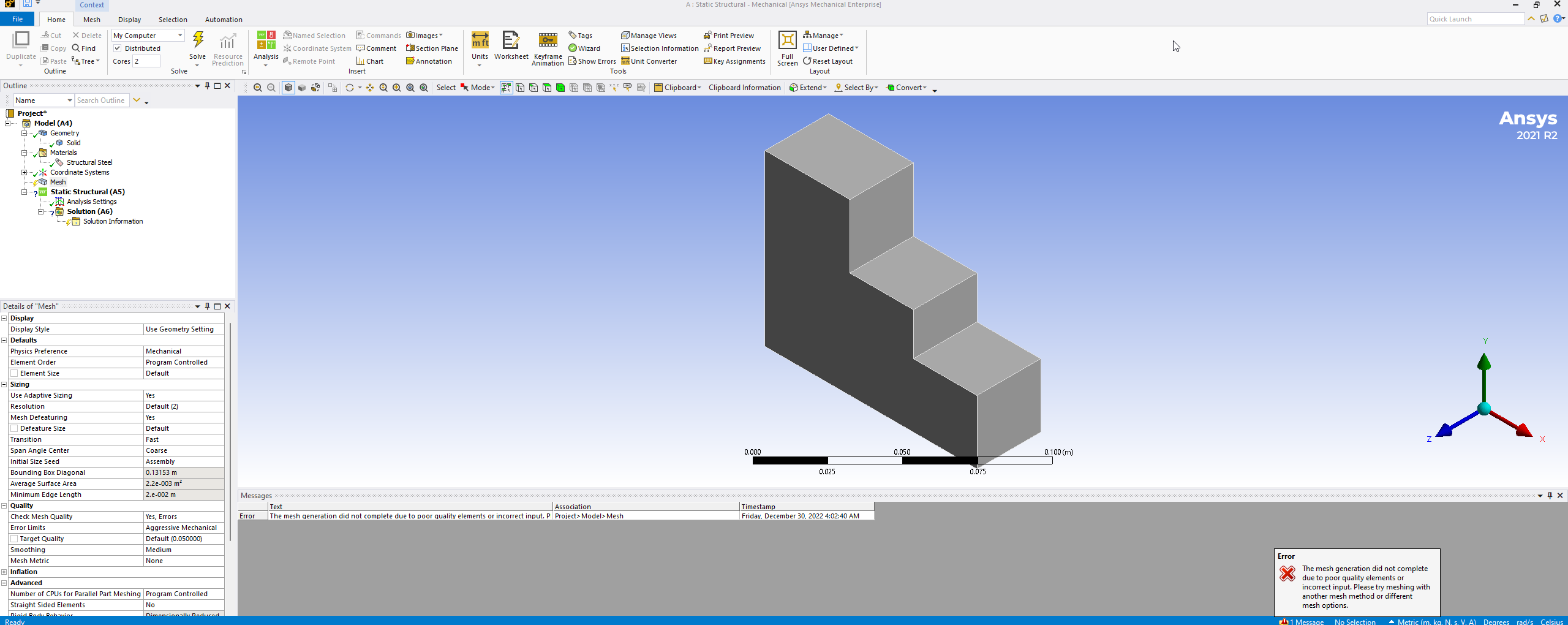
      Even with the simplest model and simplest settings, I can't generate mesh. This is probably a bug more than a mistake I made. And it's probably related with the system settings in the light of previous suggestions.


      Here is the same problem is about 5 years old and no answers given: /forum/forums/topic/ansys-19-0-will-not-create-mesh/

      There is another which "solves" the problem with changing PC: /forum/forums/topic/cant-mesh-due-to-quality-issues/


      I've re-installed Ansys 2021 R2 almost 10 times and lost 2 full-days. Please help me!

    • Ashish Khemka
      Forum Moderator

      Hi Burak,

      Based on the teams comment:

      Different customers have reported cases where ASNYS Workbench applications were not working as expected. Such cases were for exapmple:

      - ANSYS Meshing failing with an error message: "The mesh generation did not complete due to poor quality elements or incorrect input. Please try meshing with another mesh method or different mesh options". This error message was appearing with each geometry, even with the simplest (cube).

      It turned out that recent ANSYS Wokbench had been installed on machines where siginficantly older versions of other CAE/CAD applications had been installed. For instace, in the case of the failing ANSYS Meshing application, ANSYS 19.x (released in 2018) packages and AutoCAD 2013 were installed on the same machines - the problem was occuring on all machines. This old AutoCAD release and also other older CAD/CAE programs copy their DLL files into C:/Windows/System32. ANSYS can have DLL files with the same names (which are however located in C:/Program Files/Ansys Inc/v19.x) - in such cases it uses however the DLLs from the Windows directory instead its own files. Very old DLLs in the C:/Windows/System32 can be incompatible with the recent ANSYS versions, which can cause the unexpected behaviors such as those described above.

      Identification of old foreign DLL files in C:/Windows/System32 can be a challenging task. In such cases, installing ANSYS on a machine without CAD/CAE applications older more than 3-4 years than the ANSYS release might be a more efficient way to bypass the problem.


      Also, finding a “clean” machine or reimaging OS may not be an immediate option for most customers. Some 3rd party software’s installation on Windows may place some old version Intel compiler runtime library files under C:\Windows\system32, and crash some ANSYS applications, including meshing in Workbench Mechanical and Mesh, Mechanical APDL, Explicit Dynamic, Fluent and other ANSYS solvers.

      For example, below files were found on two customers’ C:\Windows\system32 folder:
      09/02/2010 08:20 PM 529,080 libiomp5md.dll
      09/02/2010 08:16 PM 2,838,200 libmmd.dll
      The libiomp5md.dll is Intel OpenMP Runtime Library. And libmmd.dll is Math Library for Intel Complier. Both are required by AnsMeshingServer.exe. They are old dated, file size are much smaller than the below ones in “C:\Program Files\ANSYS Inc\v202\tp\IntelCompiler\2019.3.203\winx64":
      02/06/2019 08:38 AM 1,728,232 libiomp5md.dll
      02/06/2019 08:38 AM 4,271,848 libmmd.dll
      Try to rename the 2 files by adding .old C:\Windows\system32, relaunch Workbench and/or affected ANSYS applications, it should turn to the correct libraries in ANSYS installation and fix the issue.

      Note: If above renaming affects 3rd party applications, copy them to the folder where 3rd party application executable is located and rename them back. Such Intel compiler runtime library files should not be placed in C:\Windows\system32, since different applications or same application but different versions may need different version run time libraries.


      Regards,

      Ashish Khemka

    • Burak Kılıç
      Subscriber
      Well, I already know that "different customers have reported cases where their ASNYS Workbench applications are not working as expected", since I have spent weeks on this particular problem. I also know that some people solved this problem with deleting their Asio4all driver, and some couldn't. The problem is, it's a VERY OLD issue, and it seems that ASNYS is not thinking of solving it yet.
       
      Let's talk about the dlls:
      Firstly, ANSYS is the LAST software that I install (actually I installed more than 20 times, I swear!).
      Secondly, there is no dll such named libmmd.dll in my system32 folder.
      Thirdly, libiomp5md.dll is from 19.11.2022, So, it's actually pretty new.
      Lastly, the oldest CAD/CAE software is from 2019 (ABAQUS).
       
      BTW, Installing ANSYS to a clean machine or reimaging OS is NOT a solution :)
       
      STOP blaming 3rd party applications, it's clearly ANSYS.
       
      Here is another bug, this one is from the website:
      1. There is a post of the same issue (5 years old post, so stop blaming 3rd parties and fix it!)
      /forum/forums/topic/ansys-19-0-will-not-create-mesh/
       
      2. I add my comment to this post.
       
      3. So, this post can be seen under "My Posts" (In this phase, I wait about a minute to see results, WTF1? This is another bug, Bugception :D)
       
       
      4. Then you click that button and can see there are a bunch of comments under the post :D, WTF2?
       
      While ANSYS is the hardest to install and buggiest software I've ever seen, the ANSYS forum is the slowest and "only" buggy forum I've ever seen in my life. I'm 33, BTW. Please let me know if you "solve" the issue. Thank you :)
       
    • Ashish Khemka
      Forum Moderator

      Hi Burak,

      Here are .dll files captured from Process Explorer for the AnsMeshingServer.exe while Mechanical v212 is meshing. Hope it could be helpful to debug this issue. 

      Check if these files exist in C:\Windows\system32. If yes, rename or remove. 

      libiomp5md.dllC:\Program Files\ANSYS Inc\v212\tp\IntelCompiler\2019.3.203\winx64\libiomp5md.dll5.0.2019.1092/6/2019 7:38Intel(R) OpenMP* Runtime LibraryIntel Corporation0x1D6000
      libmmd.dllC:\Program Files\ANSYS Inc\v212\tp\IntelCompiler\2019.3.203\winx64\libmmd.dll19.0.0.02/6/2019 7:38Math Library for Intel(r) Compilers (thread-safe)Intel Corporation0x418000
      svml_dispmd.dllC:\Program Files\ANSYS Inc\v212\tp\IntelCompiler\2019.3.203\winx64\svml_dispmd.dll19.0.0.02/6/2019 7:38SVML Library for Intel(r) Compilers (thread-safe)Intel Corporation0x11FB000
      mkl_intel_thread.dllC:\Program Files\ANSYS Inc\v212\tp\IntelMKL\2020.0.166\winx64\mkl_intel_thread.dll2020.0.0.111/26/2019 3:55Intel® Math Kernel LibraryIntel Corporation0x1F63000
      icudt54.dllC:\Program Files\ANSYS Inc\v212\tp\qt_fw\5.5.1\Win64\bin\icudt54.dll54.1.0.011/17/2020 10:33ICU Data DLLThe ICU Project0x182C000
      icuin54.dllC:\Program Files\ANSYS Inc\v212\tp\qt_fw\5.5.1\Win64\bin\icuin54.dll54.1.0.011/17/2020 10:33ICU I18N DLLThe ICU Project0x274000
      icuuc54.dllC:\Program Files\ANSYS Inc\v212\tp\qt_fw\5.5.1\Win64\bin\icuuc54.dll54.1.0.011/17/2020 10:33ICU Common DLLThe ICU Project0x1BA000
      Qt5Core.dllC:\Program Files\ANSYS Inc\v212\tp\qt_fw\5.5.1\Win64\bin\Qt5Core.dll5.5.1.011/17/2020 10:33C++ application development framework.The Qt Company Ltd0x4E6000

      Regards,

      Ashish Khemka

    • Burak Kılıç
      Subscriber


      Here are the results. Firstly, I need to specify the build installed is v222 right now.

      In my system32 folder, I have only “libiomp5md.dll” and “mkl_intel_thread.dll” between the ddls mentioned above. “mkl_intel_thread.dll” is from 2012 which is pretty old.

      Renaming “libiomp5md.dll” didn’t affect anything.


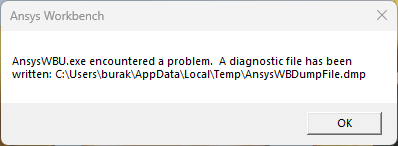
      On the other hand, renaming “mkl_intel_thread.dll” gives an error while meshing, at least something different happened.


      There are two folders inside C:\Program Files\ANSYS Inc\v222\tp\IntelMKL

      ”2020.0.166″ and “2021.3.0”.


      I copied “mkl_intel_thread.dll” from “2020.0.166\winx64\” to “system32” folder.

      Well, that also gives the same error.


      I also copied “mkl_intel_thread.1.dll” from “2021.3.0” to “system32” folder and renamed as usual “mkl_intel_thread.dll”

      That also gives the same error.


      TL;DR: In “system32” I put 2 different “mkl_intel_thread.dll” one by one


      1. From C:\Program Files\ANSYS Inc\v222\tp\IntelMKL\2020.0.166\winx64\ mkl_intel_thread.dll
      2. From C:\Program Files\ANSYS Inc\v222\tp\IntelMKL\2021.3.0\winx64\ mkl_intel_thread.1.dll


      3rd option is the deleting all “mkl_intel_thread.dll”s from system32, which is also the same. 

      Any other idea?

      P.S.: When I back to first "mkl_intel_thread.dll" it gives the error in the beginning. So, it seems that this dll cause the problem.

Viewing 4 reply threads
  • The topic ‘Can’t Generate Mesh – Nothing related with the mesh quality!’ is closed to new replies.
[bingo_chatbox]