

-
-
January 20, 2021 at 1:54 pm
Autonewbie
SubscriberHi,
I cannot modify the locked file as shown in the picture below. I could not find a way to unlock. Any suggestion? Thank you!
January 21, 2021 at 12:00 pmAniket Chavan
Forum ModeratorRight-click on the locked component in the tree and uncheck lock.n-AniketnHow to access Ansys help linksnGuidelines for Posting on Ansys Learning ForumnJanuary 22, 2021 at 2:14 amSubscriber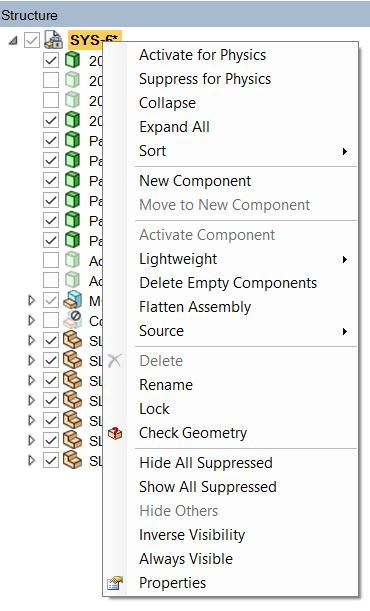 You mean this?.I have some subcomponents are locked... I do not see this problem for other model... not sure whyn
January 22, 2021 at 2:51 amForum Moderatorok, so are you saying that you have locked some subcomponents intentionally and see the lock symbol on the root component level (topmost). Can you try copy-pasting all the parts in a new SpaceClaim session?n-AniketnHow to access Ansys help linksnGuidelines for Posting on Ansys Learning ForumnJanuary 22, 2021 at 5:47 amSubscriberYou are right... Some components are locked for purposes. I can copy and paste to new design file and no such issue...nBut I have to redo everything in mechanical..... is there other way and why is it happening? Thanks!nJanuary 29, 2021 at 1:36 pmForum ModeratorI am not sure why it is happening, but can't exchange files on the forum. And the lock symbol should have gone when you a unchecked the lock at the root level.nTry changing the following option in the properties too:nSys-6> Properties> Document> Locked> Falsen-AniketnHow to access Ansys help linksnGuidelines for Posting on Ansys Learning ForumnViewing 5 reply threads
You mean this?.I have some subcomponents are locked... I do not see this problem for other model... not sure whyn
January 22, 2021 at 2:51 amForum Moderatorok, so are you saying that you have locked some subcomponents intentionally and see the lock symbol on the root component level (topmost). Can you try copy-pasting all the parts in a new SpaceClaim session?n-AniketnHow to access Ansys help linksnGuidelines for Posting on Ansys Learning ForumnJanuary 22, 2021 at 5:47 amSubscriberYou are right... Some components are locked for purposes. I can copy and paste to new design file and no such issue...nBut I have to redo everything in mechanical..... is there other way and why is it happening? Thanks!nJanuary 29, 2021 at 1:36 pmForum ModeratorI am not sure why it is happening, but can't exchange files on the forum. And the lock symbol should have gone when you a unchecked the lock at the root level.nTry changing the following option in the properties too:nSys-6> Properties> Document> Locked> Falsen-AniketnHow to access Ansys help linksnGuidelines for Posting on Ansys Learning ForumnViewing 5 reply threads- The topic ‘Cannot Modify Locked Documents – Spaceclaim’ is closed to new replies.
Innovation Space Trending discussions
 Top Contributors
-
peteroznewman
 5849
5849 -
scabo
 1906
1906 -
Dennis Chen
 1420
1420 -
javat33489
 1305
1305 -
Shyam Prasad V Atri
1021
Top Rated Tags
© 2026 Copyright ANSYS, Inc. All rights reserved.
Ansys does not support the usage of unauthorized Ansys software. Please visit www.ansys.com to obtain an official distribution.
-



The Ansys Learning Forum is a public forum. You are prohibited from providing (i) information that is confidential to You, your employer, or any third party, (ii) Personal Data or individually identifiable health information, (iii) any information that is U.S. Government Classified, Controlled Unclassified Information, International Traffic in Arms Regulators (ITAR) or Export Administration Regulators (EAR) controlled or otherwise have been determined by the United States Government or by a foreign government to require protection against unauthorized disclosure for reasons of national security, or (iv) topics or information restricted by the People's Republic of China data protection and privacy laws.

 You are navigating away from the AIS Discovery experience