-
-
May 21, 2020 at 10:00 am
pedrocarneiro
SubscriberÂ
Hi everyone,
Â
I would like to ask you about the correct connection between the elements beam 188 and link 180.Â
Â
For example if i create 3 nodes being the element 188 between the first and second node and the link element 180 between the nodes 2 and 3 how ansys will act in the node 2 because this node is shared between booth elements but these elements don’t have the same degrees of freedom?
Â
Or, it is supposed use for example the element mpc184 and create two different nodes with the same coordinates for the end of element beam 188 and for the beginning of element link 180 and after connect them using the mpc184 element for only transmit translational degrees or freedom from beam 188 to link 180?Â
Regards
-
May 22, 2020 at 12:56 pm
peteroznewman
Subscriber- Beam element is from node 1 to 2 along the x axis.
- Link element is from node 2 to 3 along the x axis.
- Node 1 is a Fixed Support.
- Node 3 has a displacement BC so that the link is supported in y and z directions.
Node 2 still has 6 DOF to represent the bending of the beam, but the link has no rotational DOF so it behaves like a spherical joint connection to the beam, except you don't have to constrain the rotation about the link axis because there is no DOF for rotation. If you move node 3 up in the Y direction, the link will pull up on node 2 and bend the beam.
Â
-
May 25, 2020 at 7:34 am
pedrocarneiro
SubscriberThanks for your answer. I will apply this in a 3D truss geometry where some elements are beam 188 that support axial and bending loads anf the others are link that only support tension. If i have some more questions during the application i will let you know. Once again thanks for your time.
Â
-
May 25, 2020 at 11:51 am
peteroznewman
SubscriberBe careful to mesh LINK180 line bodies with a SINGLE element, otherwise the solver may fail. You can force this with an Element Size mesh control on number of elements.
BEAM188 line bodies can have more elements without any problem.
-
May 26, 2020 at 8:45 am
pedrocarneiro
SubscriberYes i am currently using the command lesize to force the link elements for only have one element.
In the case of two adjacente beam element if for exemple I only to trasnfer forces between them and no moments what is the best option to do that? I am reading about the endrelease command, the mpc184 element and the cp comand but for me it is not clear what is correct option. Could you suggest anything? -
May 26, 2020 at 9:51 am
peteroznewman
SubscriberIf you have two beams that meet in a spherical joint, then you would use end release to represent that spherical joint. If a beam has a spherical joint on both ends, then it can't bend, so you can mesh that as a LINK180. That way, you don't need end releases and you don't have to worry about the rotational DOF along the axis.
-
May 26, 2020 at 11:08 am
pedrocarneiro
SubscriberÂ
Thanks for the answer.
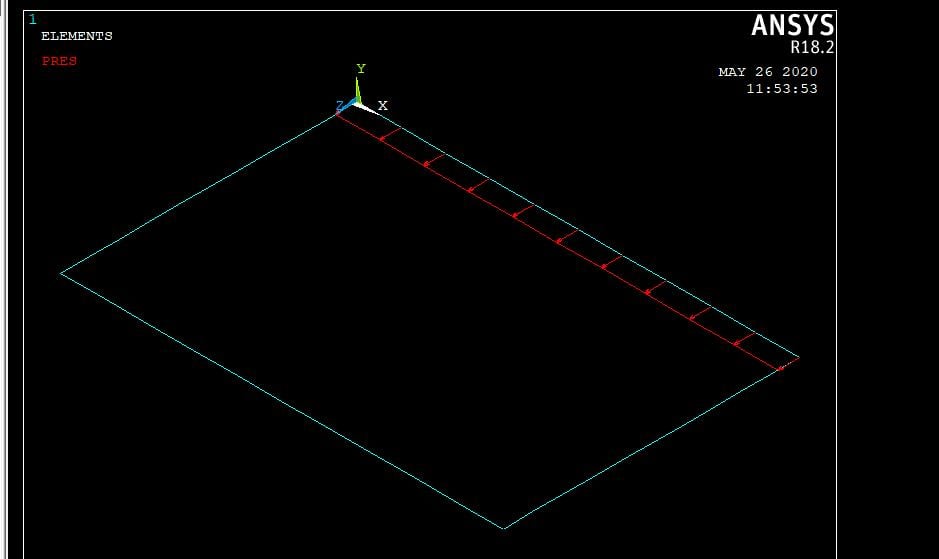
Basically I want to apply a distributed load like in the one in the attached image and i want to be able to bend the beam where the force is applied and transfer only forces to the adjacent beams.
So, i supposed that i have to create two nodes with the same coordinates in each end of the loaded beam and somehow connect them for only transmit forces and no bending the adjacent beams.
Â
From my tests I think that the mpc 184 elemento with keyopt(1)=0 could be the correct solution, but i am not sure about that.
-
May 28, 2020 at 4:30 pm
pedrocarneiro
SubscriberÂ
Anyone knows how to use the mpc184 to connect three beam nodes with the same coordinates?
Â
Â
-
June 2, 2020 at 11:45 am
peteroznewman
SubscriberThe image you show looks like a surface. Where are the beams you are trying to push on? Using Contact elements is the right approach.
-
June 3, 2020 at 7:29 am
pedrocarneiro
SubscriberThe idea is try to reproduce a tent structure, i.e. in each corner will be joining three beams, and i am looking for what is the best option to reproduce these joints.
-
June 3, 2020 at 10:48 am
peteroznewman
SubscriberIf you have a node at the corner, you can connect three beams to that one node.
Tents with tubes I have seen have a diecast metal corner with three fingers to slip the three tubes on. In that way, the tubes become "welded" to the corner so they can carry bending moments.
If you want a tube to be connected in a way that is like a spherical joint, then you can do an End Release on that beam so that it doesn't pass any moments through that end.
-
June 3, 2020 at 1:44 pm
pedrocarneiro
SubscriberÂ
Thanks for your answer.
Â
It seems more like the second option i.e. the beam doesn’t pass any moments in its end.
Â
what i am thinking is use independent nodes in each one of the three beams and use the cerig command to connect only the degrees of freedom of translation between the three end beams nodes.
Â
Is this different of use beam end release with the same node at each end of the three beams?
Â
Â
-
June 4, 2020 at 5:18 pm
peteroznewman
SubscriberWhat I said was all the beams could share one node, so the three translational DOF would be identical for all beams.
With CERIG you could link a single DOF on each end node of each of the three beams, while the other two translational DOF are free.
-
June 4, 2020 at 5:22 pm
pedrocarneiro
SubscriberIn cerig formulation:Â https://www.mm.bme.hu/~gyebro/files/ans_help_v182/ans_cmd/Hlp_C_CERIG.html it seems that you can couple multiple DOF.
Â
-
June 4, 2020 at 10:36 pm
peteroznewman
SubscriberYes sure.
If your question has been answered, please click the Is Solution link below the post that best answered your question to mark the topic Solved.
-
June 9, 2020 at 7:46 am
pedrocarneiro
SubscriberThanks for all.
In the force output of link 180 elements is not normal have negative values if you use tension only elements right?Â
Â
Â
-
June 9, 2020 at 7:46 pm
peteroznewman
SubscriberTension is positive for axial force of beams and links. -
June 9, 2020 at 7:51 pm
pedrocarneiro
SubscriberIn my first approach i forgot to turn on the large deflections on which is not compatible with the tension only option for link180 element.
-
- The topic ‘beam 188 and link 180’ is closed to new replies.
-
5884
-
1906
-
1420
-
1306
-
1021
© 2026 Copyright ANSYS, Inc. All rights reserved.