

-
-
September 15, 2021 at 9:16 am
Alp
SubscriberSeptember 15, 2021 at 1:27 pmAniket Chavan
Forum ModeratorDo you want to automate insertion of the Moving heat flux objects in a tree?
-Aniket
How to access Ansys help links
Guidelines for Posting on Ansys Learning Forum
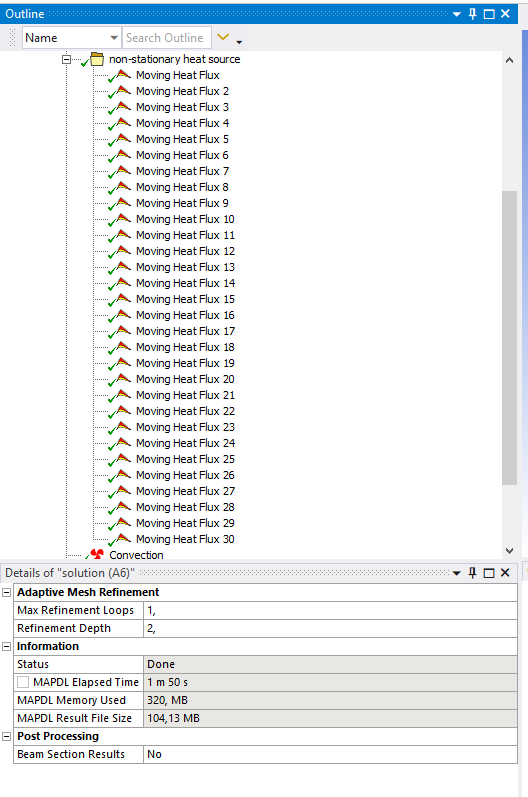
September 16, 2021 at 6:16 amSubscriberAs it is ullustrated in the video, I would like to create one moving heat flux that can travel around the rectangular object as many as I want (like a loop). To do so, I needed to create 60 heat flux, but it is not practical when I want to make 500 loops with keyboard. If you suggest to create automate the insertion of moving heat flux, that is also fine. Could you elaborate how to do?
or any other ways to use same heat flux that can make 500 loops around rectangular object?
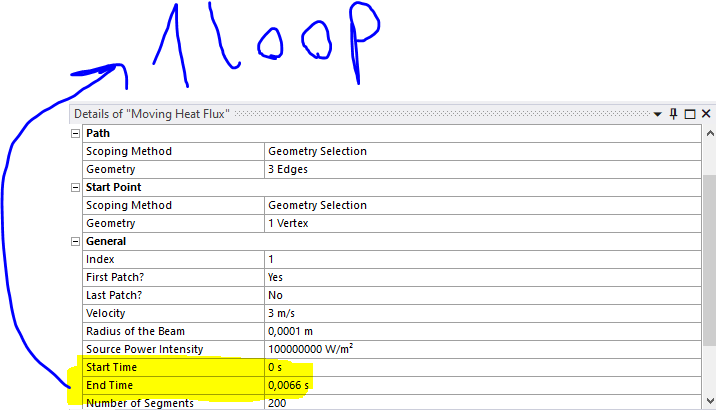
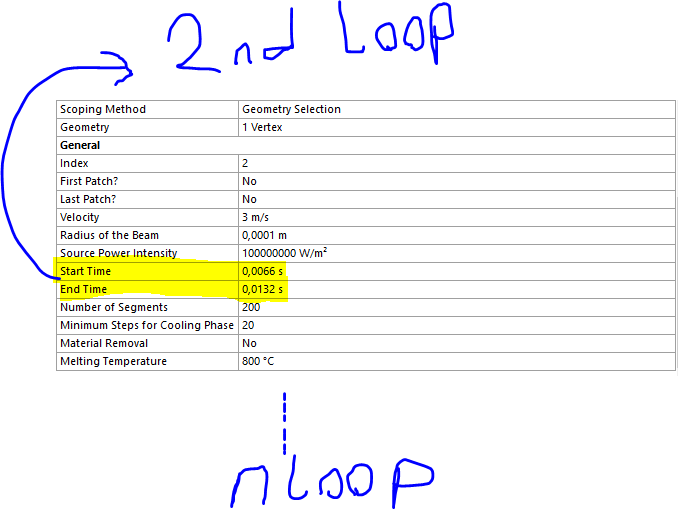
Or any way to change the start and end time in an automated manner since it seems to does not have parameter sweep properties.
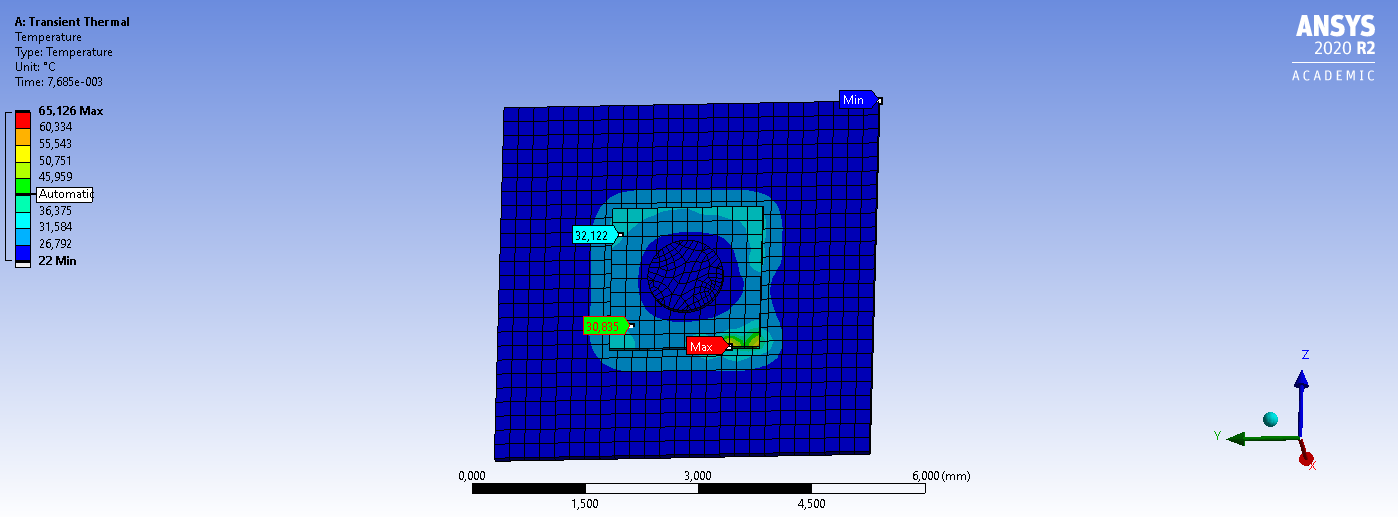
Br Alp.
September 17, 2021 at 1:23 pmForum ModeratorAnsys staff can not download any files on the forum, so if you want to reach a larger audience to get answers from, please insert inline images (like you have done) describing your problem. It would be possible to automate the Extension object insertion and property manipulation, but, an easier way would be writing a ds.dat file with limited number of moving heat transfer object and then simply extrapolating the same for large number of objects by simply editing the text file.
-Aniket
How to access Ansys help links
Guidelines for Posting on Ansys Learning Forum
September 17, 2021 at 1:50 pmSubscriberThank you. Do you have any example on APDL input files written for moving heat flux extension? Any clue clould be great.
September 17, 2021 at 4:05 pmForum ModeratorNo, but you can use your own model, and do the following:
Insert no moving heat transfer and write an input file from mechanical:
https://ansyshelp.ansys.com/account/Secured?returnurl=/Views/Secured/corp/v212/en/wb_sim/ds_writing_reading_ansys_files.html
then insert for one loop and write out the input file.
Compare these two text files in text editors, this would give you an idea about what commands are being used, extrapolate for 500 loops. Let me know if you have further roadblocks!
-Aniket
How to access Ansys help links
Guidelines for Posting on Ansys Learning Forum
September 19, 2021 at 9:31 amSubscriberYeah, If I create my own model, then I can use every properties :). However, that is not the point of time saving. There is available ACT moving heat flux extension that saves time and is really useful but I could not use for shorter path like 2 mm when it moves in 5m/s so one needs to create more path or a loop structure or any sweeping properties but I do not have access any values of this extension that is the main drawback. Maybe you can improve it by including this feature that is really needed.
Br Alp
October 5, 2021 at 3:20 pmSubscriberIn the following APDL code, I m able to change the starting point of gaussian beam with ID number of coordinate system. However, I wanna change it in a loop so I included this do loop here but it only calls once. How can I make more loop so that beam can travel around the rectangle?
!Commands inserted into this file will be executed just prior to the ANSYS SOLVE command.
!These commands may supersede command settings set by Workbench.
!Active UNIT system in Workbench when this object was created:Metric (m, kg, N, s, V, A)
!NOTE:Any data that requires units (such as mass) is assumed to be in the consistent solver unit system.
!See Solving Units in the help system for more information.
*do,i,1,14,1 ! I included this to start loop
!
! /INPUT,HFLUX_func,,,1
*DIM,HEAT_FLX1,TABLE,6,22,1,,,,i ! The last number corresponds to the ID number for the coordinate system
!
! Begin of equation: Q(x,y,t)=A*exp(B*(({X}-C)^2+({Y}-D*{TIME}-E)^2)/F^2)
!
*SET,HEAT_FLX1(0,0,1), 0.0, -999
*SET,HEAT_FLX1(2,0,1), 0.0
*SET,HEAT_FLX1(3,0,1), 0.0
*SET,HEAT_FLX1(4,0,1), 0.0
*SET,HEAT_FLX1(5,0,1), 0.0
*SET,HEAT_FLX1(6,0,1), 0.0
*SET,HEAT_FLX1(0,1,1), 1.0, -1, 0, 0, 0, 0, 2 ! "C" goes here 4te Zahl von Rechts0.05 (4. koordinat sistemine gore offset )
*SET,HEAT_FLX1(0,2,1), 0.0, -2, 0, 1, 2, 2, -1
*SET,HEAT_FLX1(0,3,1),0, -1, 0, 2, 0, 0, -2
*SET,HEAT_FLX1(0,4,1), 0.0, -3, 0, 1, -2, 17, -1
*SET,HEAT_FLX1(0,5,1), 0.0, -1, 0, 0.001, 0, 0, 1! "D" goes here 4te Zahl von Rechts0.001 hizi
*SET,HEAT_FLX1(0,6,1), 0.0, -2, 0, 1, -1, 3, 1
*SET,HEAT_FLX1(0,7,1), 0.0, -1, 0, 1, 3, 2, -2
*SET,HEAT_FLX1(0,8,1), 0.0, -2, 0, 0, 0, 0, -1! "E" goes here 4te Zahl von Rechts
*SET,HEAT_FLX1(0,9,1), 0.0, -4, 0, 1, -1, 2, -2
*SET,HEAT_FLX1(0,10,1), 0.0, -1, 0, 2, 0, 0, -4
*SET,HEAT_FLX1(0,11,1), 0.0, -2, 0, 1, -4, 17, -1
*SET,HEAT_FLX1(0,12,1), 0.0, -1, 0, 1, -3, 1, -2
*SET,HEAT_FLX1(0,13,1), 0.0, -2, 0, -3, 0, 0, -1 ! "B" goes here 4te Zahl von Rechts
*SET,HEAT_FLX1(0,14,1), 0.0, -3, 0, 1, -2, 3, -1
*SET,HEAT_FLX1(0,15,1), 0.0, -1, 0, 0.005, 0, 0, 0! "F" goes here 4te Zahl von Rechts 0.005 beam diameter
*SET,HEAT_FLX1(0,16,1), 0.0, -2, 0, 2, 0, 0, -1
*SET,HEAT_FLX1(0,17,1), 0.0, -4, 0, 1, -1, 17, -2
*SET,HEAT_FLX1(0,18,1), 0.0, -1, 0, 1, -3, 4, -4
*SET,HEAT_FLX1(0,19,1), 0.0, -1, 7, 1, -1, 0, 0
*SET,HEAT_FLX1(0,20,1), 0.0, -2, 0, 100e7, 0, 0, -1 ! "A" goes here 4te Zahl von Rechts e7 power
*SET,HEAT_FLX1(0,21,1), 0.0, -3, 0, 1, -2, 3, -1
*SET,HEAT_FLX1(0,22,1), 0.0, 99, 0, 1, -3, 0, 0
!
! End of equation: Q(x,y,t)=A*exp(B*(({X}-C)^2+({Y}-D*{TIME}-E)^2)/F^2)
!-->
sf,a1,hflux,%HEAT_FLX1%! Replace FACENAME with a named selection
*ENDDO !I included this to stop loop
April 10, 2023 at 5:10 pmME23MTECH02002
SubscriberCan anyone help me in understanding the APDL codes? like what each and every number in the below command mean for Gaussian Heat source:
*SET,HEAT_FLX1(0,0,1), 0.0,-2,0,2,0,0,-1
Thanks
Viewing 8 reply threads- The topic ‘Automation in MOVING heat flux.’ is closed to new replies.
Innovation Space Trending discussions
 Top Contributors
-
peteroznewman
 6550
6550 -
scabo
 1906
1906 -
Dennis Chen
 1463
1463 -
javat33489
 1311
1311 -
Shyam Prasad V Atri
1022
Top Rated Tags
© 2026 Copyright ANSYS, Inc. All rights reserved.
Ansys does not support the usage of unauthorized Ansys software. Please visit www.ansys.com to obtain an official distribution.
-


The Ansys Learning Forum is a public forum. You are prohibited from providing (i) information that is confidential to You, your employer, or any third party, (ii) Personal Data or individually identifiable health information, (iii) any information that is U.S. Government Classified, Controlled Unclassified Information, International Traffic in Arms Regulators (ITAR) or Export Administration Regulators (EAR) controlled or otherwise have been determined by the United States Government or by a foreign government to require protection against unauthorized disclosure for reasons of national security, or (iv) topics or information restricted by the People's Republic of China data protection and privacy laws.

 You are navigating away from the AIS Discovery experience