Ansys Assistant will be unavailable on the Learning Forum starting January 30. An upgraded version is coming soon. We apologize for any inconvenience and appreciate your patience. Stay tuned for updates.
Ansys Products

Ansys Products

Discuss installation & licensing of our Ansys Teaching and Research products.

Ansys/Fluent and Solidworks add-in not working

    • jeff.bonyun
      Subscriber
      My understanding is that there is an Add-in for Solidworks that might ease my workflow of designing in Solidworks and doing Fluent simulations. I can't get it to work. I'm using Solidworks 2024 Pro and Ansys 2025 R1 Enterprise on Windows 11 24H2. This link says that should be supported.
       
      I have modifications I make in Discovery (adding external fluid channels, adding Named Selections) and every time I modify anything in Solidworks, I have to repeat them from scratch, because I can find no way to update in place that will keep these modifications in Discovery.
       
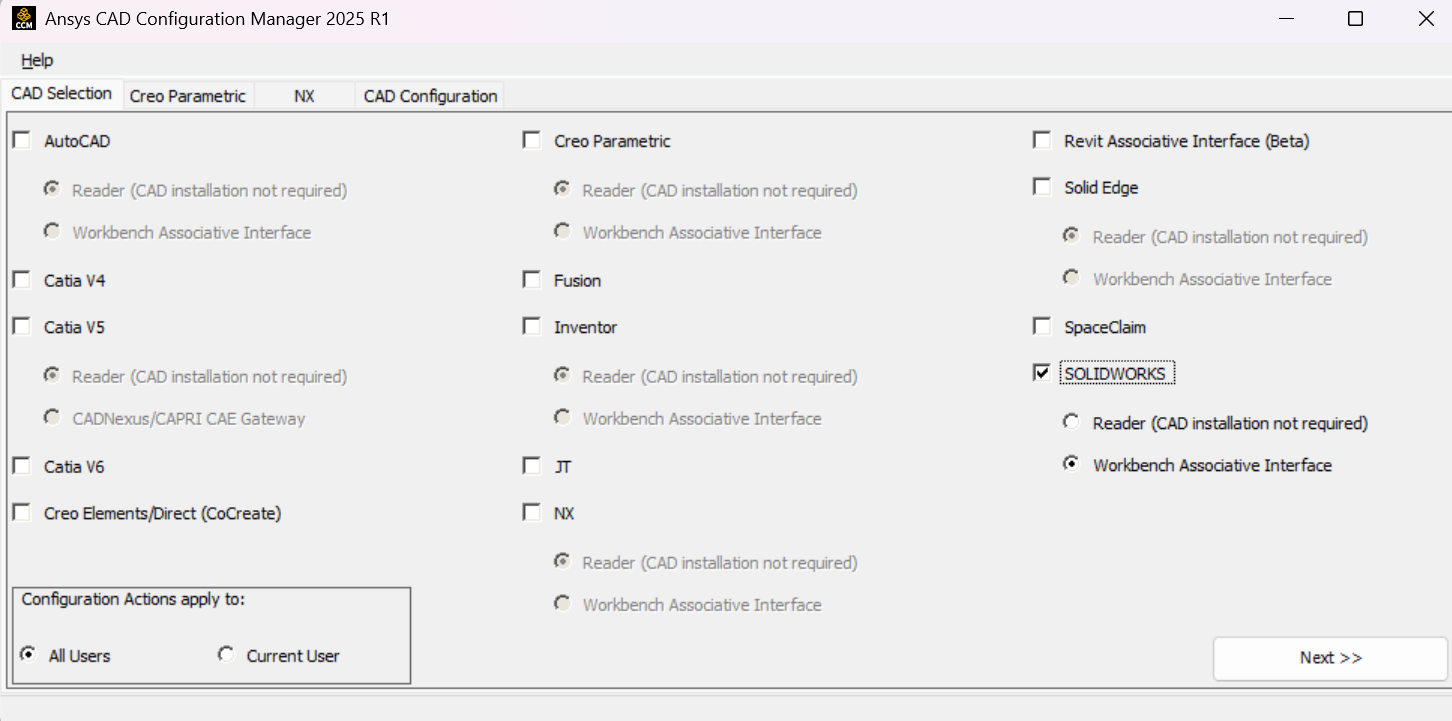
      I've tried installing the add-in using instructions I can find online. There is conflicting info, but I think the critical steps are using "CAD Configuration Manager 2025 R1" as Administrator. Every time it opens, the SOLIDWORKS options are unchecked (but maybe this manager doesn't keep track of state). I check it, and choose "Workbench Associative Interface". I leave it on "All Users". Click "Next". Click the "Configure Selected CAD Interfaces" button. It says:
       
      Prerequisites ..... Configure Success
      Discovery Workbench Plugin ..... Configure Success
      SW  Workbench PlugIn ..... Configure Success
      If I "Display Configuration Log", it's all successes, but it does say "SpaceClaimEngineeringConfiguration Not Detected", but since 2025 R1 doesn't seem to have SpaceClaim (at least I don't), this doesn't seem relevant.
       
      I exit the CAD Configuration program.
       
      Now I open Solidworks. I can either open a part or just leave all documents closed. If I look in, Tools/Add-Ins, "Ansys 2025 R1" is on the list, unchecked. I can check it and click "OK". Nothing happens. Ansys does not appear on the Tools menu, where I think it ought to appear. If I open Tools/Add-Ins again... it is unchecked again. I assume it is unable to load it, but I don't know where Solidworks might report this; there is no error given.
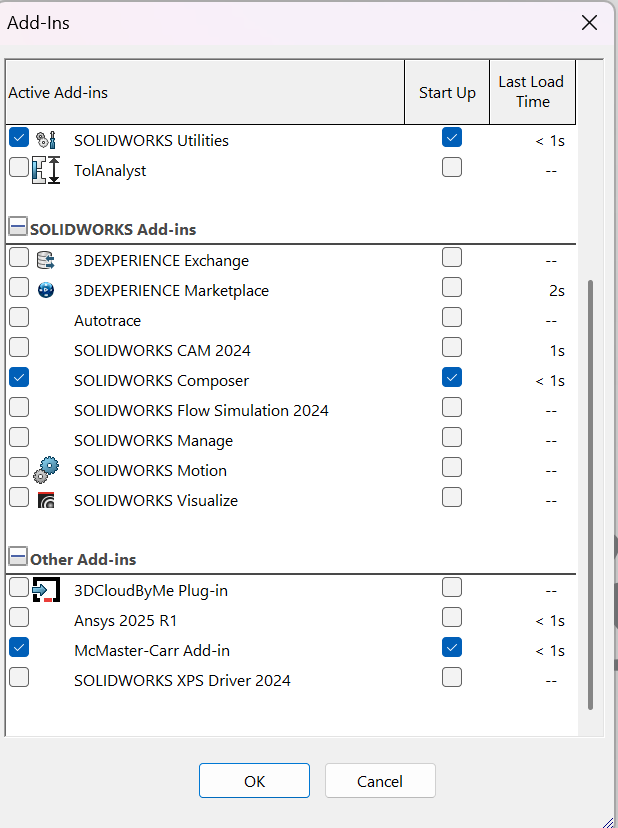
       
      I have gone down some other paths. I have tried "Unconfigure Selected CAD Products" (the add-in disappears from the list in Solidworks) and readded it. I have tried "Product and CAD Configuration Manager", chosen "Configure Products in CAD". The internet said to configure Workbench, but I don't see that on my list. I have tried "Other"/"Geometry Interfaces" and both automatically and manually choosing my CAD packages. I'm not sure what it said at first, but it reported "SOLIDWORKS Geometry Interface - Associative Interface" is "detected as previously configured".
       
      I'm out of ideas. Any help is appreciated.
      Am I going about this all wrong, not understanding how the interaction is supposed to work?

    • Rajeshwari Jadhav
      Forum Moderator

      Hi,

      Install the service pack for v2025R1 for this issue.

    • tim.sieben-haussen
      Subscriber


      LOL. jeff.bonyun gave such a complete overview and all he gets is a one liner without any aditional information. A Link to the download would be nice, i have no clue where to get the “service pack for v2025R1” :(

      When going to ansys Workbench>Help>Info About Ansys Workbench i get the following:

      2025 R1

      Point Releases and Patches installed:

      Ansys Service Pack 2025 R1.6879000
      Discovery (full install) 2025 R1.6879000
      Core WB Files 2025 R1.6879000
      Ansys Dynamic Reporting 2025 R1.6879000
      CFX (includes CFD-Post) 2025 R1.6879000
      Chemkin 2025 R1.6879000
      EnSight 2025 R1.6879000
      FENSAP-ICE 2025 R1.6879000
      Fluent (includes CFD-Post) 2025 R1.6879000
      Polyflow (includes CFD-Post) 2025 R1.6879000
      Forte (includes EnSight) 2025 R1.6879000
      Rocky 2025 R1.6879000
      TurboGrid 2025 R1.6879000
      ACIS Geometry Interface 2025 R1.6879000
      AutoCAD Geometry Interface 2025 R1.6879000
      Catia, Version 4 Geometry Interface 2025 R1.6879000
      Catia, Version 5 Geometry Interface 2025 R1.6879000
      Catia, Version 6 Geometry Interface 2025 R1.6879000
      Creo Elements/Direct Modeling Geometry Interface 2025 R1.6879000
      Creo Parametric Geometry Interface 2025 R1.6879000
      Inventor Geometry Interface 2025 R1.6879000
      JTOpen Geometry Interface 2025 R1.6879000
      NX Geometry Interface 2025 R1.6879000
      Parasolid Geometry Interface  2025 R1.6879000
      Solid Edge Geometry Interface 2025 R1.6879000
      SOLIDWORKS Geometry Interface 2025 R1.6879000
      Speos 2025 R1.6879000
      SpaceClaim 2025 R1.6879000
      Speos RPC 2025 R1.6879000
      Aqwa 2025 R1.6879000
      Autodyn 2025 R1.6879000
      Material Calibration App 2025 R1.6879000
      Mechanical Products 2025 R1.6879000
      Motion 2025 R1.6879000
      Academic Student 2025 R1.6879000

      And with this Version of ANSYS the Solidworks Plug in DOESNT WORK !!!

      Also it seems not possible for students to get a servie pack since they dont have an account number (customer number).


    • Rajeshwari Jadhav
      Forum Moderator


      Hi Tim and Jeff,

      The plugins are not included in student version, so it won't work. Instead you can import solidworks file in Discovery first and save it in Discovery format.

      Also, the CAD configuration will not be helpful for you as you are using free student version.

      Refer: Download Ansys Student | Workbench-based Simulation Tools

      image


    • tim.sieben-haussen
      Subscriber
      1. Create A text File with text editor 
      2. coppy the text below into it
      3. save it and but AddIn_Dll_Mover.bat as a name (*.bat is the important part)
      4. runs the bat as admin
      5. IT WORKS :)

        @echo on

      :: Ensure the script is running with Administrator privileges
      :: Check if the script is running as admin
      openfiles >nul 2>nul
      if %errorlevel% NEQ 0 (
          echo This script requires Administrator privileges. Restarting as administrator...
          powershell -Command "Start-Process '%~f0' -Verb runAs"
          exit /b
      )

      :: Perform the file copy operations
      echo Copying DLLs to the SolidWorks directory...
      copy /Y "%AWP_ROOT251%\Framework\bin\Win64\Xalan-C_1_12.dll" "%AWP_ROOT251%\aisol\CADIntegration\SolidWorks\winx64"
      copy /Y "%AWP_ROOT251%\Framework\bin\Win64\XalanMessages_1_12.dll" "%AWP_ROOT251%\aisol\CADIntegration\SolidWorks\winx64"
      copy /Y "%AWP_ROOT251%\Framework\bin\Win64\xerces-c_3_2.dll" "%AWP_ROOT251%\aisol\CADIntegration\SolidWorks\winx64"
      copy /Y "%AWP_ROOT251%\Framework\bin\Win64\zlibd1.dll" "%AWP_ROOT251%\aisol\CADIntegration\SolidWorks\winx64"

      :: Check if the addin is checked (this depends on the method of checking your addin)
      :: You can add specific commands here if you have a way to query the addin status
      echo Checking if addin is enabled...

      :: You can potentially use a script or method to verify that the addin is enabled in SolidWorks
      :: This step would need to be customized based on how the addin is managed

      echo Process completed.
      pause

      • Rajeshwari Jadhav
        Forum Moderator

        Hi Tim,

        I have edited my response, please note that the plugins are not included in student version. So the previous suggestion of .bat file won't work.

    • jeff.bonyun
      Subscriber

      OP here.

      Anyway, @tim.sieben-haussen was exactly right, and just copying over those DLLs worked. (I did it manually, but it looks like the script is good too.) The Solidworks add-in now actually loads and appears under Tools and stays checked. Next I’ll try to leverage it to smooth out my workflow.

      Installing the Service Pack might have achieved the same thing, but in our University environment, that’s much harder to make happen.

      I’m also unclear if I am on the free student version; I never said that I was. My impression is that I’m on an Enterprise research license through my university. Which means we lack support (hence the forum) but seem to have access to most of Ansys.

      My thanks to the forum!


      • Rajeshwari Jadhav
        Forum Moderator

        Hi Jeff,

        Thanks for the update, if you have the license and have installed academic version then plugins are included and the script will resolve the sw issue, also someone from your Univeristy should have access to Ansys Download Center as you have the Enterprise license.

    • tim.sieben-haussen
      Subscriber

      @ Rajeshwari Jadhav

      "The plugins are not included in student version, so it won't work. Instead you can import solidworks file in Discovery first and save it in Discovery format.

      Also, the CAD configuration will not be helpful for you as you are using free student version."

      IDK man, i got my ansys from here: https://www.ansys.com/academic/students/ansys-student
      Pretty sure that its the student License because thats the name. And its working fine, so i think what you are saying is not correct and might confuse people, who infact do have access to this Plug-In. 

      • Rajeshwari Jadhav
        Forum Moderator


        Hi Tim,

        yes you are absolutely correct, student verison has plugins installed.


Viewing 6 reply threads
  • The topic ‘Ansys/Fluent and Solidworks add-in not working’ is closed to new replies.
[bingo_chatbox]