Ansys Assistant will be unavailable on the Learning Forum starting January 30. An upgraded version is coming soon. We apologize for any inconvenience and appreciate your patience. Stay tuned for updates.
General Mechanical

General Mechanical

Topics related to Mechanical Enterprise, Motion, Additive Print and more.

ANSYS Workbench Mechanical Legend Display

    • Muhammed
      Subscriber


      Hi everyone.


      I am trying to increase the font size of the legend in the Ansys Workbench Mechanical. What is the solution for this? 


      Any help is appreciated.


      Thanks in advance.

    • peteroznewman
      Subscriber

      Do you only need the font larger when doing a screen grab to paste the plot with legend into a report or presentation?


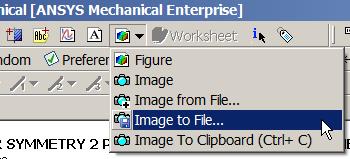
      If so, you can use the Image to File button.


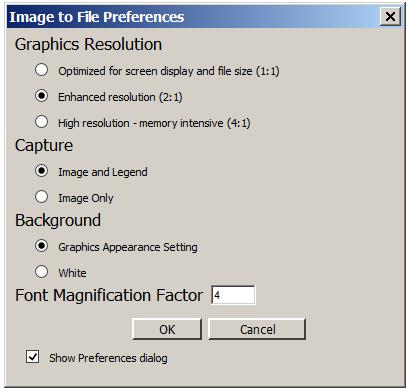
      Then type a Font Magnification Factor. I typed in a 4 instead of a 1.


      You can also check to use a White Background here.


    • Sandeep Medikonda
      Ansys Employee

      Hi Muhammad,


      You can also write a simple macro such as:


      DS.Graphics.SetFontStyle( 0, 'Arial', 0, 0, 30, 0, 0 );


      DS.Graphics.SetFontStyle( 2, 'Arial', 0, 0, 30, 0, 0 );


      DS.Graphics.Redraw(1);


      Note that the default font size is 16 and here we are changing it to 30 using index 2.


      Lastly, You need to save this macro as a file named “SampleFont.js” in a convenient location. Then from within Mechanical: Tools> Run Macro > SampleFont.js.


      Hope this helps.


      Regards,


      Sandeep



    • Muhammed
      Subscriber

      Thank you so much guys. You saved my day!

    • Manasseh Victor
      Subscriber

      Can i change the font style from normal to Bond/underline/italic?

Viewing 4 reply threads
  • The topic ‘ANSYS Workbench Mechanical Legend Display’ is closed to new replies.
[bingo_chatbox]