Ansys Assistant will be unavailable on the Learning Forum starting January 30. An upgraded version is coming soon. We apologize for any inconvenience and appreciate your patience. Stay tuned for updates.
Ansys Free Student Software

Ansys Free Student Software

Topics cover installation and configuration of our free student products.

ANSYS STUDENT 2022 R2 WINDOWS 11 UNKNOW ERROR

    • turca petrica
      Subscriber

      Good day gents,

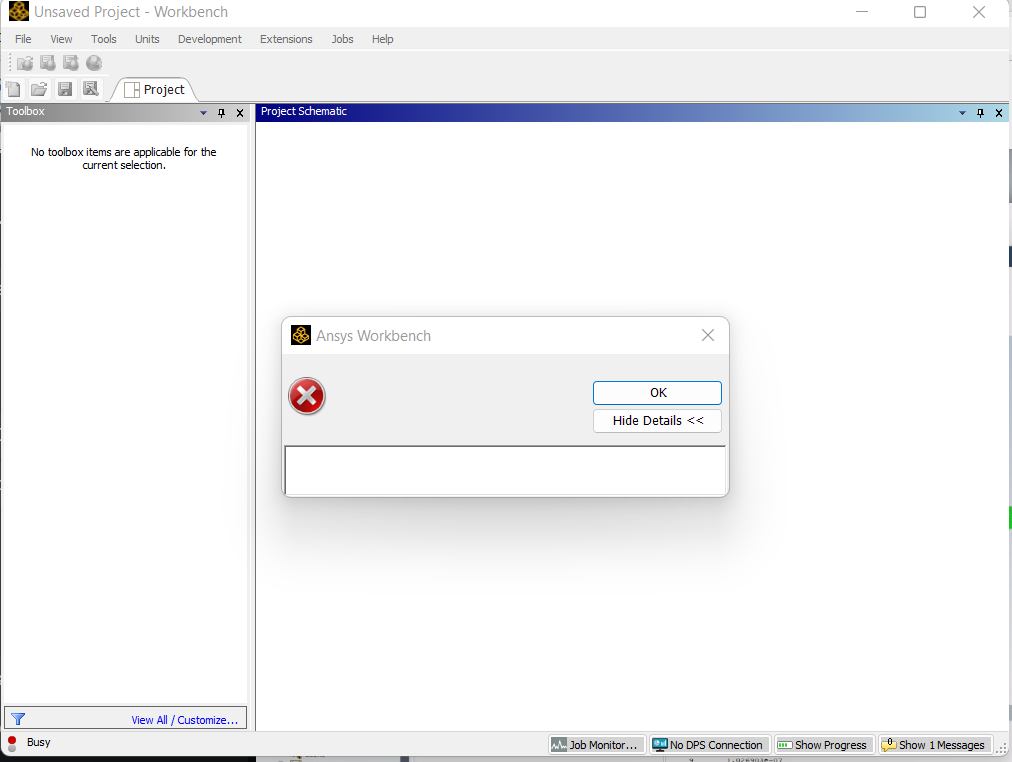
      I have a problem after installation of ANSYS STUDENT 2022 R2 on my WINDOWS 11.

      Issue looks like that in the picture : Is an error without any message and when i look in the license folder,i believe some files missing.

      Please give me a solution to fix it cause i need it for Master degree courses.

      Best regards,

    • George Karnos
      Ansys Employee

      When you installed, did you right-click on setup.exe and choose "more->run as administrator" ?
      under C:\Program Files\ANSYS Inc\ANSYS Student There should be an install.log file and maybe a an install.err file. Do those shpow any errors?
      If you did not right-click run as administrator, try uninstalling and reinstalling.
      Also, check visrus scanning and firewalls for any blocking going on.

    • turca petrica
      Subscriber

      Hi George,

      Thanks for the answer ! I stop firewall and antivirus plus also give permission to install as Administrator, still have the same problem.

      Also i check the installation Log and all i can see wrong in there is this : Discovery workbench plugin in ... Not Configured . 

      Any other suggestion will be welcome !


      Best regards,

    • abdo magdy
      Subscriber
      Have you found a solution for this , I'm facing the same problem now
    • Ahmad Imad Abdel Aziz
      Subscriber

      I have the same issue, how to resolve this inconvenience? 

Viewing 4 reply threads
  • The topic ‘ANSYS STUDENT 2022 R2 WINDOWS 11 UNKNOW ERROR’ is closed to new replies.
[bingo_chatbox]