Ansys Assistant will be unavailable on the Learning Forum starting January 30. An upgraded version is coming soon. We apologize for any inconvenience and appreciate your patience. Stay tuned for updates.
3D Design

3D Design

Topics related to Ansys Discovery and Ansys SpaceClaim.

Ansys Meshing(issue in topology/sharing?)

    • anuragparth24
      Subscriber

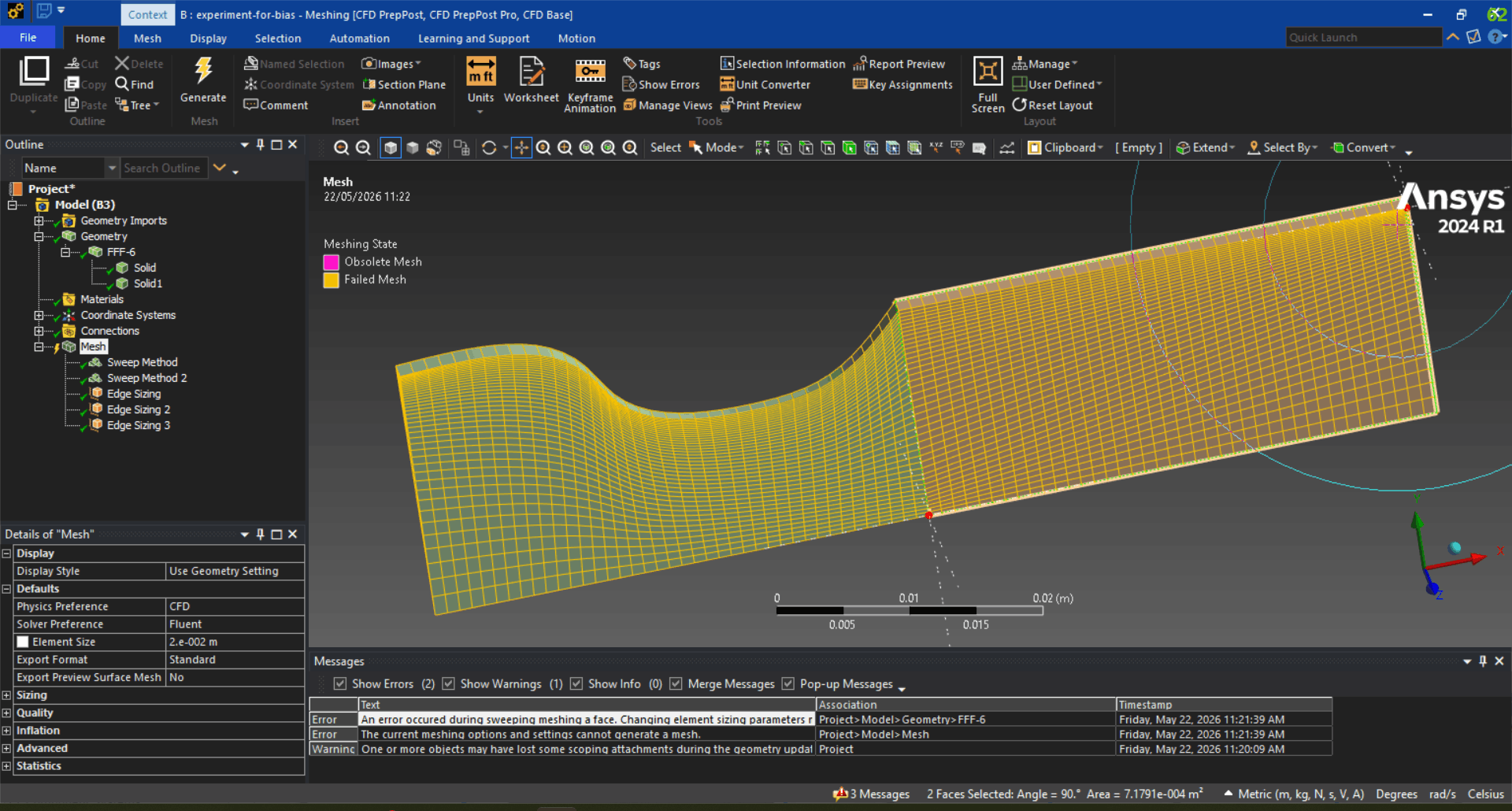
      I have a body, i divided it in two part. First i do not share/force share the bodies but I get a non-conformal mesh. Seocnd I share the topology, i get a confromal mesh but it is a failed mesh (yellow color) . I dont know how to proceed or what to change in geometry. In the image below, it shows problematic geometry, which i dont understand like why it is problematic what is the cause. I would like to know the the solution or suggestions Thanking you

    • peteroznewman
      Subscriber

      In SpaceClaim, under the Repair tab, use the Extra Edges button and then the Spit Edges button to clean up the geometry.  On the Workbench tab, you might need to use the Share button again.

      In Workbench, suppress all the mesh controls, but use a reasonable value for the Default Element Size and try meshing with no additional controls.  Does that mesh with Hex elements or Tet elements?  If it meshes with Tet elements, clear generated data and unsuppress a single Sweep mesh control for the rectangular body.  Right click on that body and Generate Mesh on Selected Body.  If that meshes cleanly, then Generate Mesh to mesh the second body.  If that gives you a valid mesh, now you can selectively unsuppress the edge sizing mesh controls to get the element sizes you want.


    • anuragparth24
      Subscriber

      In spaceclaim no extra edges and split edges were found. After this I shared the geometry again in workbench tab.
      In meshing without any controls valid mesh is generated(hexa elements). 
      I am only getting a valid mesh if generate the mesh individually for all the bodies not when i generate the mesh at once all together.
      is the mesh generated by individually selected body work fine, if i export it in openfoam?  

    • peteroznewman
      Subscriber

      A mesh generated one body at a time is fine. You can export the mesh with a full license, but not with the Student license.

    • anuragparth24
      Subscriber

      Yes It is working, may I ask the reason, why it is working when generated individually not when I click on generate button, related to processing power or something else ?  

    • peteroznewman
      Subscriber

      The reason is you are giving the mesher a simpler task when you tell it to mesh one body at a time.

    • anuragparth24
      Subscriber

      okay, thanks for all the help. 

Viewing 6 reply threads
  • You must be logged in to reply to this topic.
[bingo_chatbox]