TAGGED: 2d-meshing, ansys-meshing, curvature, edge-sizing, inflation-layer
-
-
January 30, 2025 at 9:21 am
e.bakhtyary
SubscriberHi,
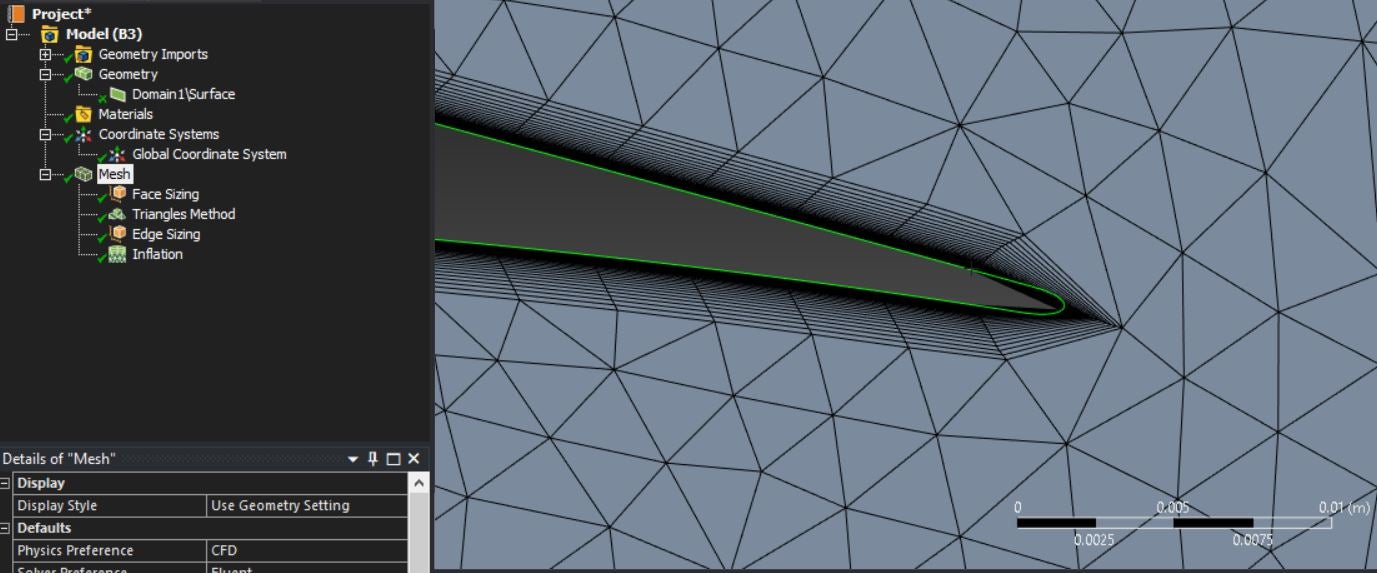
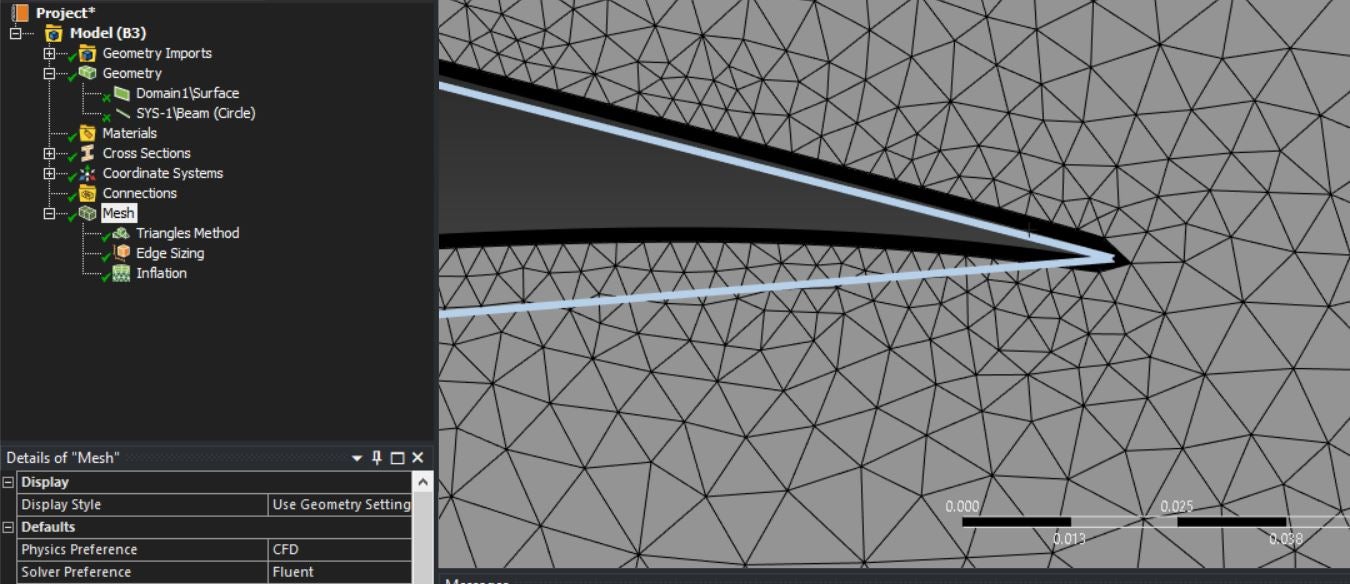
I'm doing an optimization problem over a 2D airfoil. Ansys Meshing cannot capture curvature over the blade (especially at the trailing edge) when the geometry is imported from SpaceClaim. I've also tried to convert the airfoil curve to a beam but the problem persists. I've attached the images in the following:
Before converting the airfoil to a beam:
After converting:
Â
Note that when the geometry is imported from DesignModeler with the same settings, there is no problem at all. However, I've no idea about DM scripting, and scripting in SpaceClaim is more friendly.Â
The generated mesh from DM's geometry:
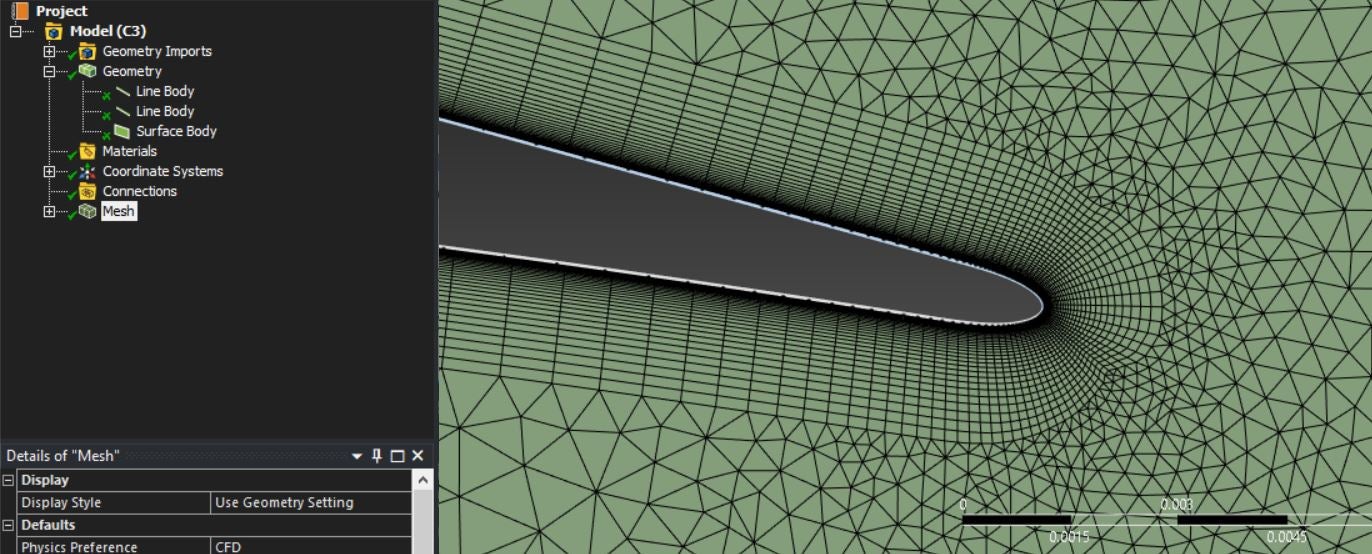
Â
Why is applying edge sizing in 2D problematic? is there any way?
Any help would be greatly appreciated.

-
January 30, 2025 at 9:29 am
Rob
Forum ModeratorWhat edge sizing did you set? Size functions?
-
January 30, 2025 at 9:53 am
e.bakhtyary
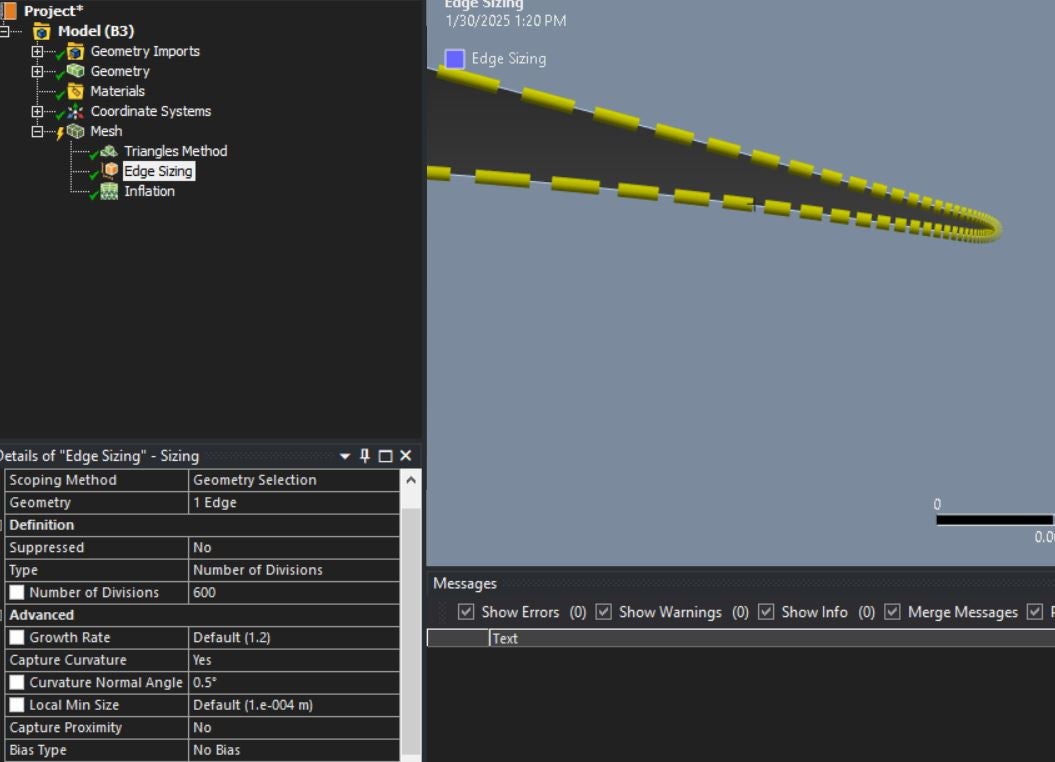
SubscriberNo, I didn't use any size function. I added a sizing and then clicked on the airfoil curve. Then, I set the settings. I also defined the minimum size for the curvature as 0.0001 for both global mesh settings and the edge sizing curvature setting (also, defeature size = 1e-5):
Â
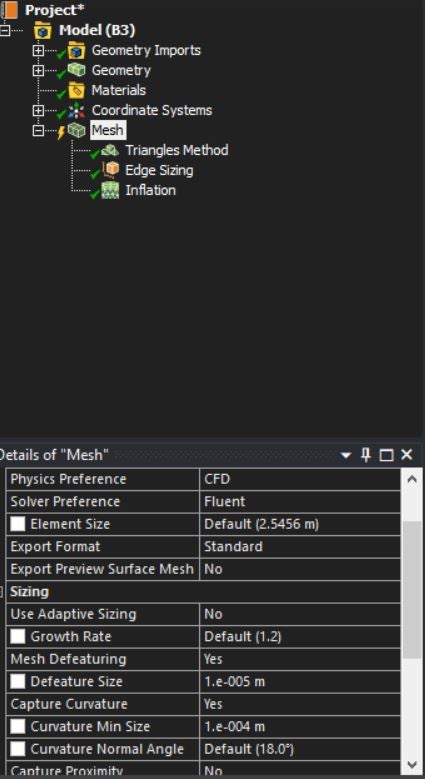
Global mesh setup:
Â
Thanks for your help in advance.
-
-
January 30, 2025 at 10:25 am
Rob
Forum ModeratorDrop the surface curvature angle to something lower than 18 degrees, otherwise you may be creating a conflict in the settings. I use edge sizing very rarely, most meshes are built with size functions only.Â
-
January 30, 2025 at 10:34 am
e.bakhtyary
SubscriberThanks for your help.Â
I've just done that (curvature normal angle = 0.5 deg for both settings), and nothing changes. I don't know what SpaceClaim does to the geometry, that DM doesn't, which creates this problem!
By size functions, do you mean adaptive sizing? Since, I cannot find any function settings in the mesh configuration tab.
-
-
January 30, 2025 at 11:26 am
Rob
Forum ModeratorCurvature size function. Why would you convert an airfoil to a beam? Can you double check you have a curve there and it's not been faceted to very short straight line.Â
-
January 30, 2025 at 11:36 am
e.bakhtyary
SubscriberBcz the SpaceClaim omits the airfoil curve when sending the geometry to meshing bloc, but DM keep the line "parts", so I thought if I can keep the airoil as a line body (which is possible through converting it into a beam) , it may result in a similar mesh to that from DM (image presented at the above).
How can I apply size func for a curvature setup?
Tnx a lot.
-
January 30, 2025 at 11:39 am
Rob
Forum ModeratorHmm, I'll check that with the Discovery team - what happens in Discovery Geometry? Â
I think you turn on adaptive size functions, I've not used Workbench Meshing recently so am a little rusty. There are tutorials in the Meshing Help section which should cover that too.Â
-
January 30, 2025 at 11:55 am
e.bakhtyary
SubscriberThanks for your help. No, I didn't turn on adaptive meshing. One can use either adaptive sizing or capture curvature setup. Using both in tandem is not possible in meshing as far as I know. BTW, I don't need adaptive sizing, I just want to apply inflation and a proper sizing to the airfoil, and keep the other settings as default...that's it.
All the best.
-
January 30, 2025 at 2:16 pm
Rob
Forum ModeratorWhich version are you using, and where did the curves come from (ie created in the tool or imported)?Â
-
January 30, 2025 at 2:26 pm
e.bakhtyary
SubscriberVersion: 2024 R1
The airfoil curve is imported in both SpaceClaim and DesignModeler, but DM keeps the curve as a "Line Body" part, and SpaceClaim doesn't keep it, so in Ansys Meshing only a single surface exists in the geometry tree. Even though I tried to keep the airfoil curve as a beam to make the geometry similar to that of DM, it didn't make any difference. I've uploaded their images in the question body.
Tnx for your help.
-
January 30, 2025 at 2:42 pm
Rob
Forum ModeratorA beam means something for Mechanical so don't use that. DM has a line body, but again that shouldn't do anything in Meshing, and shouldn't connect to the surface: Meshing for CFD works on the surface only.Â
Â
-
January 30, 2025 at 2:50 pm
e.bakhtyary
SubscriberOk, thanks for your reply. I will not create a beam again, but any ideas what should I do now for capturing the curvature? As you can see, Meshing couldn't create a decent mesh around the trailing edge for the geometry coming from SpaceClaim...
Tnx a lot
-
-
January 30, 2025 at 2:56 pm
Rob
Forum ModeratorTry Discovery in 25R1. What format did you export from the CAD tool?Â
-
January 30, 2025 at 3:02 pm
e.bakhtyary
SubscriberWill do. The computational domain is a C-type grid around the airfoil, which was firstly created in ICEM and then imported in SpaceClaim in the *.igs format. The airfoil curve is imported using a *.txt file (polyline = true, and there is no gap in the airfoil curve).
Thanks for your time.
-
January 30, 2025 at 3:07 pm
Rob
Forum ModeratorRight..... You've likely fallen foul of CAD reader effects. DM is parasolid based, SpaceClaim was ACIS.Â
-
January 30, 2025 at 3:14 pm
e.bakhtyary
SubscriberOh, thanks for the details and your useful information.Â
I will try switching into Discovery.
Best
-
- You must be logged in to reply to this topic.
-
5969
-
1906
-
1420
-
1307
-
1021
© 2026 Copyright ANSYS, Inc. All rights reserved.