-
-
August 27, 2020 at 10:51 pm
albuspotter
SubscriberHello everyone! I am running Ansys 2020R1 student version. I am having issues with running Ansys APDL software.
Recently I changed the user name in my pc.
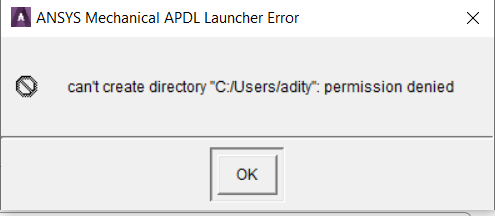
Now I'm getting an error whenever I open ANSYS Mechanical APDL on both the versions. Rest all the programmes like Workbench are working fine.
"can't create directory error "C/Users/
"permission Denied" I tried this steps but still couldn't resolve the issue...
1) Uninstalling and reinstalling the packages...
2) Completely cleaning all ANSYS based registries in regedit and installing again.
I have attached the snips of the error. My new username is 'Aditya" instead of 'adity' and the path is "C:/Users/Aditya".
August 28, 2020 at 11:09 pmtsiriaks
Ansys EmployeeSorry. ANSYS employees are not allowed to download attachment or click external links. Could you post the images inline with text ?nPlease also provide the output of the 'set' commandnThe issue is very likely that you didn't migrate the entire account to the new username, so some part is still pointing to your old account (which APDL happens to use)nViewing 1 reply thread- The topic ‘ANSYS Mechanical APDL installation problem : can’t create directory C:/Users/username’ is closed to new replies.
Innovation Space Trending discussions
 Top Contributors
-
peteroznewman
 6650
6650 -
scabo
 1906
1906 -
Dennis Chen
 1469
1469 -
javat33489
 1312
1312 -
Shyam Prasad V Atri
1022
Top Rated Tags
© 2026 Copyright ANSYS, Inc. All rights reserved.
Ansys does not support the usage of unauthorized Ansys software. Please visit www.ansys.com to obtain an official distribution.
-


The Ansys Learning Forum is a public forum. You are prohibited from providing (i) information that is confidential to You, your employer, or any third party, (ii) Personal Data or individually identifiable health information, (iii) any information that is U.S. Government Classified, Controlled Unclassified Information, International Traffic in Arms Regulators (ITAR) or Export Administration Regulators (EAR) controlled or otherwise have been determined by the United States Government or by a foreign government to require protection against unauthorized disclosure for reasons of national security, or (iv) topics or information restricted by the People's Republic of China data protection and privacy laws.

 You are navigating away from the AIS Discovery experience