-
-
April 18, 2020 at 11:26 am
Verena2
SubscriberHello,Â
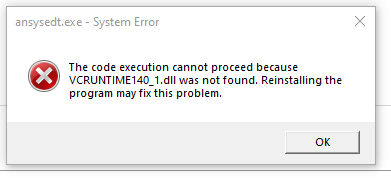
I installed the Ansys student version 2020 R1 and when I start Workbench I get following error:
The execution of the code could not be continued as VCRUNTIME140_1.dll can not be found. This problem can probably be solved through a new installation.
I already tried installing it new 2 times now but without success.
Can anyone help me, please?
I also included photos of the error file.
-
April 23, 2020 at 6:48 pm
tsiriaks
Ansys EmployeePlease include images inline with text as ANSYS employees are not allowed to download attachment.
As for this issue, try manually install ALL of the prerequisites from under (default) C:Program FilesANSYS IncANSYS Studentv201prereq , except those that have 'MPI' and 'opencl' in the name. Make sure they are all successful.
If that doesn't help, try re-order your Path environment variable so that C:WINDOWSsystem32;C:WINDOWS;C:WINDOWSSystem32Wbem;… entries are in front of everything else.
-
May 12, 2020 at 12:30 pm
qyc9262
SubscriberI had the exact same problem as shown above and I had done both recommended step but both of them didnt work. What else should I do? Thank you.
Â
Â
Â
-
May 14, 2020 at 1:12 am
tsiriaks
Ansys EmployeePost screenshots of the error inline with text.
Also, enter the following command
set
in CMD Prompt and post its output here
-
February 16, 2021 at 2:43 am
-
- The topic ‘Ansys can’t find vcruntime140_1.dll and won’t start (student version)’ is closed to new replies.

-
6750
-
1906
-
1484
-
1324
-
1087
© 2026 Copyright ANSYS, Inc. All rights reserved.