Fluids

Fluids

Topics related to Fluent, CFX, Turbogrid and more.

How to monitor variables in a specfic region (a problem with Report Monitor)

    • ZX
      Subscriber

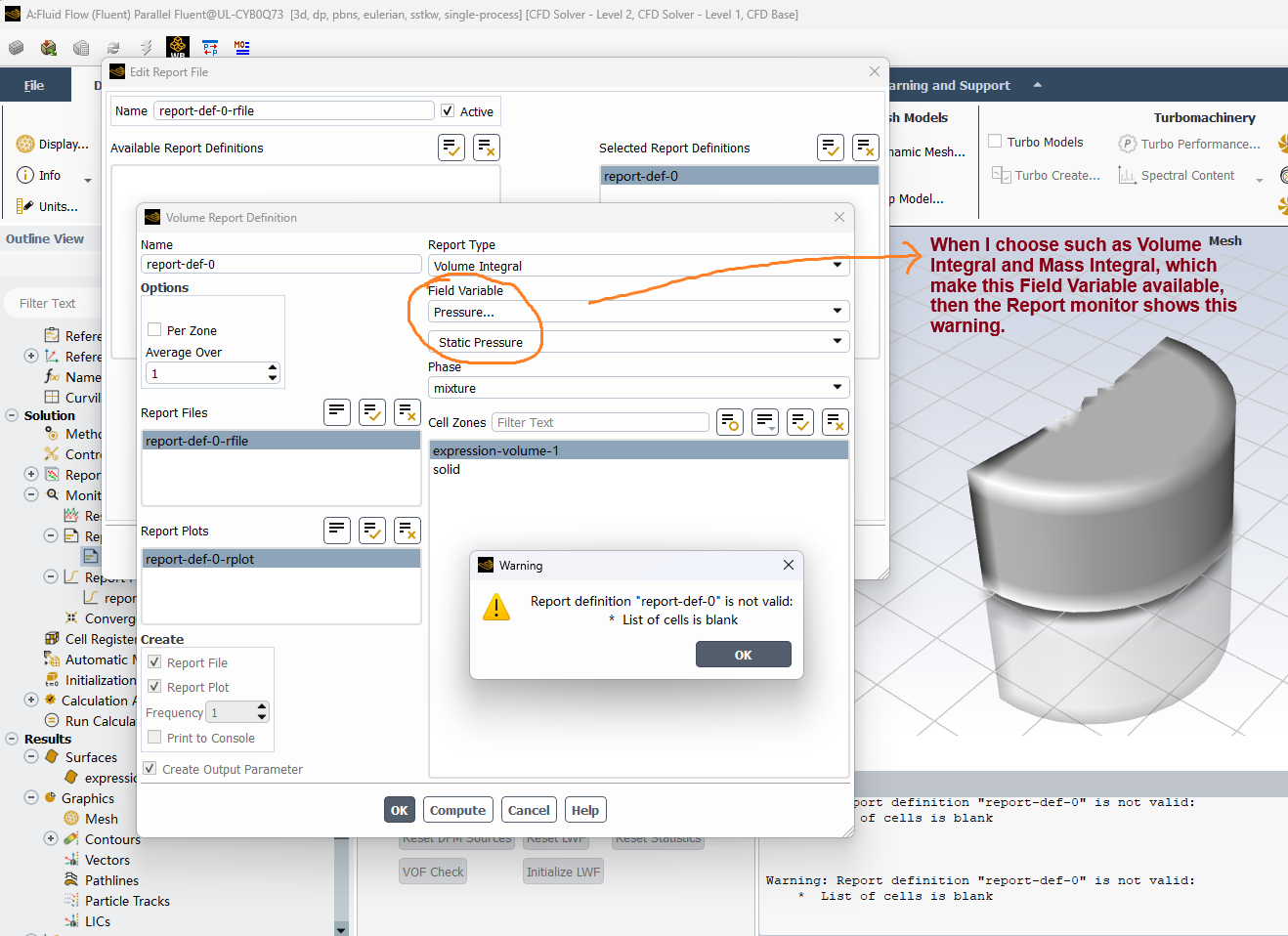
      Hi, I am trying to create a Report to monitor some variables (such as velocity) in a specifc region of the whole fluid domain, as shown in the image, which is a part of a clinder. 

      Now, when I use 'Cell Register' or 'Expression-Volume' to create such a part, to use the Report to mointor the variables in this part, it shows Warning: Report definition "report-def-0" is not valid: List of cells is blank. However, as the image shows, I have already selected the part (expression-volume-1) and the part can be displayed in the window. 

      By contrast, if I select the whole fluid domian (the clinder named as solid in the image), then there is no issues of the Report monitor. Furthermore, for the Report type, when I choose such as Volume Integral and Mass Integral, which make the Field Variable available, then the Report monitor shows this warning, but if I choose like Volume and Mass, which make the Field Variable unavailable, then there is no issues.

      So can anyone please help with this? If this approach does not work, then how should I monitor the variables in a specfic region?

      Thanks in advance.


    • Rob
      Forum Moderator

      Which solver version are you using and have you initialised the flow? As it's a warning what happens when you try and solve? 

      • ZX
        Subscriber

        Hi Rob, thank you for your reply. 

        I am using Ansys Fluent 2025R2, but the same warning happens in 2025R1, and yes I have initilized the flow. If I ignore the warning and run the simulation, then the Report monitor fails to show itself, I can not get data from the Report monitor.

        Could you please let me know if I can use UDF to obtain the variables in a specific region? If yes, which UDF can be used for this? Thank you very much.

    • Rob
      Forum Moderator

      You can use UDFs for anything, but I don't have an example, and I can't share code on the Forum anyway. If the monitor region is fixed use Mesh Separate (ribbon in Fluent) to split the zone of interest. As it's then a separate fluid zone the normal reporting functions are applicable. 

      There were problems reporting on registers in older versions of Fluent, but those should have been resolved. I'll check, but that may be in January. 

      • ZX
        Subscriber

        Hi Rob, thank you very much. I will try these approaches. 

    • Rob
      Forum Moderator

      OK, you can use a Volume Integral from the Ribbon to report on the registers. However, the Report Definitions don't see the registers for some reason so can't use the approach for monitors. 

      • ZX
        Subscriber


        Thank you very much. For the Volume Integral from the Ribbon to report on the registers, could you please let me know if this is the Volume Intergral  in the Results ribbon? Where I can check the Volume Integral after the simualtion is done, but can not use Report Definition to monitor during the simulation? 


Viewing 3 reply threads
  • You must be logged in to reply to this topic.










