-
-
January 22, 2020 at 4:35 pm
xiaojiangyou
SubscriberCan anyone help me with the 2D mesh in ANSYS mechanical?
I created a surface with SpaceClaim and changed the analysis type to 2D.Â
I then opened the model and tried to mesh the surface. However, after generating the mesh, the surface becomes a very long pillar (as shown in the attached figure. Only the face marked out in red is the original surface that I want to deal with.)
Â
Any suggestions would be appreciated!
Â
XiaojiangyouÂ
-
January 23, 2020 at 1:18 am
peteroznewman
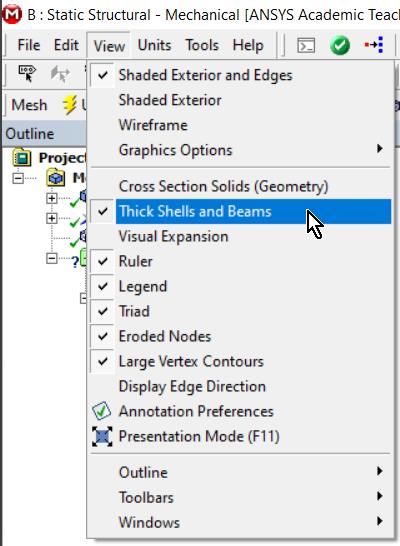
SubscriberThe 2D elements are displayed with Thick Shells turned on. You can turn that off, or just square up the view and you won't see it.
-
January 24, 2020 at 2:57 pm
xiaojiangyou
SubscriberWould you mind showing me where is the Thick Shells? I really appreciate it.
-
January 25, 2020 at 1:08 am
-
January 26, 2020 at 12:12 am
xiaojiangyou
SubscriberThanks!!
-
February 2, 2020 at 9:28 pm
Neda2Jar
SubscriberI need some help with my research, pleaseÂ
it about analysis the performance of green facade using ANSYS Fluent, in 2D As porous mediumÂ
my problem is how to set the option for porous mediumÂ
-
February 3, 2020 at 1:27 am
peteroznewman
SubscriberNeda2Jar, you asked this question in this discussion. That is the right place to ask. Please don't ask it a second time in a second discussion. That wastes people's time.
-
- The topic ‘2D meshing in ANSYS mechanical’ is closed to new replies.
-
5274
-
1859
-
1398
-
1257
-
1021
© 2026 Copyright ANSYS, Inc. All rights reserved.