-
-
September 22, 2020 at 8:27 am
Stat
SubscriberHi everyone,nI am performing an analysis with multiple steps and I want to calculate the fatigue life of the model when only the load of the last step is applied as cyclic loading.nI have been told that I can do that by using tabular data. However I was not able to find where do I define the tabular data.nCan anyone help me with that? n -
September 22, 2020 at 9:05 am
Stat
SubscriberIn addition, will the program calculate the fatigue life of the model due to cyclic loading implemented on the last step by default? n -
September 22, 2020 at 3:09 pm
danielshaw
Ansys EmployeeFor Constant Amplitude, Proportional loading (r-ratio) or Non-Constant Amplitude Proportional loading (e.g., history data), the Mechanical Fatigue Tool will use whatever result set that you specify (in Details Window). By default, the last result set is specified.n -
September 23, 2020 at 12:36 pm
Stat
SubscriberI appreciate the answer!n -
September 23, 2020 at 3:13 pm
Stat
SubscriberAt the Display Time tabs in Definition I understand that I can set the ending time of the cyclic loading, but always the starting time is at 0 sec. How can I define the starting time to be at the 4th sec, since my cyclic loading is implemented at the 4th till the 5th sec.n
n
-
September 23, 2020 at 6:00 pm
danielshaw
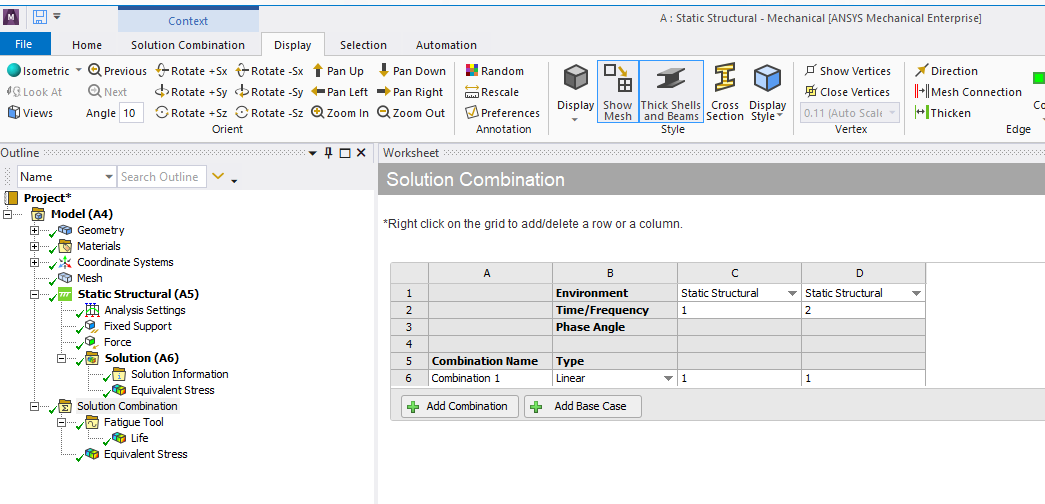
Ansys EmployeeThe Fatigue Tool (FT) just uses the FE results from the specified result set. In a static analysis, time does not have any physical meaning. It is just a counter. When you set the Display Time to be equal to 2 seconds, you are just telling the FT to use the FE results that are associated with a solution time of 2 seconds. nIf you want to examine the fatigue damage caused by cycling between result set 4 and result set 5, you need to do a Constant Amplitude, Proportional Loading analysis. You need to set up a Solution Combination that contains result set 4 and result set 5; and then place a FT under that Solution Combination. The FT will use the alternating stress between result set 4 and result 5 to determine the fatigue damage.n -
September 23, 2020 at 8:14 pm
Stat
SubscriberThank you for the answer once again!nDoes this has to be on a discrete analysis?n Do I have to export the remaining stresses from the previous steps and import them in a new analysis in order to perform the last step and calculate the fatigue damage?n -
September 28, 2020 at 6:15 pm
danielshaw
Ansys EmployeeI am not sure what you mean by a discrete analysis. You need to result sets from the same model. They can be 2 results from the same multi-step solution or they can be 2 result sets from separate solutions that share the same mesh.n -
September 29, 2020 at 7:49 pm
danielshaw
Ansys EmployeeI meant to say two results sets from the same model.n -
September 30, 2020 at 8:54 pm
Stat
SubscriberI understood what you mean and I appreciate your interest!nI am afraid that I do not know how to extract the 2 result sets that I am interested in, from the multi-step solution and how to prepare the simulation that will consider cycling loading between these two results sets.nn -
October 2, 2020 at 2:15 pm
-
Viewing 10 reply threads
- The topic ‘Fatigue tool for the last step of a multiple-step analysis’ is closed to new replies.

Innovation Space
Trending discussions
Top Contributors
-
6119
-
1906
-
1436
-
1308
-
1022
Top Rated Tags
© 2026 Copyright ANSYS, Inc. All rights reserved.
Ansys does not support the usage of unauthorized Ansys software. Please visit www.ansys.com to obtain an official distribution.