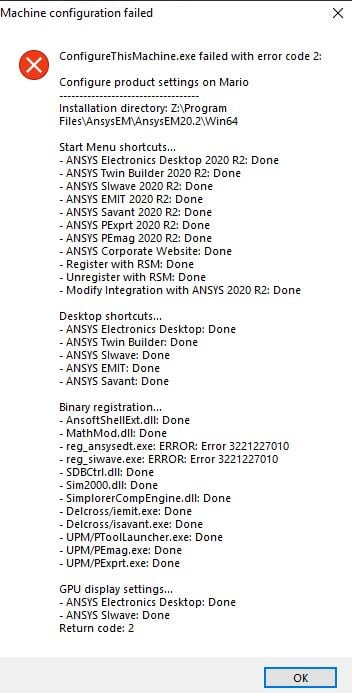
TAGGED: ansys-maxwell
-
-
September 9, 2020 at 8:05 pm
mario1996
SubscriberSeptember 9, 2020 at 8:09 pmANSYS_MMadore
Forum ModeratorHello Mario,nThis may be due to a Windows Update, patch KB4571756. We have had reports from several customers of this issue today. The suggestion at this time is to back-out the Windows Update KB4571756.nSeptember 10, 2020 at 8:49 amSubscriberI did not update windows to that patch, I'm still on the previous one.nSeptember 10, 2020 at 11:29 amForum ModeratorMario,nIs it possible Updates were automatically installed? Please try these steps to verify.nnTo uninstall the Windows update:n1. Select the start button or Windows Desktop Search and type update history and select View your Update history.n2. On the Settings/View update history dialog window, Select Uninstall Updates.n3. On the Installed Updates dialog window, find and select KB4571756, and then click the Uninstall button.n4. Restart your Windows device.nnThanksnSeptember 16, 2020 at 8:41 amthece
SubscriberSame problem. Uninstalling KB4571756 and restarting windows fixed it.nFreaking windows nSeptember 16, 2020 at 11:33 amVivek_Kushwaha
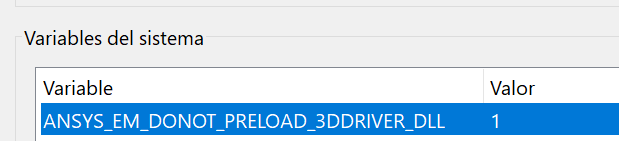
SubscriberI also faced same issue could you inform on this forum whenever windows patch the issue so that i can get the latest windows updates . nThank YounSeptember 16, 2020 at 12:12 pmForum ModeratorA recent Windows update, Microsoft update KB4571756, results in one of the Windows functions (DescribePixelFormat) crashing on startup. nnFor versions 2018.0 and newer, please try setting the environment variable ANSYS_EM_DONOT_PRELOAD_3DDRIVER_DLL=1 to get around the problem.nnFor guidance on creating an Environment Variable please refer to this link. You need to create a NEW Variable.nhttps://www.computerhope.com/issues/ch000549.htmnNew Variable Name: ANSYS_EM_DONOT_PRELOAD_3DDRIVER_DLLnNew Variable Value: 1nnSeptember 17, 2020 at 3:39 amyoussefaly97
SubscriberI am facing the same issue, however adding this ANSYS_EM_DONOT_PRELOAD_3DDRIVER_DLL=1 solves part of the problem, it gets SIwave to open the initializing/loading Window instead of just crashing without doing anything. I can confirm that by setting the value to 0 and trying again.nnUninstalling KB4571756 gives the same results as ANSYS_EM_DONOT_PRELOAD_3DDRIVER_DLL=1.nSeptember 17, 2020 at 12:24 pmForum Moderator- What is the issue you are encountering after setting the variable? Please provide details.nSeptember 18, 2020 at 1:43 amSubscriberThis only happens with SIwave, the rest of the suite open just fine.nnSIwave displays the initializing/loading window/screen for a few seconds, then a standard window opens that is just small enough for the close, maximize & minimize buttons. After a few seconds, both disappear and SIwave is no longer visible in the Task Manager.nIf the variable value is set to 0, or if I uninstall KB4571756, SIwave does not open any windows and is only visible in the Task Manager for a few seconds before it disappears.nCurrently running Windows 10 2004 with all updates installed.nI have attached a screenshot for clarity.nnSeptember 19, 2020 at 10:01 pmSubscriberSeptember 24, 2020 at 12:55 pmannyanich
Subscribern You said that this environment variable fix should solve the problem for versions 2018+ -- is there by any chance a fix in the works for version 2015 as well? Unfortunately, setting the environment variable did not help in my case with Ansys 2015. I had to uninstall KB4571756 in order to get it working again.nAll the best,nAnn YanichnSeptember 24, 2020 at 12:59 pmForum ModeratorVersion 2015 is no longer officially supported. The only option would be uninstalling the update.nOctober 1, 2020 at 3:03 pmtimlinNL
SubscriberFor those who has tried the above but no luck yet, please try the followings:nOpen up Command Prompt -> Run as AdministratornSend two commands to set the environment variablessetx ANSYS_EM_DONOT_PRELOAD_3DDRIVER_DLL 1nsetx ANSYS_EM_DONOT_PRELOAD_3DDRIVER_DLL 1 /mnnThis should work.nnTimnOctober 19, 2020 at 11:23 amedaakar
SubscriberI also had the same problem. I uninstalled the KB4571756 update and it worked. But when I turned the computer off and on again, the same problem happened again. What could be the reason?.Could you help?nOctober 19, 2020 at 11:35 amForum ModeratorDid you set the environment variable as suggested above? Your system is probably reinstalling the update KB4571756 automatically, which is why it happens again after reboot.nnThanks,nMattnOctober 19, 2020 at 1:17 pmSubscriberyes I have set it as examining the environment variable. But it didn't work.nOctober 19, 2020 at 1:19 pmForum ModeratorPlease run the set command from a Windows command prompt and send the full output. Omit the from the command.nnThanks,nMattnOctober 19, 2020 at 1:40 pmSubscriber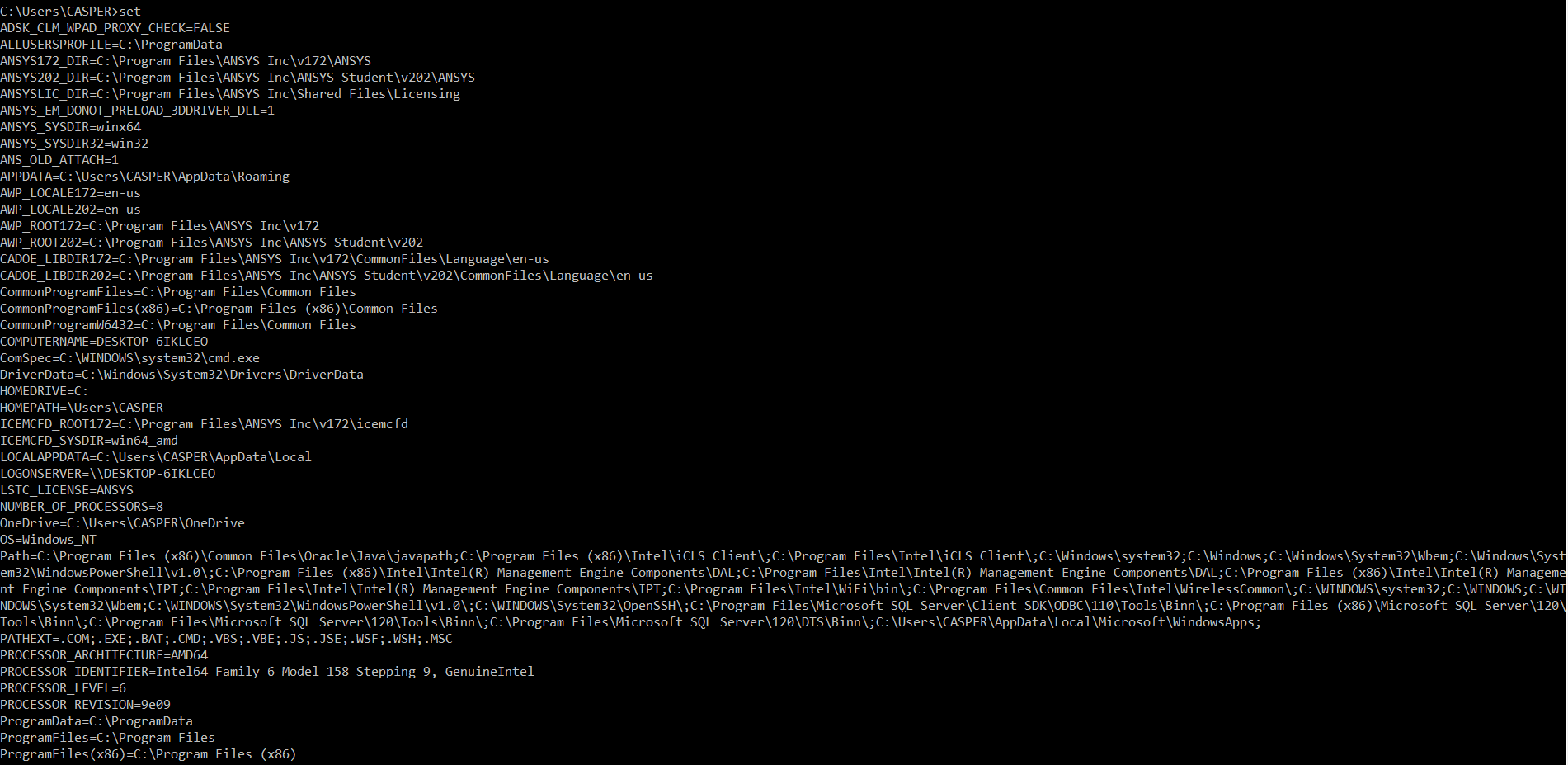
 n
October 19, 2020 at 1:55 pmForum ModeratorYou may try uninstalling update KB4571756.n nTo uninstall the Windows update:n1. Select the start button or Windows Desktop Search and type update history and select View your Update history.n2. On the Settings/View update history dialog window, Select Uninstall Updates.n3. On the Installed Updates dialog window, find and select KB4571756, and then click the Uninstall button.n4. Restart your Windows device.n nAdditionally, you may be able to run the following from an elevated CMD to uninstall the update:n wusa /uninstall /KB:4571756 /quiet /promptrestartnnOctober 19, 2020 at 2:59 pmSubscriberi removed this update. It does not appear in updates. What can I do?nnOctober 19, 2020 at 3:40 pmForum ModeratorCan you please confirm the issue that you are encountering? There are several issues that were mixed into this thread, so perhaps I am trying to resolve the wrong issue.nnThanksnMattnOctober 19, 2020 at 3:43 pmForum ModeratorArray Were you still experiencing problems with SIwave? If so, please try this.nn1. Close all siwave.exe processesn2. Using regedit, delete the HKEY_CURRENT_USER\SOFTWARE\Ansoft\SIwave\2017.0\Ansoft SIwave\BCGWorkspace registry keyn3. Launch SIwavennAs an alternative you can run:n
n
October 19, 2020 at 1:55 pmForum ModeratorYou may try uninstalling update KB4571756.n nTo uninstall the Windows update:n1. Select the start button or Windows Desktop Search and type update history and select View your Update history.n2. On the Settings/View update history dialog window, Select Uninstall Updates.n3. On the Installed Updates dialog window, find and select KB4571756, and then click the Uninstall button.n4. Restart your Windows device.n nAdditionally, you may be able to run the following from an elevated CMD to uninstall the update:n wusa /uninstall /KB:4571756 /quiet /promptrestartnnOctober 19, 2020 at 2:59 pmSubscriberi removed this update. It does not appear in updates. What can I do?nnOctober 19, 2020 at 3:40 pmForum ModeratorCan you please confirm the issue that you are encountering? There are several issues that were mixed into this thread, so perhaps I am trying to resolve the wrong issue.nnThanksnMattnOctober 19, 2020 at 3:43 pmForum ModeratorArray Were you still experiencing problems with SIwave? If so, please try this.nn1. Close all siwave.exe processesn2. Using regedit, delete the HKEY_CURRENT_USER\SOFTWARE\Ansoft\SIwave\2017.0\Ansoft SIwave\BCGWorkspace registry keyn3. Launch SIwavennAs an alternative you can run:n\siwave.exe -resetWorkspacesn October 19, 2020 at 4:33 pmpierpaolosquadrito
SubscriberHi, I'm Pierpaolo from Sicilsat Communications, I'm contacting you because I have on my workstation the same issue with error 3221227010 on reg_ansysedt.exe, running ConfigureThisMachine.exe. I have this problem running Ansys Electronics Desktop ( Ansys 2017.2).nI follow the instructions creating a new environment variable but it doesn't work. nCan you please help me ?.Thanks in advancen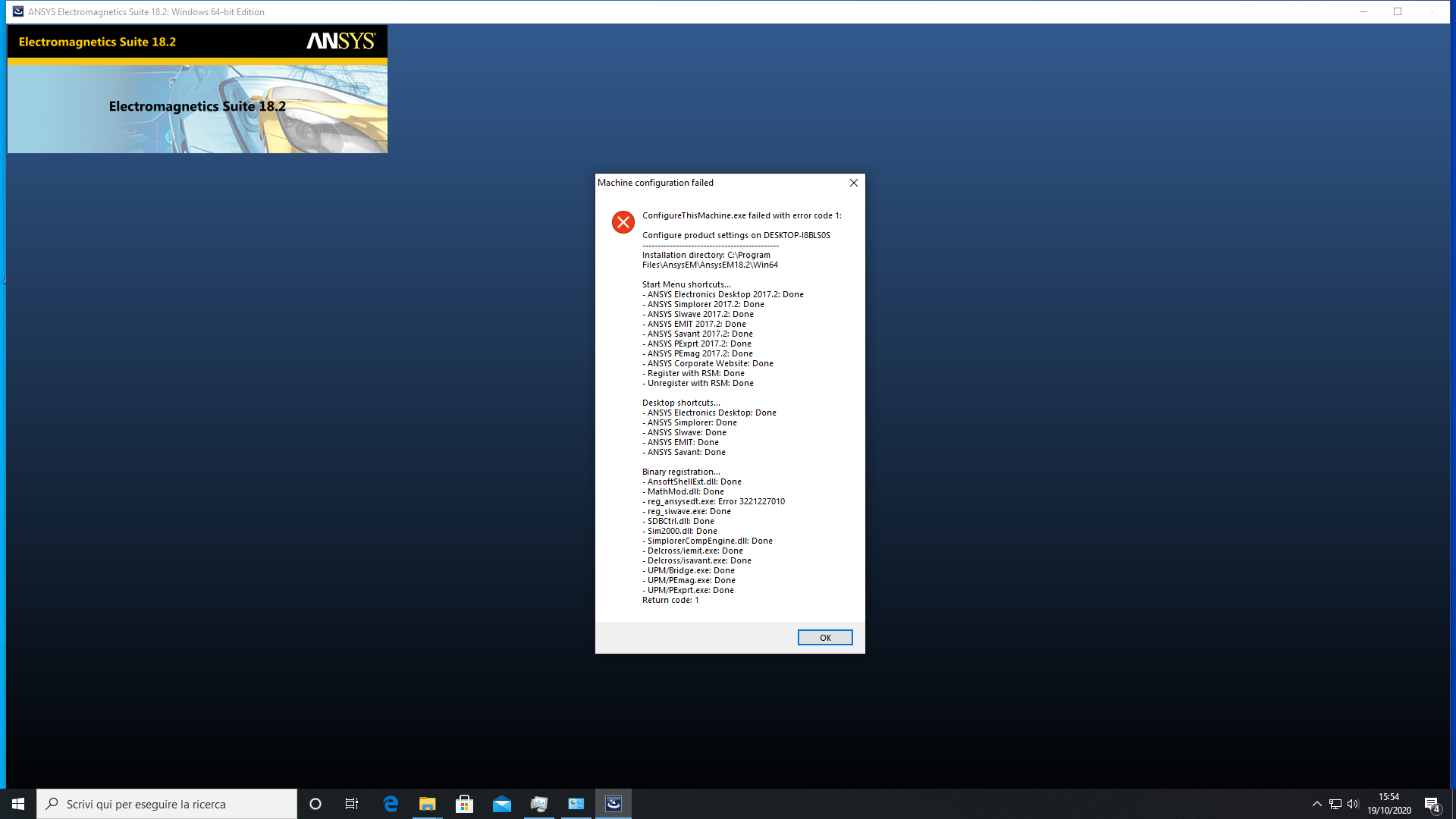 n
October 19, 2020 at 4:35 pmForum ModeratorThis fix is only supported with versions 2018.0 and newer. You will either need to uninstall the Windows Update or update to a new version of Ansys EM.nOctober 19, 2020 at 5:01 pmSubscriberthe problem is that i dont have on my Windows 10 Pro this KB4571756, but the error is the same. Do you have any other suggestions? Because i cant upgrade the current version because i need to pay for a new one license for upgrade I guess. nOctober 23, 2020 at 8:41 pm
n
October 19, 2020 at 4:35 pmForum ModeratorThis fix is only supported with versions 2018.0 and newer. You will either need to uninstall the Windows Update or update to a new version of Ansys EM.nOctober 19, 2020 at 5:01 pmSubscriberthe problem is that i dont have on my Windows 10 Pro this KB4571756, but the error is the same. Do you have any other suggestions? Because i cant upgrade the current version because i need to pay for a new one license for upgrade I guess. nOctober 23, 2020 at 8:41 pmDavidE_Qili
SubscriberSame problem here and no windows update by that name appears. Also tried with the environment variable thing.n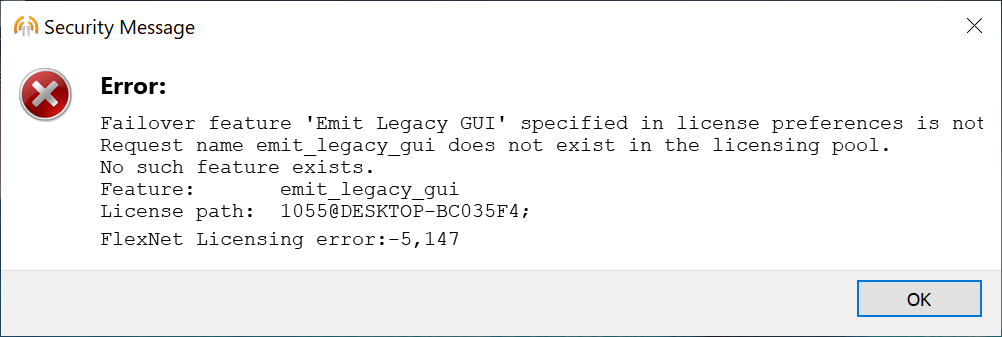
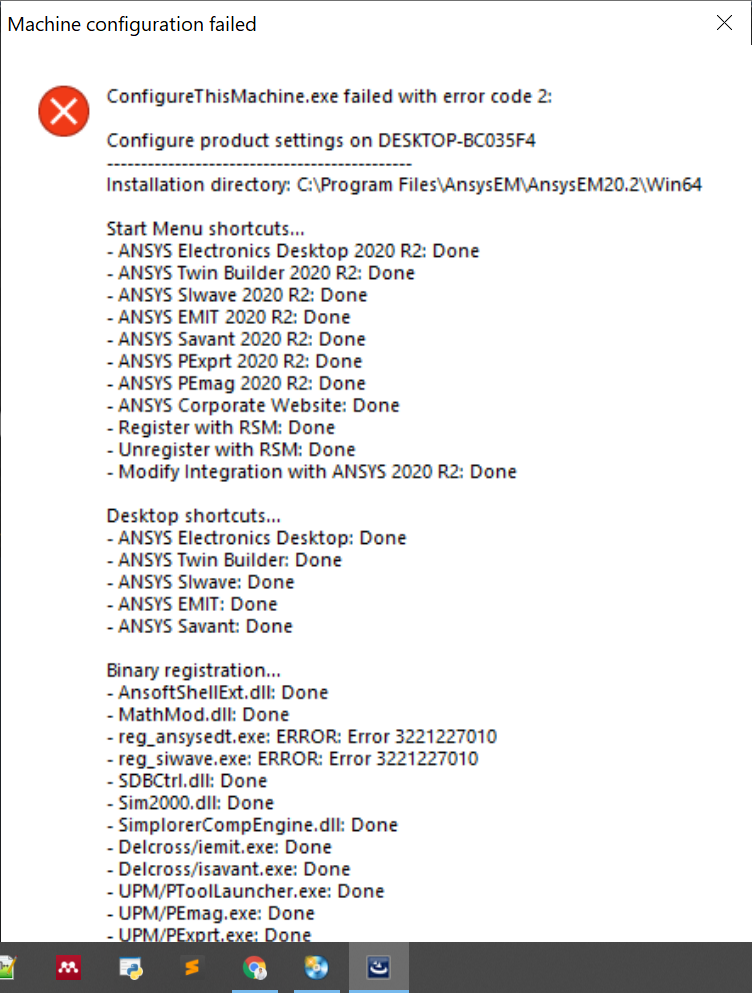
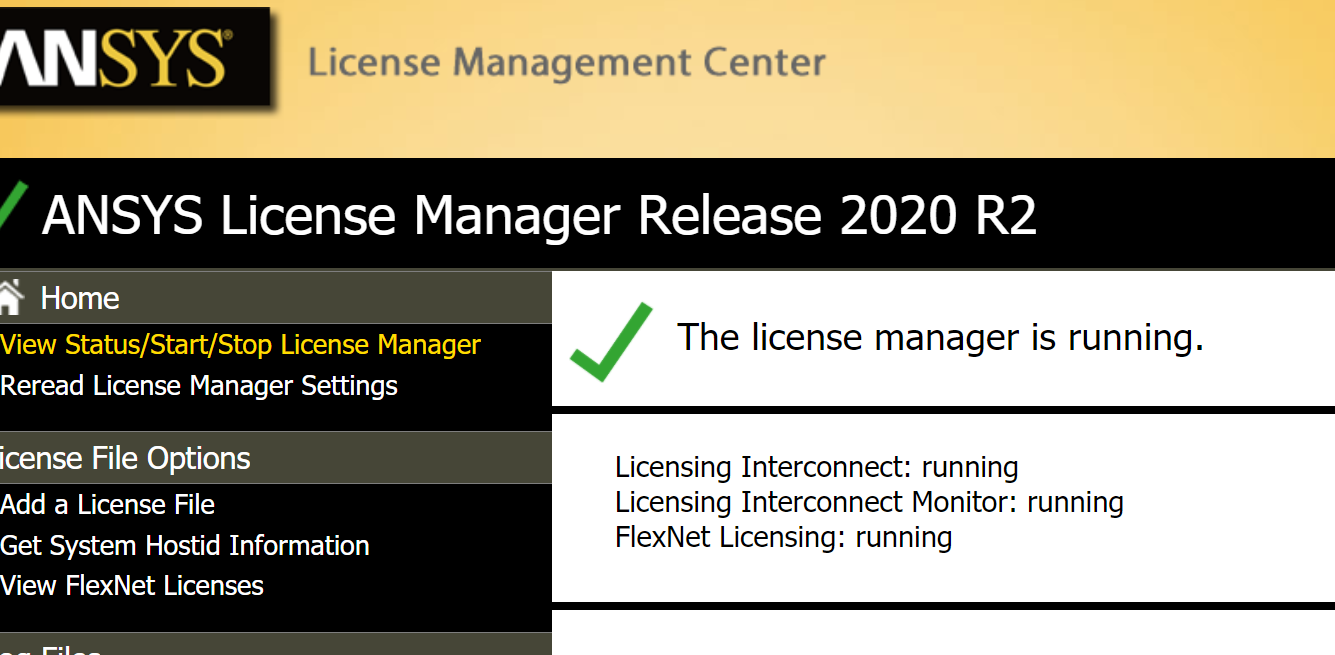
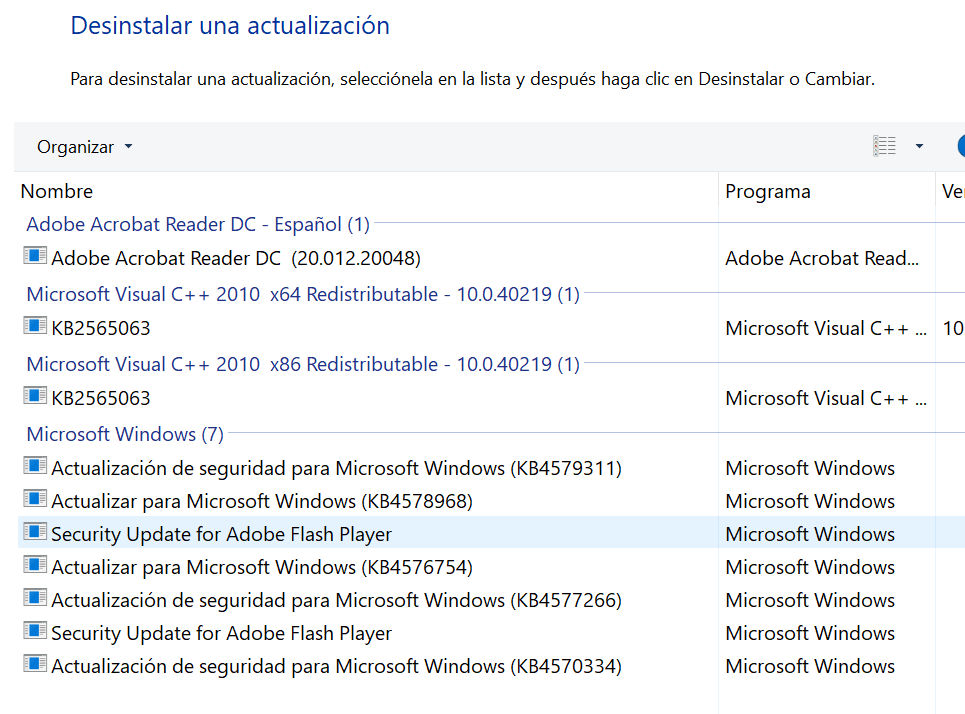
 October 26, 2020 at 12:06 pmForum ModeratorCould you please try removing KB4579311 as this seems to be potentially causing issues as well.nnRegarding the license error, that is normal as you likely do not have a license for the standalone Emit.nDecember 2, 2020 at 9:37 pm
redant
SubscriberThe KB4579311 not causing issues. I found that the win 10 version should be not later than 19041.450. It easy to check by launch winver command in searchbox. nHere the list of problematic KBs:nKB4576478nKB4571756nSo, you should keep next KBs configuration in Microsoft Windows update:nKB4580419nKB4566782nKB4570334nKB4586781nKB4586864nSome KBs hides after another KBs. You should remove as much as possible KBs and hide the problematic KBs by wushowhide.diagcab, but more stable is to downgrade win 10 to 19041.450 build and do not update.nnAntoDecember 4, 2020 at 12:34 amsummerdumas
SubscriberThe computer that I am on is new and does not have the KBs mentioned above (see below). This makes uninstalling those KBs difficult and reverting is also a challenge. How does one downgrade to a previous build? My googling has me going in circles. n n
December 4, 2020 at 7:06 amSubscriberHello summerdumas,nThe worse way is to install win 10 build not later 19041.450 without automatic updates (just to google win 10 distributive in WWW). Because after that build the update that causing error are in win10 distributive and you cannot uninstall it. nIf the first install was windows 10 build early 19041.450 then just uninstall KBs while ANSYS start work. Note: Not every KBs have uninstall button. It easy to solve. After uninstall KB refresh the Installed Updates window. Can be appears a previous KB update (Hiding KB updates).nFor uninstall such KB you need:ngo to C:\Windows\servicing\Packages.nFind KB file like as Package_for_KB4586864~31bf3856ad364e35~amd64~~19041.621.1.0.mum Where KB4586864 is number of interested KB and extension should be .mumnNote that: The file should be start from Package_for_KB... like that. There packages with numbers it not need.nOpen this file in NotepadnFind the words permanence=permanent and change the word permanent on removable.nsave and refresh installed updates window.nThen you can uninstall this KBnFor reference to google words uninstall uninstallable windows updates or https://borncity.com/win/2016/10/21/windows-updates-fehlende-deinstallation-erzwingen/nBest Regards nAnton LukyanovnDecember 4, 2020 at 7:32 amSubscribernDecember 4, 2020 at 12:37 pmForum ModeratorWhat issue are you seeing? Did you encounter errors with your ANSYS Electronics Installation? Please share screenshots.nDecember 4, 2020 at 1:05 pmForum ModeratorDid you try setting the environment variable as discussed in this thread?nDecember 10, 2020 at 5:03 amSubscriberand thank you both for your responses. My computer is in the lab and I won't be going back there for the time being due to the COVID stay at home order. I will try again when restrictions loosen up a bit. If I remember correctly, my errors were the same as DavidE_Qili's machine configuration failed message. Thank you again for responding. nJanuary 12, 2021 at 10:47 am
n
December 4, 2020 at 7:06 amSubscriberHello summerdumas,nThe worse way is to install win 10 build not later 19041.450 without automatic updates (just to google win 10 distributive in WWW). Because after that build the update that causing error are in win10 distributive and you cannot uninstall it. nIf the first install was windows 10 build early 19041.450 then just uninstall KBs while ANSYS start work. Note: Not every KBs have uninstall button. It easy to solve. After uninstall KB refresh the Installed Updates window. Can be appears a previous KB update (Hiding KB updates).nFor uninstall such KB you need:ngo to C:\Windows\servicing\Packages.nFind KB file like as Package_for_KB4586864~31bf3856ad364e35~amd64~~19041.621.1.0.mum Where KB4586864 is number of interested KB and extension should be .mumnNote that: The file should be start from Package_for_KB... like that. There packages with numbers it not need.nOpen this file in NotepadnFind the words permanence=permanent and change the word permanent on removable.nsave and refresh installed updates window.nThen you can uninstall this KBnFor reference to google words uninstall uninstallable windows updates or https://borncity.com/win/2016/10/21/windows-updates-fehlende-deinstallation-erzwingen/nBest Regards nAnton LukyanovnDecember 4, 2020 at 7:32 amSubscribernDecember 4, 2020 at 12:37 pmForum ModeratorWhat issue are you seeing? Did you encounter errors with your ANSYS Electronics Installation? Please share screenshots.nDecember 4, 2020 at 1:05 pmForum ModeratorDid you try setting the environment variable as discussed in this thread?nDecember 10, 2020 at 5:03 amSubscriberand thank you both for your responses. My computer is in the lab and I won't be going back there for the time being due to the COVID stay at home order. I will try again when restrictions loosen up a bit. If I remember correctly, my errors were the same as DavidE_Qili's machine configuration failed message. Thank you again for responding. nJanuary 12, 2021 at 10:47 amJagmohan
SubscriberHi,nWhat is the procedure to uninstall Ansys HFSS 2019R3 on CentOS 7?nThanks in advance!nJanuary 12, 2021 at 3:33 pmForum ModeratorYou can just delete the /AnsysEM/AnsysEM19.5 directory.nJanuary 22, 2021 at 5:54 pmSubscriberThank you , It worked!!nCan you please explain how to give a port excitation to an unground Coplanar waveguide?nIs it wave port or lumped port?nI have used both the combinations but they are not working.nThanks in advanced!nJanuary 22, 2021 at 5:56 pmForum ModeratorPlease post that query at /forum/categories/electronics.nnThank you,nMattnViewing 38 reply threads- The topic ‘Ansys Maxwell error 3221227010’ is closed to new replies.
Innovation Space Trending discussions
 Top Contributors
-
peteroznewman
 4612
4612 -
scabo
 1515
1515 -
Dennis Chen
 1386
1386 -
javat33489
 1209
1209 -
Shyam Prasad V Atri
1021
Top Rated Tags
© 2025 Copyright ANSYS, Inc. All rights reserved.
Ansys does not support the usage of unauthorized Ansys software. Please visit www.ansys.com to obtain an official distribution.
-


The Ansys Learning Forum is a public forum. You are prohibited from providing (i) information that is confidential to You, your employer, or any third party, (ii) Personal Data or individually identifiable health information, (iii) any information that is U.S. Government Classified, Controlled Unclassified Information, International Traffic in Arms Regulators (ITAR) or Export Administration Regulators (EAR) controlled or otherwise have been determined by the United States Government or by a foreign government to require protection against unauthorized disclosure for reasons of national security, or (iv) topics or information restricted by the People's Republic of China data protection and privacy laws.

 You are navigating away from the AIS Discovery experience