TAGGED: apdl-coding, spring-connections, static-structural, workbench
-
-
August 27, 2020 at 1:16 pm
AmbarNaik13
SubscriberIn my model, I have various clinched joints which are modeled using spring connections between the two plates. For each joining point there is a reference co-ordinate system, the origin of which is the center of clinched joint. There 3 spring connections defined; one in each major axis.nIn ANSYS, in the solution tree, the elastic force in spring connection can be checked using spring probe. However, it is a tedious task to check elastic force in 111 spring connections individually considering the evaluation. nIt would be nice if someone can suggest me an APDL commant in which I can retrieve these results all at once like in a row and column format. For eg. force in a spring connection (X-direction); along-with the name of the spring connection:n nSpring 1 xxx nSpring 2 xxxnnI am not an advanced user when it comes to scripting. It would be nice if somebody could provide me with a command. Thank you in advance.n -
August 28, 2020 at 12:57 pm
Ashish Khemka
Forum ModeratornnPlease refer the following link:nnYou can implemenet the same within a *do loop.nnRegards,nAshish Khemkan -
August 28, 2020 at 3:25 pm
JJ_Thompson
SubscriberHello, you can try the following:*dim,force_X,array,111,2 nesel,,ename,,COMBIN14 slencm,spring,elem n!now loop over all springs n*do,i,1,111, nCmsel,,springnnslen*GET,max_elem,ELEM,,NUM,MAXnesel,,elem,,max_elemnnslen*GET,REAL_NO,ELEM,max_elem,ATTR,REALncmsel,,springnesel,r,real,,REAL_NOnesel,r,ename,,combin14nnsleneslnnfsum,n*get,_FX,fsum,fxnforce_X(i,1)=real_nonforce_X(i,2)=_FXncmsel,,springnesel,u,real,,real_nonnslencm,spring,elemn*enddon*cfopen,FORCE_XX,txtn*vwrite,force_X(1,1),force_X(1,2)n%G %Gn*cfclosennYou should go to the mechanical folder where you work and find force_XX.txt. You can replace the spring real constant with the location of the spring and add two more columns to the table. I do not know what kind of spring you are using so you can modify the code for your use. -
August 29, 2020 at 11:27 am
AmbarNaik13
Subscriber@JJ_thompson Do I have to use this code as APDL command?n -
August 29, 2020 at 12:54 pm
JJ_Thompson
SubscriberYes, you have to add it as a command snippet in the solution section of the project tree in Ansys Mechanical. What version of Ansys are you using? You should also back up your workbench files before you start. n -
August 30, 2020 at 5:49 am
AmbarNaik13
SubscriberI am using ANSYS 2019 R2. I tried to open the text file of the results. It says, it is too big to be opened using notepad.n -
August 30, 2020 at 2:07 pm
peteroznewman
SubscriberGet Notepad++ which is a free text editor that can handle large files and is much faster at opening large files than Notepad.nhttps://notepad-plus-plus.org/downloads/n -
August 31, 2020 at 10:46 am
JJ_Thompson
SubscribernHello AmbarNaik13,Did you try Peter's suggestion? I have opened notepad files with lots of contact definitions containing lots of columns and rows; I did not have a problem. nYou can also try breaking the file into two or more parts. Or import it into an external program like Matlab. n -
September 4, 2020 at 6:55 am
AmbarNaik13
SubscribernI tried opening that file in Notepad++, it says its too big to be opened. The file size is around 10 GB.n -
September 4, 2020 at 9:15 am
peteroznewman
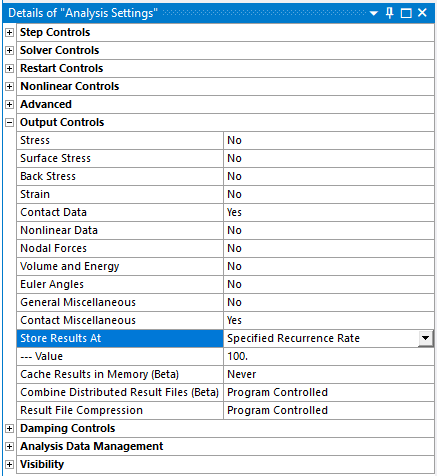
SubscribernIs this model a Transient Structural analysis? Those are notorious for creating very large result files. The trick to avoiding excessively large files is to set an appropriate value on the frequency of writing output. Under Analysis Settings, is Output Controls and under that is a pull down for Store Results At and I have typed a Value of 100. That means ANSYS will only write output 1 time in 100 increments. That would take a 10,000 MB file and make it 100 MB.n
-
September 4, 2020 at 10:02 am
AmbarNaik13
SubscriberHi. It is static structural analysis. I will try your suggestion and revert back.n -
September 4, 2020 at 10:05 am
-
September 4, 2020 at 2:21 pm
peteroznewman
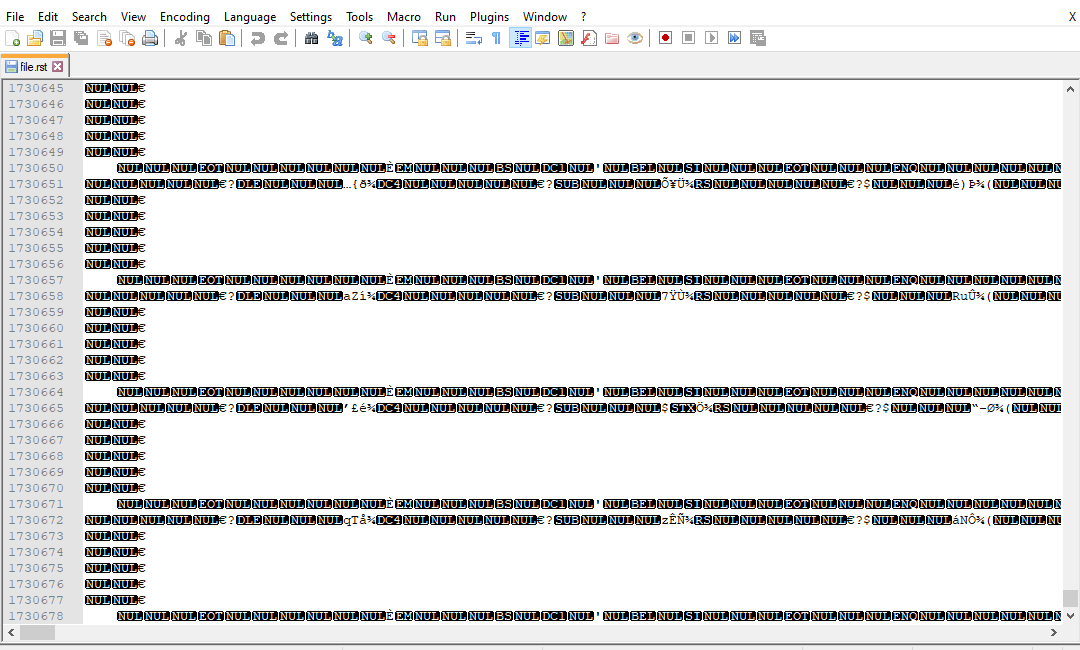
SubscriberI thought you were using the code provided. Don't open the .rst file, that is binary.nGo to the mechanical folder where you work and find force_XX.txt as described in JJ_thompson's post.n -
September 4, 2020 at 5:14 pm
AmbarNaik13
SubscriberThe file generated is completely blank. I also don't understand how to make changes in that code related to spring real constant. I am bit unfamiliar with the coding.n -
September 5, 2020 at 12:00 am
peteroznewman
SubscriberI am a novice at coding, but I have successfully used code someone wrote for me that created a text file. If you can share your project, I can try out JJ_tompson's code.n -
September 7, 2020 at 6:16 pm
AmbarNaik13
SubscriberUnfortunately, due to confidentiality I cannot share the project here.n -
September 11, 2020 at 3:21 pm
AmbarNaik13
SubscriberI had to share the above mentioned file in another thread. Could you use those files to write the code so that the text file is generated?n
-
Viewing 16 reply threads
- The topic ‘How to get elastic force of a large number of spring connections in a model using APDL command?’ is closed to new replies.

Innovation Space
Trending discussions
Top Contributors
-
5824
-
1906
-
1420
-
1305
-
1021
Top Rated Tags
© 2026 Copyright ANSYS, Inc. All rights reserved.
Ansys does not support the usage of unauthorized Ansys software. Please visit www.ansys.com to obtain an official distribution.