-
-
June 14, 2026 at 2:46 pm
k23052087
SubscriberHello everyone,
I encountered a possible inconsistency when setting the concentration boundary condition for species transport in LS-DYNA.
The keyword
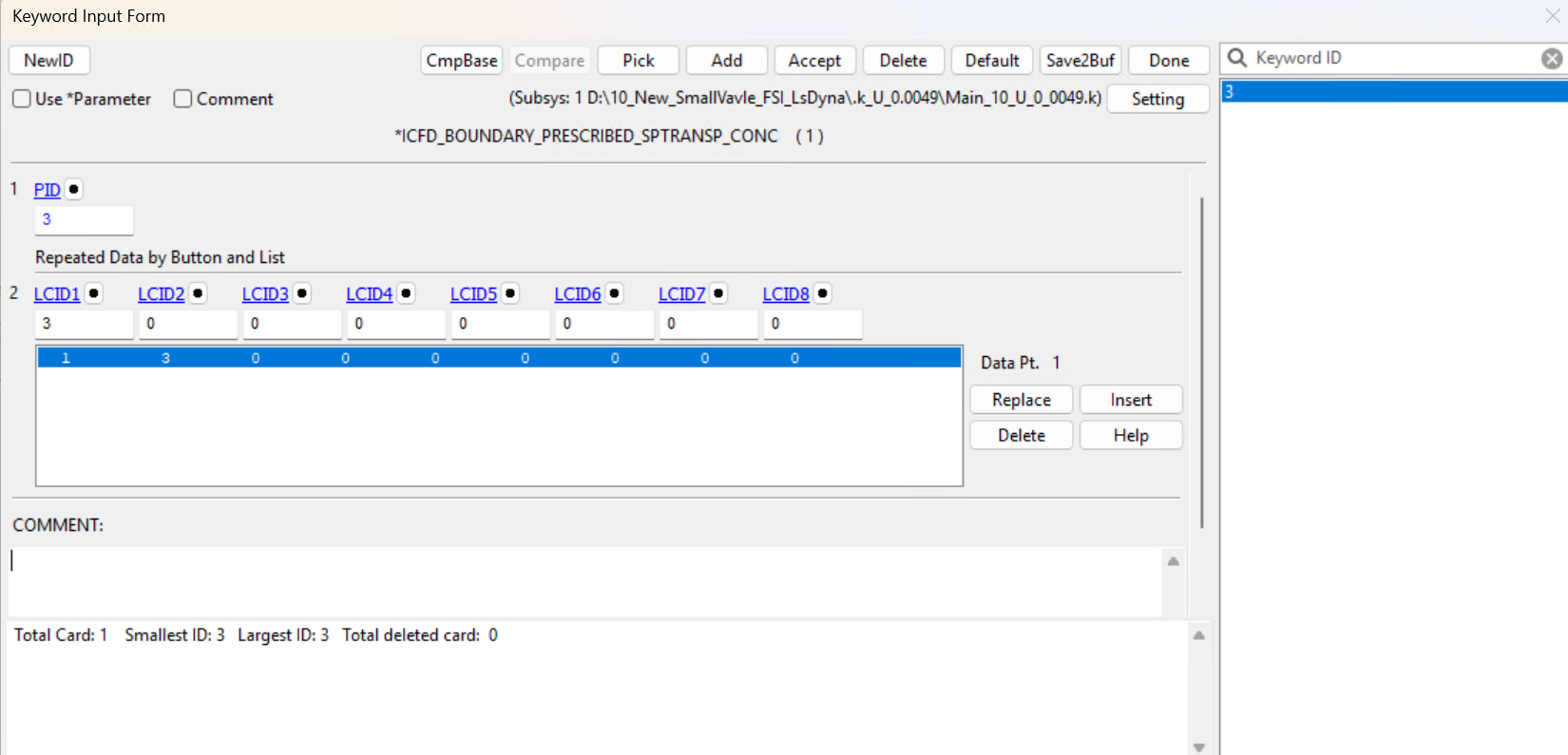
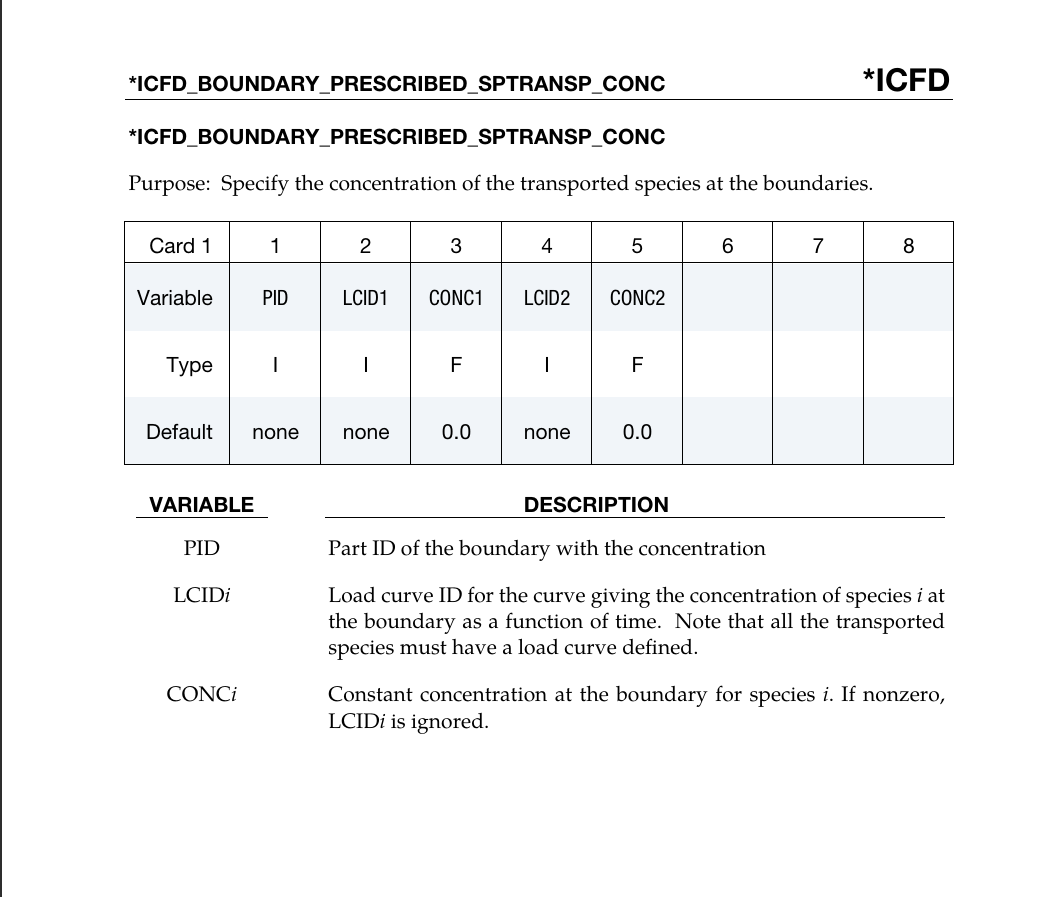
*ICFD_BOUNDARY_PRESCRIBED_appears differently in the LS-PrePost keyword interface and in the LS-DYNA manual.SPTRANSP_CONC In LS-PrePost, the keyword is shown as a two-line structure:
the first line defines the PID
the second line contains the LCID values
However, in the LS-DYNA manual, the keyword is documented in a single-line format where PID, LCID and CONC fields appear together.
Because of this difference, I observed the following behaviour:
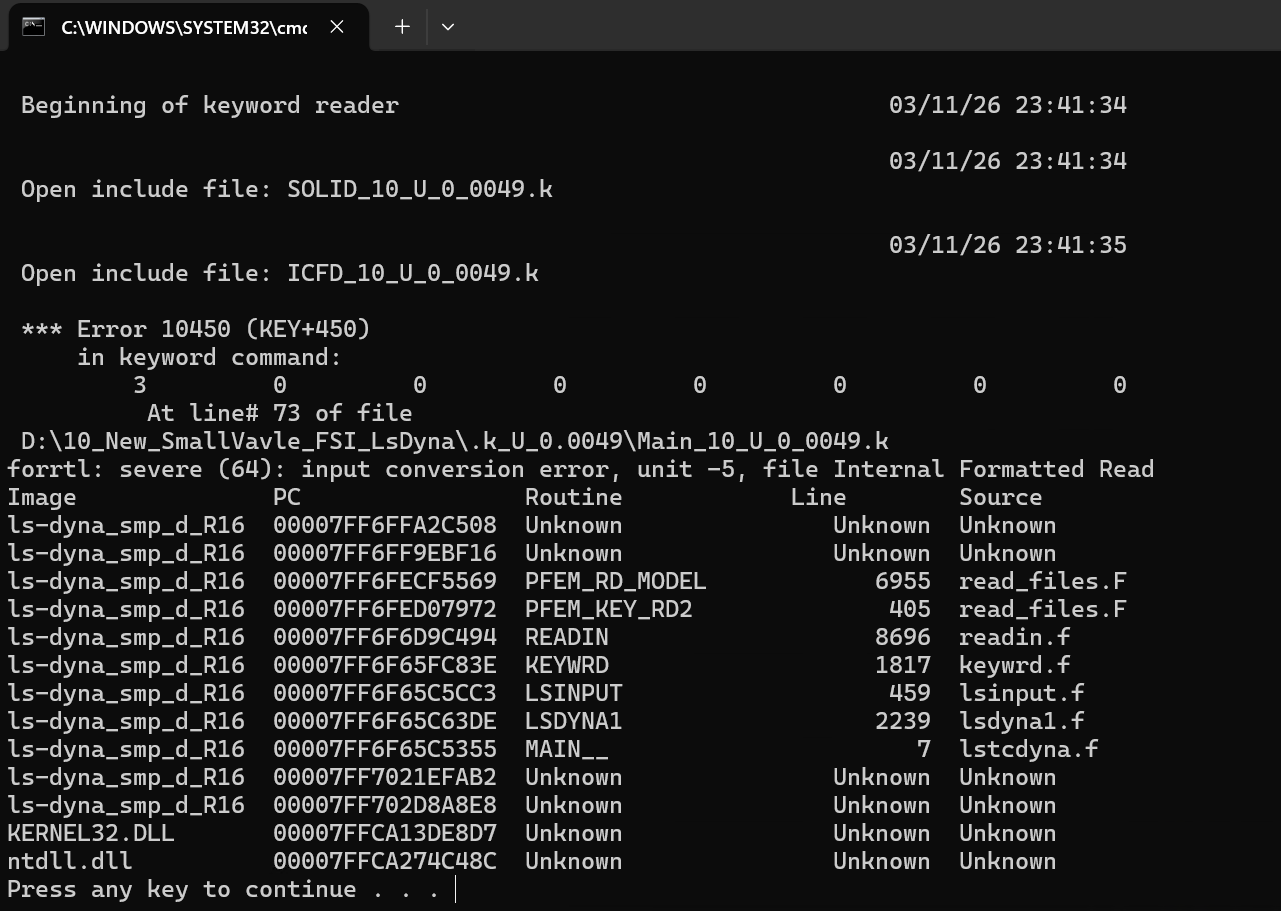
If I follow the format shown in LS-PrePost, the solver produces an error:
and the simulation cannot start.
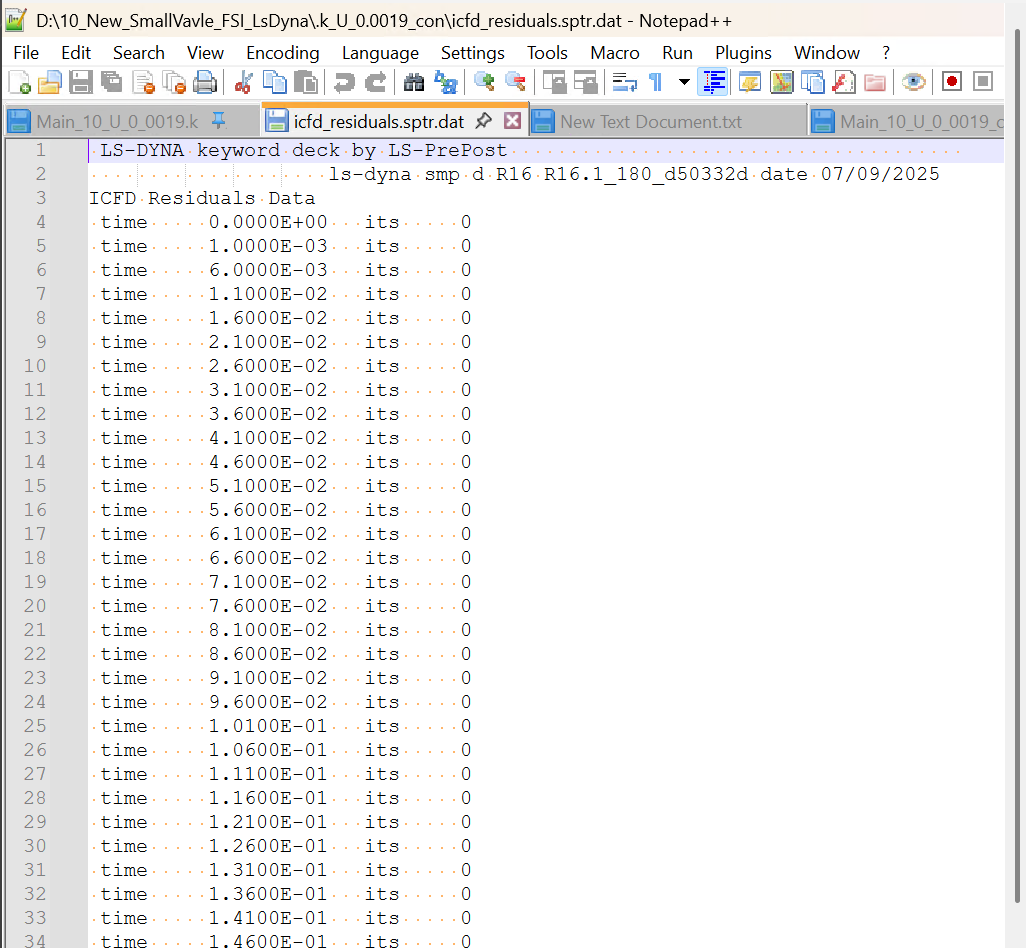
Even if I instead follow the manual format and remove the second line, the simulation runs but the concentration boundary condition does not seem to be applied. In this case:
I also noticed a similar mismatch for another keyword related to species transport:
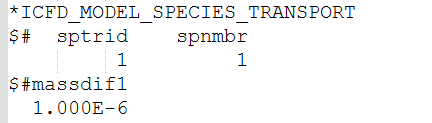
*ICFD_MODEL_SPECIES_TRANSPORTwhere the format in the LS-PrePost interface does not fully match the manual description.
Because of this inconsistency I am currently unable to run simulations that require inlet concentration boundary conditions for species transport.
Could anyone clarify:
The correct keyword format
*ICFD_BOUNDARY_PRESCRIBED_SPTRANSP_CONC whether this difference between LS-PrePost and the manual is expected
or if this might be a bug?
My LS-DYNA version: R16 SMP and LS-PrePost version: 4.12.6Thank you so so so much for any guidance!
-
June 15, 2026 at 7:41 am
ErKo
Ansys EmployeeHi
Please do not create duplicates - wait for other forum members to provide feedback.
All the best
Erko
-
June 15, 2026 at 1:49 pm
ErKo
Ansys EmployeeHi
in general use the way the keyword manual says (and that runs as you saw), not LSPP as that is not always updated with new keywords (manual is of course)
so say e.g., for PID=1 and LCID=5 (R16):
*icfd_boundary_prescribed_sptransp_conc
1,5,
(use comma here easier to use than spaces)As a side note:
For R17 see the new help manual as the keyword has changed again a bit – so updates were done in various forms and keyword has thus changed so making it a bit confusing , but always look at keyword manual iii in the release you are using.
Erko
-
June 17, 2026 at 12:27 pm
k23052087
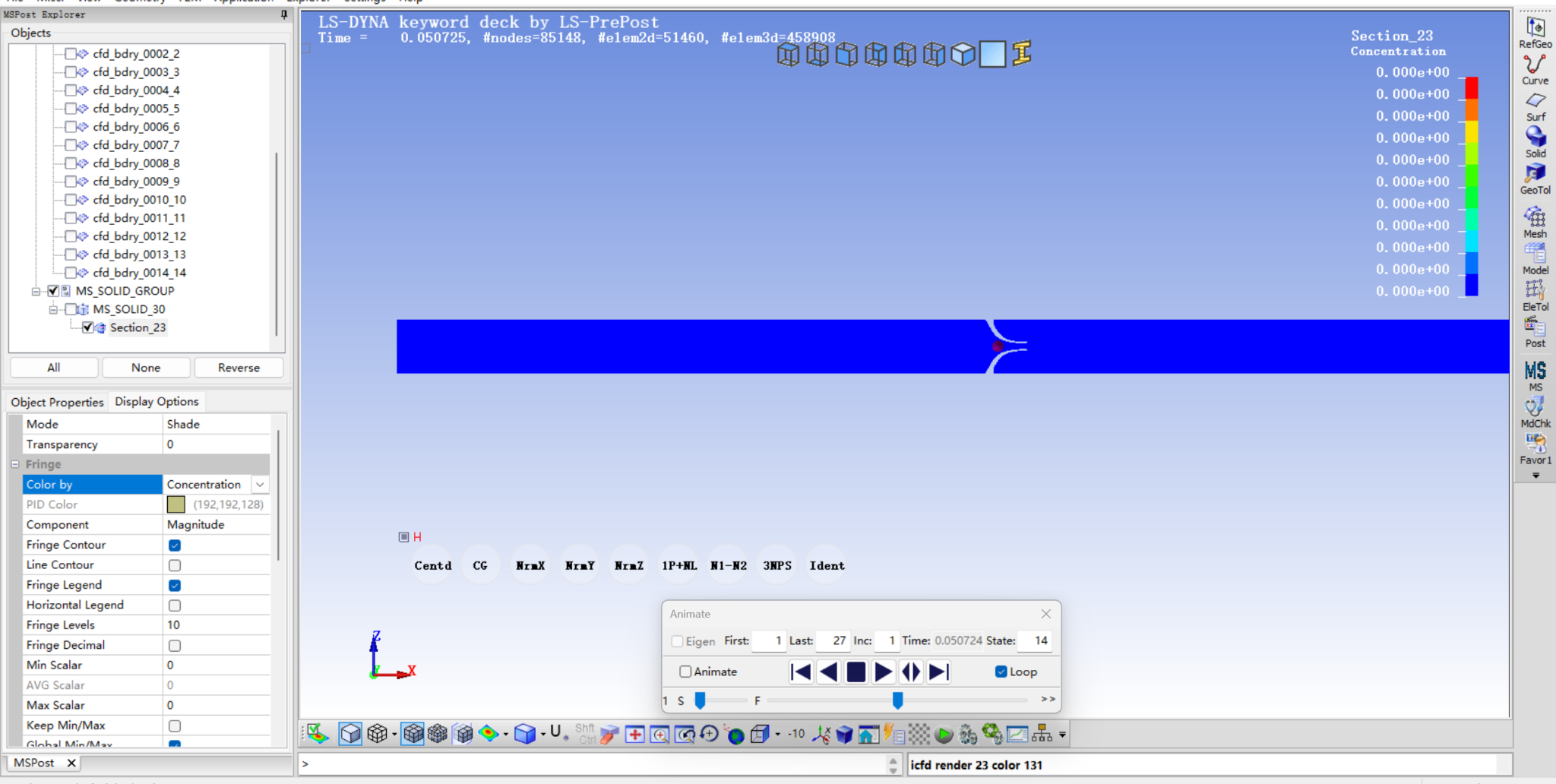
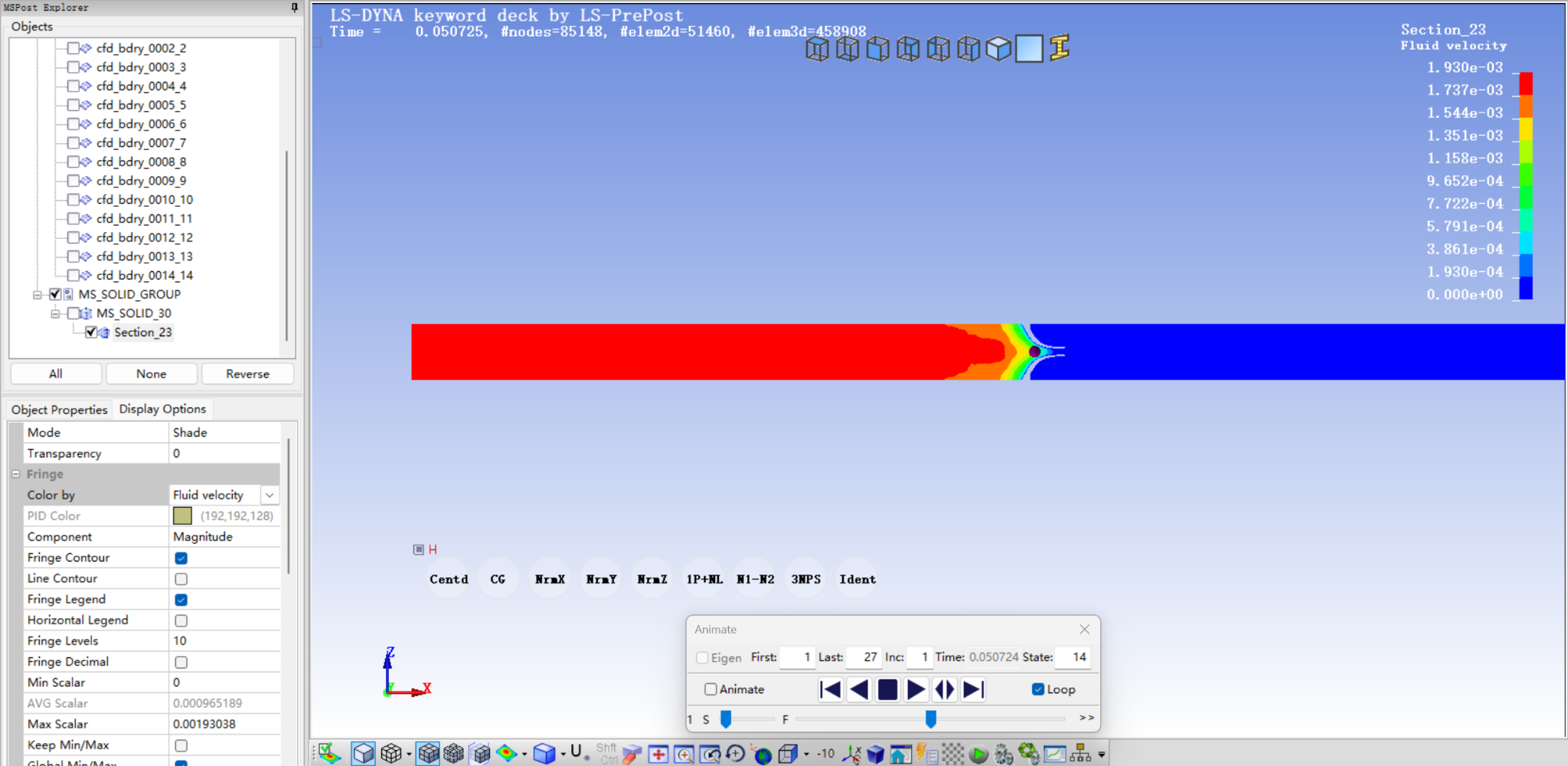
SubscriberHi Erko,Thank you for your reply.I tried the format from the keyword manual, using commas as you suggested. The simulation can run with this format, but the concentration field is still zero in the result.My boundary PID is 3, and my load curve ID is also 3.I first tried:*ICFD_BOUNDARY_PRESCRIBED_SPTRANSP_CONC3,3,I also tried:*ICFD_BOUNDARY_PRESCRIBED_SPTRANSP_CONC3,3,0.0,Both cases can run, but the concentration field is still zero.I also changed the load curve scale factors to 1.0, because I noticed that my previous curve had SFA = 0.0 and SFO = 0.0.The curve I used is:*DEFINE_CURVE$# lcid sidr sfa sfo offa offo dattyp lcint3 0 1.0 1.0 0.0 0.0 0 0$# a1 o10.0 1.02.0 1.0I also tried the simpler curve format:*DEFINE_CURVE30.0,1.02.0,1.0However, the concentration contour is still completely zero.In the result, I checked the cross-section at around t = 0.0507 s. The velocity field is clearly non-zero, so the fluid is moving. However, the concentration field remains zero everywhere and they used the same ICFD part id.So it seems that the flow field is solved correctly, but the prescribed species concentration is not applied to the boundary.Could you please help me check if I am still missing something? At the moment, the job runs without input error, but the transported concentration field stays zero.
And also, Could you please let me know whether the documentation or keyword format for this feature will be updated in the R17 manual?It would also be very helpful if LS-DYNA could provide a simple example using:
*ICFD_MODEL_SPECIES_TRANSPORT
*ICFD_BOUNDARY_PRESCRIBED_SPTRANSP_CONC
*DEFINE_CURVEI checked the currently available official LS-DYNA examples, but I could not find an example that uses this concentration boundary keyword.
A small example with one inlet, one transported species, and a prescribed inlet concentration would help confirm the correct keyword format and all required settings.
Thank you very much for your help.Best regards,Jiyu -
June 17, 2026 at 12:42 pm
ErKo
Ansys EmployeeHi
Looks ok – so hard to say, but try to change the SPTRID as below also in the icfd mat see below*icfd_mat
1,1,1.18e-3,,,,11
*icfd_model_species_transport
$species trasport id, spec transport model
11,1
$diffusivity1,lciddif1,diffusivity2,lciddiff2
1.0,,,,Yes, we do not have any shared examples on this application.
Perhaps you can upload your model here (say shared link) and someone (non Ansys) can help perhaps (Dennis CHen)?
All the best
Erko-
June 17, 2026 at 4:55 pm
k23052087
SubscriberHi Erko,
Thank you very much for your suggestions.
I tried the settings you recommended. I changed the SPTRID in *ICFD_MAT and used the same SPTRID in *ICFD_MODEL_SPECIES_TRANSPORT. I also checked the species transport model and the prescribed concentration boundary settings again.
However, the concentration field still remains zero, so the issue does not seem to be solved yet.
I have now packed the model, keyword files, and all related settings into a ZIP file. I uploaded it using the link you provided.
Thank you again for your help.
Could you also please let me know how I will be notified if someone reviews the model or leaves a suggestion? Will I receive an email notification, or should I check the page regularly?
Best regards,
Jiyu-
June 18, 2026 at 6:13 am
ErKo
Ansys EmployeeHello Jiyu
Thanks for the update.
We can not really look on those files as the support needs to be provided via the AIS forum here.
Could you please use your own share file link and share those here, and perhaps Dennis Chen can look into those (Ansys empl. can not download any files here).
All the best
Erko
-
June 18, 2026 at 4:04 pm
k23052087
SubscriberHi Erko,
Thank you for your reply.
I have uploaded the model files using my own shared link:
https://1drv.ms/u/c/ccb31efd7b2b1ccd/IQC6q8-zuS13SoSnVtjjzd3KAU8gyIJuZs8x_7SAga1j3Z0?e=ywANHr
The ZIP file includes the model and the relevant keyword settings.
If the link have any problem, please let me know.Thank you again for your help. I would be very grateful if Dennis Chen or anyone else could take a look.
Best regards,
Jiyu

-
-
-
June 18, 2026 at 10:02 pm
Dennis Chen
SubscriberHello, Jiyu, would you be willing to send your input file to my email address zchen6@gatech.edu? I would like to try to help but no promises in this specific case since I've never done a project related to mass transport in Dyna. However, if we keep the example simple, it's just a troubleshooting excercise, and to that end, I can try to help.
Thanks
-
June 19, 2026 at 12:42 pm
k23052087
SubscriberHi Dennis
Thank you so much for you help.
I already sent a compressed folder to your email.
Best
-
June 19, 2026 at 1:05 pm
ErKo
Ansys EmployeeAlso make sure you run MPP dp (R16) not SMP
-
-
-
- You must be logged in to reply to this topic.
-
6765
-
1906
-
1490
-
1330
-
1127
© 2026 Copyright ANSYS, Inc. All rights reserved.