TAGGED: ls-prepost, result-visualization
-
-
January 30, 2026 at 8:46 pm
ah3616
SubscriberHi - I am having issues with visulaization of my simulation results in LS-PrePost. I have tried updating the software and there is no change. I go to visualize my d3plots and turn on the thickness under FEM -> Mesh - > Appearance and when in its initial state everything appears correctly. As soon as i press play to view the simulation result progress the mesh moves and then is stuck there and will not go back even when I stop the run. I do have my NLOC on one of my parts set to 1 which makes the material go from the mesh shell surface outward. As soon as i play the results it jumps to have the mesh thickness extend equal distance from the shell mesh surface as though NLOC = 0. I have tried opening it with and without the input keyword file and have not had any changes. Any guidance is greatly appreciated. Thank you!
-
February 1, 2026 at 7:59 pm
Vijay
Ansys EmployeeHello User,
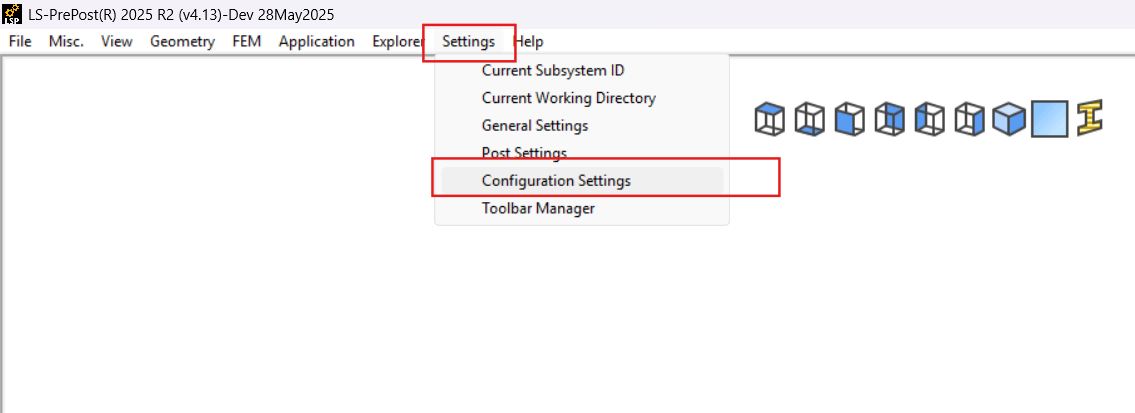
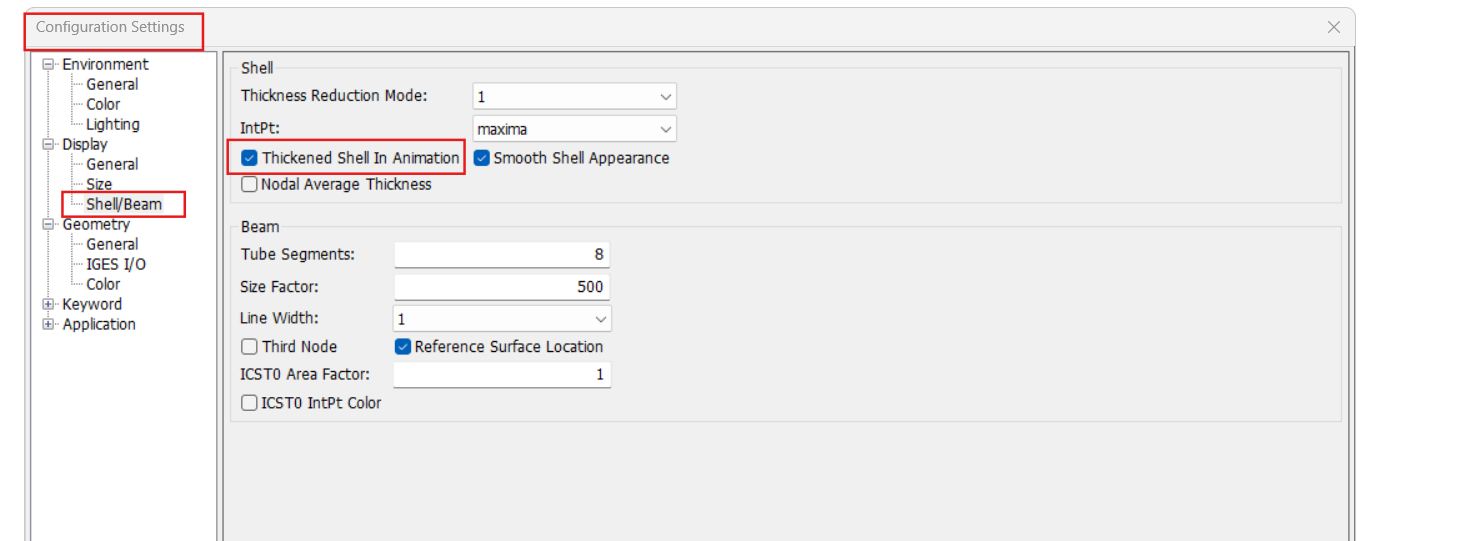
Please activate this option.This should work.
Regards,Â
VijayÂ
Introducing Ansys Assistant a 24/7 AI-powered virtual assistant for active Ansys academic customers.Â
Have a look at our public help documentation website:Â Ansys HelpÂ
For more exciting courses and certifications, hit this link:Â Ansys Innovation Courses | ANSYS Innovation SpaceÂ
Â
-
February 1, 2026 at 8:20 pm
ah3616
SubscriberThat is already turned on for me. The issue use to not occur at all, then one day it started to shift when i opened the binary plot only. so i started to open the d3plot and keyword which fixed it until recently where now i cannot turn on thickness under appearance, press play, and not have it jump the thickness inward. thank you for your help
Â
-
February 1, 2026 at 8:33 pm
Vijay
Ansys EmployeeHello User,
The issue might be related to the LS‑PrePost version or possibly the NLOC parameter. Could you try using an older LSPP version to see if the behavior changes? Additionally, please test it with a simple model to help isolate the problem
Thanks,
Vijay
Â
-
- You must be logged in to reply to this topic.
-
5579
-
1885
-
1403
-
1298
-
1021
© 2026 Copyright ANSYS, Inc. All rights reserved.