Ansys Assistant will be unavailable on the Learning Forum starting January 30. An upgraded version is coming soon. We apologize for any inconvenience and appreciate your patience. Stay tuned for updates.
Ansys Free Student Software

Ansys Free Student Software

Topics cover installation and configuration of our free student products.

Licensing error when switching to solution mode in Fluent

    • mydogdodge10
      Subscriber

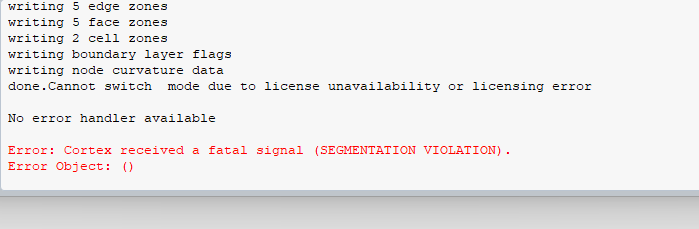
      This is the error I received. I have tried turning off any VPN's, uninstalling and reinstalling, etc. already. I have the diagnostic file saved, but I do not see a place to attach it here. Any help would be much appreciated.

    • Rahul
      Ansys Employee

      The transition to solver mode may be failing because you are trying to use a license that is not included in your current license. Please launch the Fluent launcher and check the Capability Level. If it is set to 'Enterprise,' change it to the licence available to you, e.g, 'Premium', and then verify whether the same issue occurs.

    • mydogdodge10
      Subscriber

      The same issue occurs, I tried both Pro and Premium settings.  This started when I accidentally made a model with too many nodes for the student version and tried to import it into the solver, if that helps at all.  I went back to using less nodes than the max, but I'm still getting the license error. Any other ideas?

    • Rahul
      Ansys Employee

      Try clearing temporary files. 

      1. Close all running Ansys applications. 
      2. In your Windows search bar, type %APPDATA%. Go to the folder that appears. 
      3. Navigate to the Ansys folder. There should be a folder inside called v2xx. 
        1. The exact numbers will vary based on the version of Ansys you are using. v242 corresponds to Ansys 2024R2, v231 corresponds to Ansys 2023R1,  and so on.
      4. Rename v2xx to v2xxold. When you start Ansys again, Ansys will automatically create a new v2xx folder.
    • mydogdodge10
      Subscriber

      I just went through that process, and I am getting the exact same error. Any other ideas?

    • mydogdodge10
      Subscriber

      Just encountered a new situation which may shed some light. I changed the router DNS server from adgaurd to default, and used the default mesh size in fluent, and the fluent solver worked again with no error. However, when I tried to change the mesh sizing of my geometry in the fluent mesher, it went back to giving me the same error as above. I then tried to use the default mesh size and it still didnt work.  It looks like for some reason when I mesh a geo using too many nodes for the student version, it disables my license permanently or something. Any ideas?

Viewing 5 reply threads
  • You must be logged in to reply to this topic.
[bingo_chatbox]