-
-
April 4, 2025 at 3:14 pm
kyle.owens
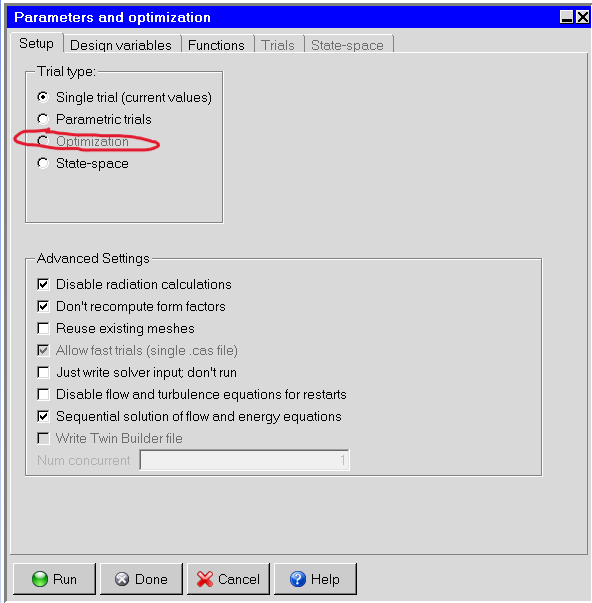
SubscriberWe're seeing some issues with students unable to use Anysys ICEPACK. We're either seeing an error like Warning: you don't have an "ice-opt" license feature-disabling optimization or and we're seeing the optimization button in the parameters greyed out like in this screenshot.
Are any adjustments or special configuration instructions users may need to use it or is it that our campus license doesn't support this tool?ÂThank you,ÂKyle OwensLead IT Analyst
OIT Client Experience and Instructional Technology Services -
April 8, 2025 at 11:25 am
Rajeshwari Jadhav
Forum ModeratorHi Kyle,
Attach the screenshot again, it's not visible over here.
-
April 8, 2025 at 1:09 pm
kyle.owens
SubscriberGood morning, this is the first thing users see in the bottom left pane when in the icepak tool
the issue they're facing is optimization is greyed out in Solve > Paremeters and Optimization
I then found this KBÂ https://ansys13.ansys.com/KnowledgeArticles/Phase-3/2052070/2052070.pdf which states Optimization is an ADD-ON feature for ANSYS Icepak as well as for Design Exploration within Workbench. To use any of these optimizations option an additional license feature is needed. However, the same ADDON feature will work for both Icepak and Design of Exploration. I'm trying to figure out if University of Texas at Arlington Licensing supports this feature so I was hoping to speak with our account rep, who I also emailed but haven't gotten a response.Â
-
April 8, 2025 at 1:22 pm
Rajeshwari Jadhav
Forum ModeratorHi Kyle,
What's the name of your AM/AR, I don't see any "ice-opt" increments over here ProductToFeatureMap-2025-03-10.pdf ?
-
- You must be logged in to reply to this topic.
-
4633
-
1535
-
1386
-
1215
-
1021
© 2025 Copyright ANSYS, Inc. All rights reserved.