Ansys Assistant will be unavailable on the Learning Forum starting January 30. An upgraded version is coming soon. We apologize for any inconvenience and appreciate your patience. Stay tuned for updates.
Ansys Products

Ansys Products

Discuss installation & licensing of our Ansys Teaching and Research products.

How to solve this problem ?

    • 1375939052
      Subscriber

      When I use ansys to calculate thermal stresses, I get an error and can't calculate it, checking the calculation log suggests the following “Thermal strain in element 4464979 with material 37 has caused theelement to invert. Please check the thermal expansion definition and the temperature change.”Is this content that I set the coefficient of thermal expansion too large? I don't know how to change it?

    • Armin
      Ansys Employee

      Hello,

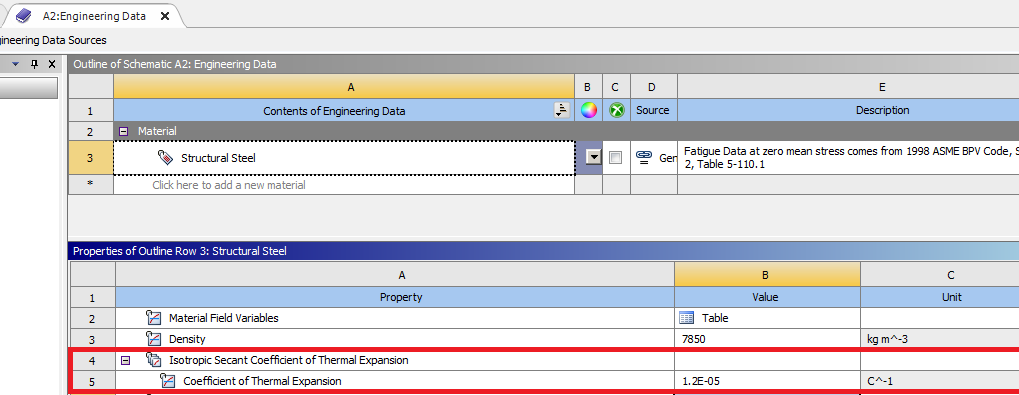
      The error message suggests that the thermal expansion definition or the temperature change applied to the material may be incorrect or not suitable for the simulation. The coefficient of thermal expansion is controlled from the Engineering Data Application (see the screenshot below). You can also refer to the following below for information about thermal strains: 19.5.2.7. Thermal Strain

      • 1375939052
        Subscriber
        Thank you very much for your answer, after I found the problem I rechecked the temperature import and found that it was partially under-imported, the problem is now solved. There is just a new problem "An I/O error has occurred for file.PC6. System error code = 28." I found that there is not enough space for saving, I don't know if it is the file itself or the software calculating the space?
    • Armin
      Ansys Employee

      No problem, I'm glad that the initial issue is resolved.

      Error code 28 typically indicates that the system has run out of disk space. Ansys Mechanical generates temporary files during simulations, which can grow significantly depending on the complexity of the model, mesh size, and analysis type. If possible, simplify your simulation by reducing the mesh density. Other options could be freeing up disk space, changing the working directory, and verifyng write permission. 

      • 1375939052
        Subscriber

        Thank you for your reply.

        After making sure that there is enough disk space to start the computation, I found that the computation slows down with the same settings, while the computation process opens the output file without seeing the convergence curve of the force, and after some time of computation prompts for an error“An internal solution magnitude limit was exceeded. (Node Number 680833, Body right\BB1, DOF UY) Please check your Environment for inappropriate load values or insufficient supports.  You may select the offending object and/or geometry via RMB on this warning in the Messages window.  Please see the Troubleshooting section of the Help System for more information.”and“The value of UY at node 680833 is 1781336. It is greater than thecurrent limit of 1000000 (which can be reset on the NCNV command).This generally indicates rigid body motion as a result of anunconstrained model. Verify that your model is properly constrained.”In the meantime I would like to ask the following if you know how the NCNV command works. Looking forward to your reply.

        • Armin
          Ansys Employee

          Hello,

          Could you ask your new question about the NCNV command as a separate post in the forum? This way, someone more experienced with MAPDL commands will be able to assist you. 
          Also, when posting your new query, it would be very helpful if you could include a few screenshots of your model, along with a description of the boundary conditions and other settings you used to set it up.

        • 1375939052
          Subscriber

          Thank you very much for the advice you gave, I'll start a new thread on the NCNV issue

Viewing 2 reply threads
  • You must be logged in to reply to this topic.
[bingo_chatbox]