Ansys Assistant will be unavailable on the Learning Forum starting January 30. An upgraded version is coming soon. We apologize for any inconvenience and appreciate your patience. Stay tuned for updates.
General Mechanical

General Mechanical

Topics related to Mechanical Enterprise, Motion, Additive Print and more.

Optimizing Computational Efficiency in Ansys Mechanical

    • bb52123130
      Subscriber

      Dear Supporters,


      I am currently performing large deformation and contact-based nonlinear analysis in Ansys Mechanical and would like to optimize my computational efficiency. However, I have noticed that GPU acceleration is rejected for my current analysis. I would appreciate any guidance on improving performance.


      🔹 System Specifications

      CPU: 12-core, 24 logical processors

      Memory: 128GB RAM

      GPU: NVIDIA RTX A5000

      Storage: HDD & SSD

      🔹 Current Ansys Mechanical Settings

      CPU Usage: 12 physical cores

      Parallel Processing: Distributed

      GPU Acceleration: NVIDIA RTX A5000

      🔹 Issue

      During the simulation, GPU utilization is rejected, and the analysis relies solely on CPU resources. Given the computational demands of large deformation and contact-based nonlinear simulations, I would like to know:


      Is there a way to enable GPU acceleration for this type of analysis?

      What additional settings or optimizations can improve overall computational efficiency?

      For reference, I have attached a screenshot of Task Manager during the simulation to illustrate resource utilization.


      Thank you in advance for your insights and recommendations.


      Best regards,

    • peteroznewman
      Subscriber

      Make sure to solve projects stored on the SSD.  Only use the HDD to archive old models.

      One recommendation for a 12 core computer is to only request solving on a maximum of 11 cores.  I benchmarked that on a 16 core computer a few years ago and the solution time increased going from 15 to 16 cores.  Ansys includes this advice in some of the messages it produces. 

      In that benchmark, I plotted solution time vs number of cores requested and the curve quickly flattens out so the benefit of cores above 8 becomes quite small.

      In that same year I did the benchmarking, I also compared solving on cores only vs one less core and a GPU.  Only one of the nine test models was faster on the GPU so I decided to not spend the money on the GPU.

    • bb52123130
      Subscriber
       

      Thank you for the valuable information about setting physical cores!
      I have been running analyses using 12 cores, but I will change the setting to use 11 cores.


      Could you tell me how to change the settings in ANSYS Workbench to use the SSD?

      During the analysis, the SSD does not seem to be active. Could this also be a factor contributing to the high computational cost?

      I truly appreciate it.

    • peteroznewman
      Subscriber

      If you are in Mechanical, the simplest way to ensure that the SSD is used is to have the project files stored on the SSD.

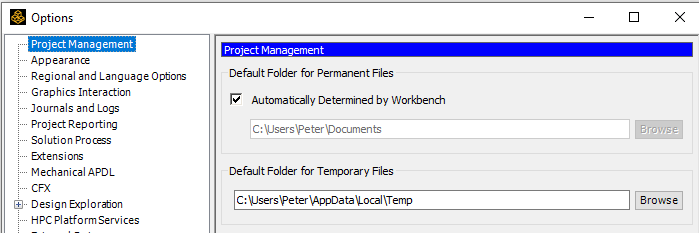
      In Workbench, use Tools, Options and set the Default Folder for Temporary Files to be a folder on the SSD.

    • bb52123130
      Subscriber

      Thank you for answering even my basic questions.

      I followed the instructions as directed, but I was unable to select the SSD. Although my PC has an SSD installed, I don’t recall performing any specific setup for it. Do I need to take any special steps to make it usable?

    • peteroznewman
      Subscriber

      How many drives does your computer have?  Just one?  If you purchased the computer and it came with a SSD, then the SSD is drive C:

      If your computer has more than one drive, say C: and D: and you know one of them is a SSD and the other is a HDD, then in File Explorer, for This PC, right click on the drive and get Properties and look on the Hardware tab. My computer only has one drive but the properties tell me it is a NVMe type of drive, which is known to be a type of SSD.


    • bb52123130
      Subscriber
       

      It looks like I misunderstood how to check in Explorer. The SSD was already properly set up, and I had been saving files to it all along!

      At this point, I believe I have completed all the necessary settings. Thank you so much for your support!

      If you have any spare time, I would greatly appreciate it if you could take a look at another question I posted:
      "Seeking Advice on Negative Pressure and Contact Analysis in FEA"
      Seeking Advice on Negative Pressure and Contact Analysis in FEA 

      Your help has been truly invaluable, and I can't thank you enough for your time and expertise!

Viewing 6 reply threads
  • You must be logged in to reply to this topic.
[bingo_chatbox]