Ansys Assistant will be unavailable on the Learning Forum starting January 30. An upgraded version is coming soon. We apologize for any inconvenience and appreciate your patience. Stay tuned for updates.
Photonics

Photonics

Topics related to Lumerical and more.

Help running the optimization sweep example of grating coupler in FDTD

    • leroy.dok
      Subscriber

      Hi all,


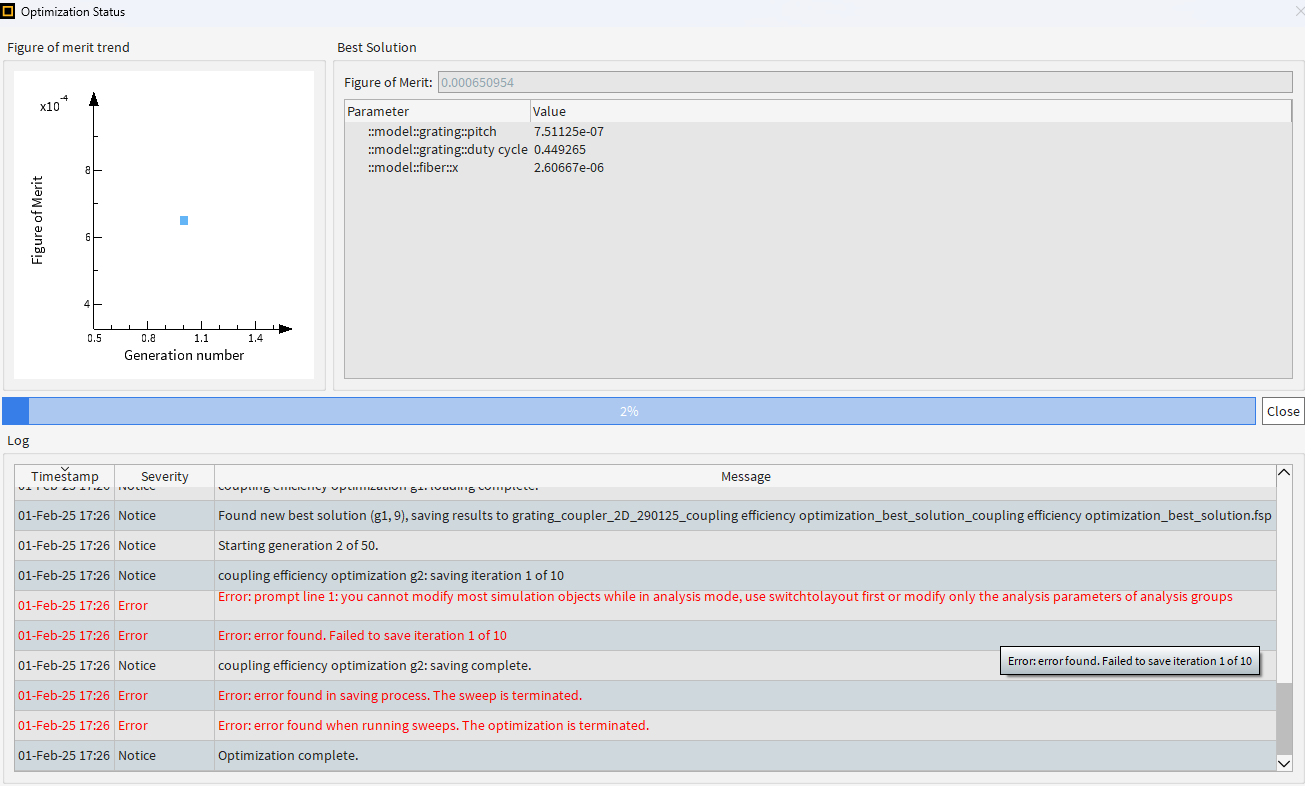
      ive been trying to run the example simulation of the grating couplers - (https://optics.ansys.com/hc/en-us/articles/360042305334-Grating-coupler) when i try to run the 2D simulation in fdtd it works fine but then when i run the parameter sweep optimiziation whic supposed to get me the optimized pitch and duty cycle of the grating im getting the following error:


      note that i did not change any parameters of the model objects and for the parameter sweep values, i just downloaded the example and ran it (first i ran the model itself and only then i ran the optimization parameter sweep) and the parameter sweep results conclude with this error after less than 5 minuets. 

      did someone encounter this?


      Thanks,

      Leroy

    • leroy.dok
      Subscriber

      Follow up question:

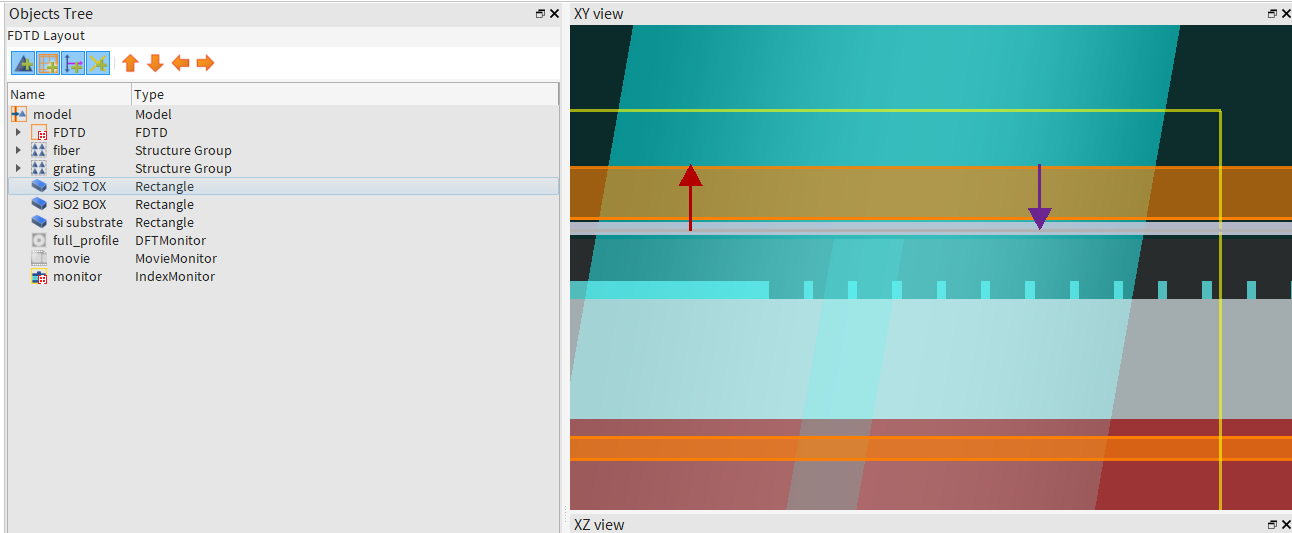
      when i download the example the object tree looks as in the attached image:

      it seems like there is no source in this simulation so im not sure what the 'monitor' supposed to detect if there is no light coming out through the fiber.

      im clearly missing something here, would appreciate your help. thank you,

      Leroy

    • Kirill
      Forum Moderator

      Dear Leroy,

      1. It looks like you're running the optimization while still in Analysis mode. Try switching back to Layout mode first.
      2. In this example, the Ports (FDTD) - Simulation Object is used, which serves as the source.

      Best regards,
      Kirill

      • leroy.dok
        Subscriber

        Thank you very much for the fast response.

        i did ran it in analysis mode by mistake - i fixed it.

        i have more questiones about modifying the simulation to my needs:

        i wish to design grating coupler for Si3N4 core of 300 nm with top silica cladding of 2 um and BOX of 3 um at 1550 nm for TE modes, for that end do i need to:


        1- change the port to be suitable for TE in the mode selection tab of the port property? (if not what will detrmine if the grating is for TE or TM?)

        2- set the global source settings of the port to work around 1.55 um ? (range of 1.5 to 1.6 um is good enough?)

        3- of course change the geomery to suit my case and the material properties.

        is there anything else i should change? do i need to change something in the monitor settings as well?

        once the simulation is over the Figure of Merit is actually the coupling coefficent ? if so what values are considered to be good enough to work with? if FOM is 0.5 that means that half of the power is lost?

        sorry for the many questions, and again thank you for your response.

        Leroy

    • zhuxia
      Subscriber

      I met the same question? How do you solve it?


    • Kirill
      Forum Moderator

      Dear Subscribers,

      To modify the model, please refer to the article mentioned above, specifically the section "Updating the model with your parameters."

      A few comments regarding your questions:

      1. In general, yes. I recommend checking the electric field direction using 'Visualize Mode Data.' In this example, it is preset to align with the grating.
      2. You can adjust the bandwidth as needed. You can even set the start and stop values to be the same, e.g., 1.55 µm, if required.
      3. Correct.
      4. Port 2 is a monitor, so no changes are necessary.
      5. Yes. Since FOM represents transmission at Port 2, an FOM = 0.5 means the coupling efficiency is 0.5.

      For guidance on whether this is "good enough," please refer to the section "Taking the model further."

      Best regards,
      Kirill

Viewing 4 reply threads
  • You must be logged in to reply to this topic.
[bingo_chatbox]