

TAGGED: rocky-dem
-
-
January 31, 2025 at 2:44 pm
Shyam Prasad V Atri
SubscriberHello
I am trying to download SDK modules of rocky based on what is provided here
https://www.youtube.com/watch?v=UMM-63fl3Lk
Can anyone please help me download this?
https://innovationspace.ansys.com/knowledge/forums/topic/ready-to-use-module/
I go here and it takes me to this page
https://download.ansys.com/currentReleases
I do not see rocky ready to use module anywhere.
-
January 31, 2025 at 2:47 pmSubscriber
Never mind, I found a way to download it.
-
January 31, 2025 at 3:46 pm
Rob
Forum ModeratorPlease post the link it's available for others: staff are inside the system so it's a little different!
-
January 31, 2025 at 4:19 pmSubscriber
Hey I downloaded the zip file.
But when I look at the source codes, I see that they contain only the DLL files.
I would like to see the equations used to make those DLL files the source codes. (I have seen the equations given in the documentation. but I want to see it on the modules.) Are those available for the user?
If so can you please tell me where can I download them?
Please let me know.
-
January 31, 2025 at 4:31 pmForum Moderator
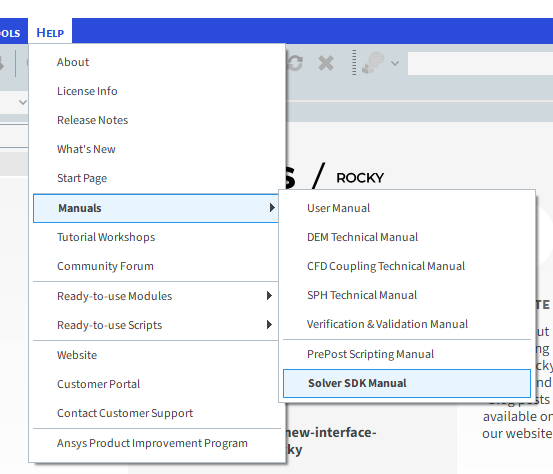
If it's not in DOC then no. But there is an SDK manual.
-
January 31, 2025 at 4:40 pmSubscriber
I looked at the manual. The equations are present. But in the src codes I do not see the equations. I only see the DLL files.
I want to see the equations in src code. please let me know if those are available?
-
January 31, 2025 at 5:01 pmSubscriber
I see that all the equations i am looking for are in the .cu files. I thought rocky will have a bunch of cpp and header files. So please tell me the
q1) when I want to make my own DLL file I need to modify the .cu file is it?
q2) suppose I want to debug my code is there a way to connect rocky with debugger? Is there an example that shows that. If so, can you please point me to that example?
-
February 3, 2025 at 3:37 amSubscriber
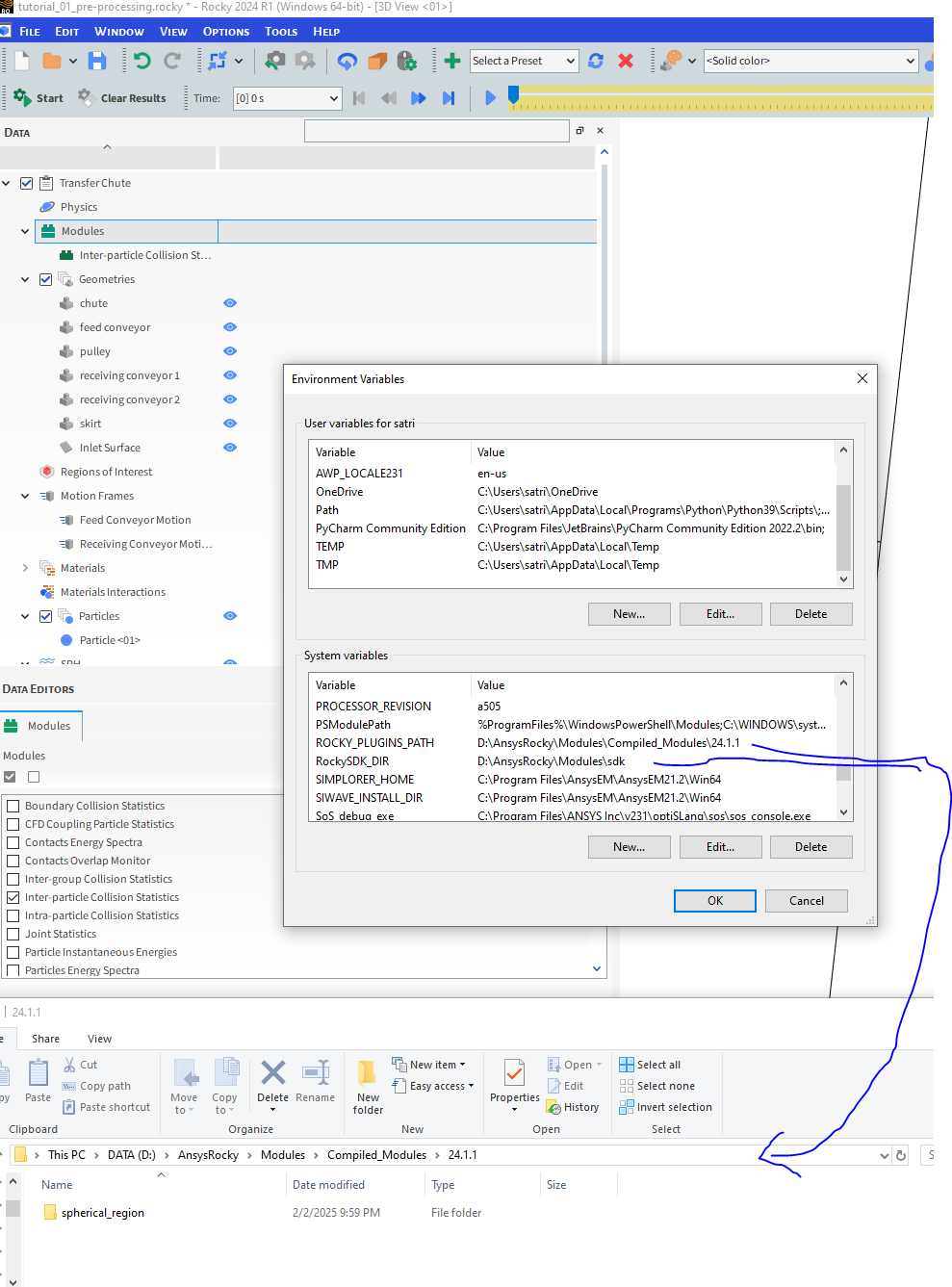
Also please tell me why cant i access the module that I compiled.
My environment variable is pointing to the appropriate folder.
-
February 3, 2025 at 4:25 amSubscriber
I even removed the 2.4.1 in the env variable and tried it again. still I do not see the compiled module.
Note: 1) I am not getting any errors while compiling.
2)I am not changing anything in the cmakeList.txt file.
3) I do not have rocky open while compiling. I am opening it after everything is compiled.
4) I have restarted the computer after defining the env variable
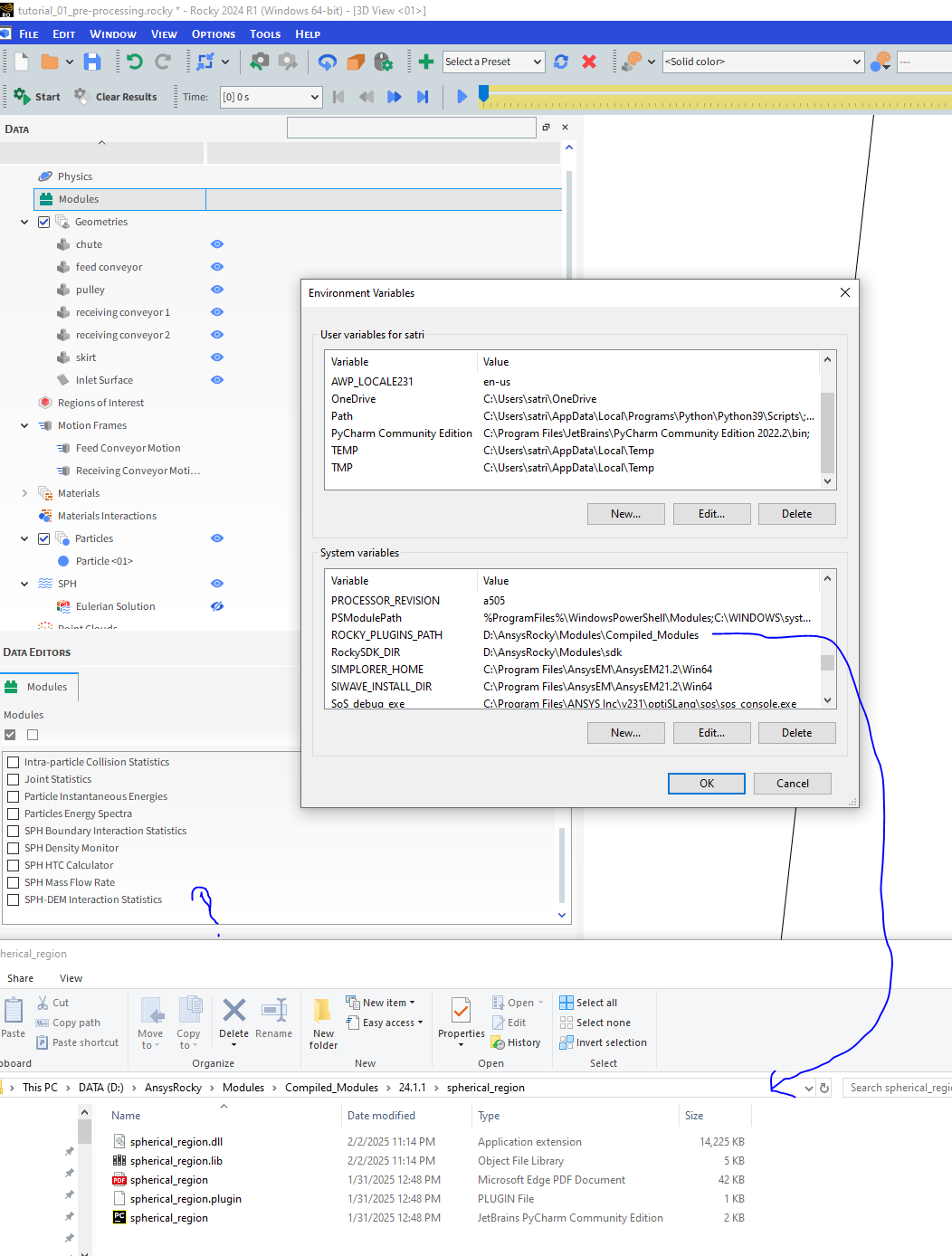
I still cannot see the compiled module in rocky
-
February 3, 2025 at 4:56 amSubscriber
I am compiling rocky with these commands
cmake -DCMAKE_GENERATOR_PLATFORM=x64 spherical_region
cmake --build . --config Release
cmake -P cmake_install.cmakeand I still cant see the new custom module
-
February 3, 2025 at 2:34 pmSubscriber
This is the compileLog that i have put it in a text file if it helps to locate the problem.
**********************************************************************
** Visual Studio 2022 Developer Command Prompt v17.6.5
** Copyright (c) 2022 Microsoft Corporation
**********************************************************************D:\AnsysRocky\Modules\sdk\spherical_region>cmake -DCMAKE_GENERATOR_PLATFORM=x64 spherical_region
-- Building for: Visual Studio 17 2022
CMake Warning (dev) in CMakeLists.txt:
No project() command is present. The top-level CMakeLists.txt file must
contain a literal, direct call to the project() command. Add a line of
code such asproject(ProjectName)
near the top of the file, but after cmake_minimum_required().
CMake is pretending there is a "project(Project)" command on the first
line.
This warning is for project developers. Use -Wno-dev to suppress it.CMake Warning (dev) in CMakeLists.txt:
cmake_minimum_required() should be called prior to this top-level project()
call. Please see the cmake-commands(7) manual for usage documentation of
both commands.
This warning is for project developers. Use -Wno-dev to suppress it.-- Selecting Windows SDK version 10.0.22621.0 to target Windows 10.0.19045.
-- The C compiler identification is MSVC 19.36.32537.0
-- The CXX compiler identification is MSVC 19.36.32537.0
-- Detecting C compiler ABI info
-- Detecting C compiler ABI info - done
-- Check for working C compiler: C:/Program Files/Microsoft Visual Studio/2022/Community/VC/Tools/MSVC/14.36.32532/bin/Hostx64/x64/cl.exe - skipped
-- Detecting C compile features
-- Detecting C compile features - done
-- Detecting CXX compiler ABI info
-- Detecting CXX compiler ABI info - done
-- Check for working CXX compiler: C:/Program Files/Microsoft Visual Studio/2022/Community/VC/Tools/MSVC/14.36.32532/bin/Hostx64/x64/cl.exe - skipped
-- Detecting CXX compile features
-- Detecting CXX compile features - done
-- Setting CUDA_TOOLKIT_ROOT_DIR to 'C:/Program Files/NVIDIA GPU Computing Toolkit/CUDA/v11.7'
-- Found CUDA: C:/Program Files/NVIDIA GPU Computing Toolkit/CUDA/v11.7 (found suitable exact version "11.7")
-- Found OpenMP_C: -openmp (found version "2.0")
-- Found OpenMP_CXX: -openmp (found version "2.0")
-- Found OpenMP: TRUE (found version "2.0")
-- Modified CMAKE_CXX_FLAGS: '/DWIN32 /D_WINDOWS /W3 /GR /EHsc /openmp'
-- NVCC flags: '-std=c++17;-gencode=arch=compute_35,code="sm_35,compute_35";-gencode=arch=compute_60,code="sm_60,compute_60";-gencode=arch=compute_70,code="sm_70,compute_70";-gencode=arch=compute_80,code="sm_80,compute_80"'
-- INCLUDE_DIR = 'D:/AnsysRocky/Modules/sdk/include'
-- LINK_DIR = 'D:\AnsysRocky\Modules\sdk/libs'
-- ROCKY_PLUGIN_INSTALLATION_DIRECTORY = 'D:\AnsysRocky\Modules\Compiled_Modules'
CMake Warning (dev) in CMakeLists.txt:
No cmake_minimum_required command is present. A line of code such ascmake_minimum_required(VERSION 3.26)
should be added at the top of the file. The version specified may be lower
if you wish to support older CMake versions for this project. For more
information run "cmake --help-policy CMP0000".
This warning is for project developers. Use -Wno-dev to suppress it.-- Configuring done (5.5s)
CMake Warning (dev) at C:/Program Files/Microsoft Visual Studio/2022/Community/Common7/IDE/CommonExtensions/Microsoft/CMake/CMake/share/cmake-3.26/Modules/FindCUDA.cmake:1989 (add_library):
Policy CMP0003 should be set before this line. Add code such asif(COMMAND cmake_policy)
cmake_policy(SET CMP0003 NEW)
endif(COMMAND cmake_policy)as early as possible but after the most recent call to
cmake_minimum_required or cmake_policy(VERSION). This warning appears
because target "spherical_region" links to some libraries for which the
linker must search:rocky20api-MD, rocky20addins-MD, rocky20-MD, rocky_logging-MD
and other libraries with known full path:
C:/Program Files/NVIDIA GPU Computing Toolkit/CUDA/v11.7/lib/x64/cudart_static.lib
CMake is adding directories in the second list to the linker search path in
case they are needed to find libraries from the first list (for backwards
compatibility with CMake 2.4). Set policy CMP0003 to OLD or NEW to enable
or disable this behavior explicitly. Run "cmake --help-policy CMP0003" for
more information.
Call Stack (most recent call first):
CMakeLists.txt:13 (cuda_add_library)
This warning is for project developers. Use -Wno-dev to suppress it.-- Generating done (0.0s)
-- Build files have been written to: D:/AnsysRocky/Modules/sdk/spherical_regionD:\AnsysRocky\Modules\sdk\spherical_region>cmake --build . --config Release
MSBuild version 17.6.3+07e294721 for .NET FrameworkChecking Build System
Building NVCC (Device) object CMakeFiles/spherical_region.dir/Release/spherical_region_generated_spherical_region.cu.obj
spherical_region.cu
CUSTOMBUILD : nvcc warning : The 'compute_35', 'compute_37', 'sm_35', and 'sm_37' architectures are deprecated, and may be removed in a future release (Use -Wno-deprecated-gpu-targets to suppress warning). [D
:\AnsysRocky\Modules\sdk\spherical_region\spherical_region.vcxproj]
CUSTOMBUILD : nvcc warning : The 'compute_35', 'compute_37', 'sm_35', and 'sm_37' architectures are deprecated, and may be removed in a future release (Use -Wno-deprecated-gpu-targets to suppress warning). [D
:\AnsysRocky\Modules\sdk\spherical_region\spherical_region.vcxproj]
spherical_region.cu
D:/AnsysRocky/Modules/sdk/include\rocky20/model/general_data.h(1932): warning C4244: 'initializing': conversion from 'size_t' to 'double', possible loss of data [D:\AnsysRocky\Modules\sdk\spherical_region\sph
erical_region.vcxproj]
D:/AnsysRocky/Modules/sdk/include\rocky20/model/general_data.h(1934): warning C4244: 'initializing': conversion from 'size_t' to 'double', possible loss of data [D:\AnsysRocky\Modules\sdk\spherical_region\sph
erical_region.vcxproj]
D:/AnsysRocky/Modules/sdk/include\rocky20/model/general_data.h(1948): warning C4244: 'initializing': conversion from 'double' to 'int', possible loss of data [D:\AnsysRocky\Modules\sdk\spherical_region\spheri
cal_region.vcxproj]
D:\AnsysRocky\Modules\sdk\spherical_region\spherical_region\spherical_region.cu(71): warning C4297: 'initialize_cuda': function assumed not to throw an exception but does [D:\AnsysRocky\Modules\sdk\spherical_
region\spherical_region.vcxproj]
D:\AnsysRocky\Modules\sdk\spherical_region\spherical_region\spherical_region.cu(71): note: The function is extern "C" and /EHc was specified
D:\AnsysRocky\Modules\sdk\spherical_region\spherical_region\spherical_region.cu(71): warning C4297: 'initialize_cuda': function assumed not to throw an exception but does [D:\AnsysRocky\Modules\sdk\spherical_
region\spherical_region.vcxproj]
D:\AnsysRocky\Modules\sdk\spherical_region\spherical_region\spherical_region.cu(71): note: The function is extern "C" and /EHc was specified
D:\AnsysRocky\Modules\sdk\spherical_region\spherical_region\spherical_region.cu(71): warning C4297: 'initialize_cuda': function assumed not to throw an exception but does [D:\AnsysRocky\Modules\sdk\spherical_
region\spherical_region.vcxproj]
D:\AnsysRocky\Modules\sdk\spherical_region\spherical_region\spherical_region.cu(71): note: The function is extern "C" and /EHc was specified
D:\AnsysRocky\Modules\sdk\spherical_region\spherical_region\spherical_region.cu(72): warning C4297: 'initialize_cuda': function assumed not to throw an exception but does [D:\AnsysRocky\Modules\sdk\spherical_
region\spherical_region.vcxproj]
D:\AnsysRocky\Modules\sdk\spherical_region\spherical_region\spherical_region.cu(72): note: The function is extern "C" and /EHc was specified
D:\AnsysRocky\Modules\sdk\spherical_region\spherical_region\spherical_region.cu(115): warning C4297: 'finish_cuda': function assumed not to throw an exception but does [D:\AnsysRocky\Modules\sdk\spherical_reg
ion\spherical_region.vcxproj]
D:\AnsysRocky\Modules\sdk\spherical_region\spherical_region\spherical_region.cu(115): note: The function is extern "C" and /EHc was specified
D:\AnsysRocky\Modules\sdk\spherical_region\spherical_region\spherical_region.cu(115): warning C4297: 'finish_cuda': function assumed not to throw an exception but does [D:\AnsysRocky\Modules\sdk\spherical_reg
ion\spherical_region.vcxproj]
D:\AnsysRocky\Modules\sdk\spherical_region\spherical_region\spherical_region.cu(115): note: The function is extern "C" and /EHc was specified
D:/AnsysRocky/Modules/sdk/include\rocky20/api/rocky_boundary.hpp(357): warning C4244: 'argument': conversion from 'const unsigned short' to 'const uint8_t', possible loss of data [D:\AnsysRocky\Modules\sdk\sp
herical_region\spherical_region.vcxproj]
D:/AnsysRocky/Modules/sdk/include\rocky20/api/rocky_boundary.hpp(351): note: while compiling class template member function 'bool RockyBoundaryTriangle::get_boundary_flat(const EHandleLocation
,const unsigned short) const'
D:/AnsysRocky/Modules/sdk/include\rocky20/device/device_contact.hpp(85): note: see the first reference to 'RockyBoundaryTriangle::get_boundary_flat' in 'device::_GLOBAL__N__5e30c1bb_19_spheric
al_region_cu_e3c9ed17::correct_normals_on_flat_boundaries'
D:/AnsysRocky/Modules/sdk/include\rocky20/api/rocky_boundary_api.hpp(108): note: see reference to class template instantiation 'RockyBoundaryTriangle' being compiled
D:/AnsysRocky/Modules/sdk/include\rocky20/api/rocky_boundary_api.hpp(133): note: see reference to class template instantiation 'IRockyGeometryTriangleImpl' being compiled
D:/AnsysRocky/Modules/sdk/include\rocky20/api/rocky_boundary.hpp(359): warning C4244: 'argument': conversion from 'const unsigned short' to 'const uint8_t', possible loss of data [D:\AnsysRocky\Modules\sdk\sp
herical_region\spherical_region.vcxproj]
Building Custom Rule D:/AnsysRocky/Modules/sdk/spherical_region/spherical_region/CMakeLists.txt
CMake is re-running because D:/AnsysRocky/Modules/sdk/spherical_region/CMakeFiles/generate.stamp is out-of-date.
the file 'D:/AnsysRocky/Modules/sdk/spherical_region/CMakeFiles/spherical_region.dir/spherical_region_generated_spherical_region.cu.obj.depend'
is newer than 'D:/AnsysRocky/Modules/sdk/spherical_region/CMakeFiles/generate.stamp.depend'
result='-1'
CMake Warning (dev) in CMakeLists.txt:
No project() command is present. The top-level CMakeLists.txt file must
contain a literal, direct call to the project() command. Add a line of
code such asproject(ProjectName)
near the top of the file, but after cmake_minimum_required().
CMake is pretending there is a "project(Project)" command on the first
line.
This warning is for project developers. Use -Wno-dev to suppress it.CMake Warning (dev) in CMakeLists.txt:
cmake_minimum_required() should be called prior to this top-level project()
call. Please see the cmake-commands(7) manual for usage documentation of
both commands.
This warning is for project developers. Use -Wno-dev to suppress it.-- Selecting Windows SDK version 10.0.22621.0 to target Windows 10.0.19045.
-- Setting CUDA_TOOLKIT_ROOT_DIR to 'C:/Program Files/NVIDIA GPU Computing Toolkit/CUDA/v11.7'
-- Modified CMAKE_CXX_FLAGS: '/DWIN32 /D_WINDOWS /W3 /GR /EHsc /openmp'
-- NVCC flags: '-std=c++17;-gencode=arch=compute_35,code="sm_35,compute_35";-gencode=arch=compute_60,code="sm_60,compute_60";-gencode=arch=compute_70,code="sm_70,compute_70";-gencode=arch=compute_80,code="s
m_80,compute_80"'
-- INCLUDE_DIR = 'D:/AnsysRocky/Modules/sdk/include'
-- LINK_DIR = 'D:\AnsysRocky\Modules\sdk/libs'
-- ROCKY_PLUGIN_INSTALLATION_DIRECTORY = 'D:\AnsysRocky\Modules\Compiled_Modules'
CMake Warning (dev) in CMakeLists.txt:
No cmake_minimum_required command is present. A line of code such ascmake_minimum_required(VERSION 3.26)
should be added at the top of the file. The version specified may be lower
if you wish to support older CMake versions for this project. For more
information run "cmake --help-policy CMP0000".
This warning is for project developers. Use -Wno-dev to suppress it.-- Configuring done (0.1s)
CMake Warning (dev) at C:/Program Files/Microsoft Visual Studio/2022/Community/Common7/IDE/CommonExtensions/Microsoft/CMake/CMake/share/cmake-3.26/Modules/FindCUDA.cmake:1989 (add_library):
Policy CMP0003 should be set before this line. Add code such asif(COMMAND cmake_policy)
cmake_policy(SET CMP0003 NEW)
endif(COMMAND cmake_policy)as early as possible but after the most recent call to
cmake_minimum_required or cmake_policy(VERSION). This warning appears
because target "spherical_region" links to some libraries for which the
linker must search:rocky20api-MD, rocky20addins-MD, rocky20-MD, rocky_logging-MD
and other libraries with known full path:
C:/Program Files/NVIDIA GPU Computing Toolkit/CUDA/v11.7/lib/x64/cudart_static.lib
CMake is adding directories in the second list to the linker search path in
case they are needed to find libraries from the first list (for backwards
compatibility with CMake 2.4). Set policy CMP0003 to OLD or NEW to enable
or disable this behavior explicitly. Run "cmake --help-policy CMP0003" for
more information.
Call Stack (most recent call first):
CMakeLists.txt:13 (cuda_add_library)
This warning is for project developers. Use -Wno-dev to suppress it.-- Generating done (0.0s)
-- Build files have been written to: D:/AnsysRocky/Modules/sdk/spherical_region
Creating library D:/AnsysRocky/Modules/sdk/spherical_region/Release/spherical_region.lib and object D:/AnsysRocky/Modules/sdk/spherical_region/Release/spherical_region.exp
LINK : warning LNK4098: defaultlib 'LIBCMT' conflicts with use of other libs; use /NODEFAULTLIB:library [D:\AnsysRocky\Modules\sdk\spherical_region\spherical_region.vcxproj]
spherical_region.vcxproj -> D:\AnsysRocky\Modules\sdk\spherical_region\Release\spherical_region.dll
Building Custom Rule D:/AnsysRocky/Modules/sdk/spherical_region/spherical_region/CMakeLists.txtD:\AnsysRocky\Modules\sdk\spherical_region>cmake -P cmake_install.cmake
-- Install configuration: "Release"
-- Installing: D:/AnsysRocky/Modules/Compiled_Modules/24.1.1/spherical_region/spherical_region.lib
-- Installing: D:/AnsysRocky/Modules/Compiled_Modules/24.1.1/spherical_region/spherical_region.dll
-- Installing: D:/AnsysRocky/Modules/Compiled_Modules/24.1.1/spherical_region/spherical_region.plugin
-- Installing: D:/AnsysRocky/Modules/Compiled_Modules/24.1.1/spherical_region/spherical_region.py
-- Installing: D:/AnsysRocky/Modules/Compiled_Modules/24.1.1/spherical_region/spherical_region.pdfD:\AnsysRocky\Modules\sdk\spherical_region>
-
February 3, 2025 at 2:40 pmSubscriber
This is the cuda env variable.

I am using Ansys Rocky 2024 R1 version.
-
February 3, 2025 at 3:48 pm
victor.garbe
Ansys EmployeeDear Shyam, you have to restart Rocky for the module to show in the module list. Please make sure you followed all the steps as depicted in the Chapter 23: Tutorial - SDK and API: Solver tutorial.
-
February 3, 2025 at 3:52 pmSubscriber
Dear Victor, I have restarted Rocky multiple times. I have also restarted my computer multiple times. Still i see the same problem. I have followed all the steps outlined in Chapter23
-
February 3, 2025 at 3:55 pmAnsys Employee
I see you're using the 2022 Visual Studio version. In order to compile 2024 R1 modules, you have to follow the correct version of the tutorial, which uses Visual Studio Build Tools 2019.
Please check out the Chapter 23: Tutorial - SDK and API: Solver tutorial which is specific to the 24.1.1 version, and make sure you follow the correct steps.
-
February 3, 2025 at 5:18 pmSubscriber
Hello Victor
I completely uninstalled Visual Studio 2022 and installed only 2019. I uninstalled NVIDIA, too, and re-installed it. I restarte my computer two times.
After this I compiled the program.
I opened rocky after compiling.
Even now rocky is not picking up the new module.
I restarted my computer again and opened rocky. Even then I don't see the module.
I have followed everything given in rocky Tutorial 23.
I downloaded Visual studio 2019 from the link provided in the tutorial.
I don't know what to do now.
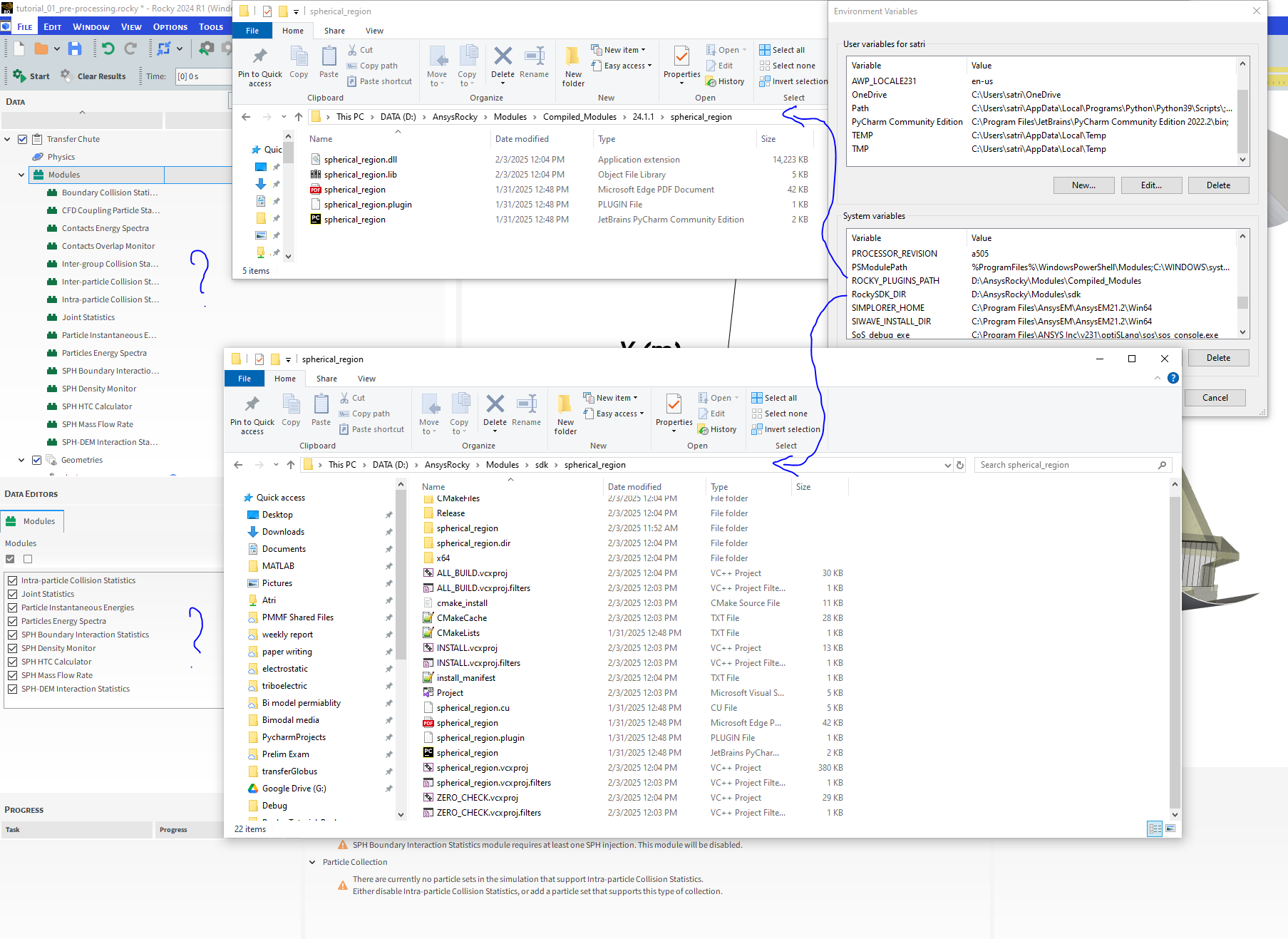
please see the log below and the screenshot from Rocky GUI.
-
February 3, 2025 at 5:20 pmSubscriber
**********************************************************************
** Visual Studio 2019 Developer Command Prompt v16.11.43
** Copyright (c) 2021 Microsoft Corporation
**********************************************************************C:\Program Files (x86)\Microsoft Visual Studio\2019\BuildTools>cd ..
C:\Program Files (x86)\Microsoft Visual Studio\2019>cd ..
C:\Program Files (x86)\Microsoft Visual Studio>cd ..
C:\Program Files (x86)>cd ..
C:\>cd ..
C:\>cd "D:\AnsysRocky\Modules\sdk\spherical_region"
C:\>
C:\>D:D:\AnsysRocky\Modules\sdk\spherical_region>
D:\AnsysRocky\Modules\sdk\spherical_region>cmake -DCMAKE_GENERATOR_PLATFORM=x64 spherical_region
-- Building for: Visual Studio 16 2019
CMake Warning (dev) in CMakeLists.txt:
No project() command is present. The top-level CMakeLists.txt file must
contain a literal, direct call to the project() command. Add a line of
code such asproject(ProjectName)
near the top of the file, but after cmake_minimum_required().
CMake is pretending there is a "project(Project)" command on the first
line.
This warning is for project developers. Use -Wno-dev to suppress it.-- Selecting Windows SDK version 10.0.19041.0 to target Windows 10.0.19045.
-- The C compiler identification is MSVC 19.29.30158.0
-- The CXX compiler identification is MSVC 19.29.30158.0
-- Detecting C compiler ABI info
-- Detecting C compiler ABI info - done
-- Check for working C compiler: C:/Program Files (x86)/Microsoft Visual Studio/2019/BuildTools/VC/Tools/MSVC/14.29.30133/bin/Hostx64/x64/cl.exe - skipped
-- Detecting C compile features
-- Detecting C compile features - done
-- Detecting CXX compiler ABI info
-- Detecting CXX compiler ABI info - done
-- Check for working CXX compiler: C:/Program Files (x86)/Microsoft Visual Studio/2019/BuildTools/VC/Tools/MSVC/14.29.30133/bin/Hostx64/x64/cl.exe - skipped
-- Detecting CXX compile features
-- Detecting CXX compile features - done
-- Setting CUDA_TOOLKIT_ROOT_DIR to 'C:/Program Files/NVIDIA GPU Computing Toolkit/CUDA/v11.7'
-- Found CUDA: C:/Program Files/NVIDIA GPU Computing Toolkit/CUDA/v11.7 (found suitable exact version "11.7")
-- Found OpenMP_C: -openmp (found version "2.0")
-- Found OpenMP_CXX: -openmp (found version "2.0")
-- Found OpenMP: TRUE (found version "2.0")
-- Modified CMAKE_CXX_FLAGS: '/DWIN32 /D_WINDOWS /W3 /GR /EHsc /openmp'
-- NVCC flags: '-std=c++17;-gencode=arch=compute_35,code="sm_35,compute_35";-gencode=arch=compute_60,code="sm_60,compute_60";-gencode=arch=compute_70,code="sm_70,compute_70";-gencode=arch=compute_80,code="sm_80,compute_80"'
-- INCLUDE_DIR = 'D:/AnsysRocky/Modules/sdk/include'
-- LINK_DIR = 'D:\AnsysRocky\Modules\sdk/libs'
-- ROCKY_PLUGIN_INSTALLATION_DIRECTORY = 'D:\AnsysRocky\Modules\Compiled_Modules'
CMake Warning (dev) in CMakeLists.txt:
No cmake_minimum_required command is present. A line of code such ascmake_minimum_required(VERSION 3.20)
should be added at the top of the file. The version specified may be lower
if you wish to support older CMake versions for this project. For more
information run "cmake --help-policy CMP0000".
This warning is for project developers. Use -Wno-dev to suppress it.-- Configuring done
CMake Warning (dev) at C:/Program Files (x86)/Microsoft Visual Studio/2019/BuildTools/Common7/IDE/CommonExtensions/Microsoft/CMake/CMake/share/cmake-3.20/Modules/FindCUDA.cmake:1985 (add_library):
Policy CMP0003 should be set before this line. Add code such asif(COMMAND cmake_policy)
cmake_policy(SET CMP0003 NEW)
endif(COMMAND cmake_policy)as early as possible but after the most recent call to
cmake_minimum_required or cmake_policy(VERSION). This warning appears
because target "spherical_region" links to some libraries for which the
linker must search:rocky20api-MD, rocky20addins-MD, rocky20-MD, rocky_logging-MD
and other libraries with known full path:
C:/Program Files/NVIDIA GPU Computing Toolkit/CUDA/v11.7/lib/x64/cudart_static.lib
CMake is adding directories in the second list to the linker search path in
case they are needed to find libraries from the first list (for backwards
compatibility with CMake 2.4). Set policy CMP0003 to OLD or NEW to enable
or disable this behavior explicitly. Run "cmake --help-policy CMP0003" for
more information.
Call Stack (most recent call first):
CMakeLists.txt:13 (cuda_add_library)
This warning is for project developers. Use -Wno-dev to suppress it.-- Generating done
-- Build files have been written to: D:/AnsysRocky/Modules/sdk/spherical_regionD:\AnsysRocky\Modules\sdk\spherical_region>cmake --build . --config Release
Microsoft (R) Build Engine version 16.11.2+f32259642 for .NET Framework
Copyright (C) Microsoft Corporation. All rights reserved.Checking Build System
Building NVCC (Device) object CMakeFiles/spherical_region.dir/Release/spherical_region_generated_spherical_region.cu.
obj
spherical_region.cu
CUSTOMBUILD : nvcc warning : The 'compute_35', 'compute_37', 'sm_35', and 'sm_37' architectures are deprecated, and may
be removed in a future release (Use -Wno-deprecated-gpu-targets to suppress warning). [D:\AnsysRocky\Modules\sdk\spher
ical_region\spherical_region.vcxproj]
CUSTOMBUILD : nvcc warning : The 'compute_35', 'compute_37', 'sm_35', and 'sm_37' architectures are deprecated, and may
be removed in a future release (Use -Wno-deprecated-gpu-targets to suppress warning). [D:\AnsysRocky\Modules\sdk\spher
ical_region\spherical_region.vcxproj]
spherical_region.cu
D:/AnsysRocky/Modules/sdk/include\rocky20/model/general_data.h(1932): warning C4244: 'initializing': conversion from 's
ize_t' to 'double', possible loss of data [D:\AnsysRocky\Modules\sdk\spherical_region\spherical_region.vcxproj]
D:/AnsysRocky/Modules/sdk/include\rocky20/model/general_data.h(1934): warning C4244: 'initializing': conversion from 's
ize_t' to 'double', possible loss of data [D:\AnsysRocky\Modules\sdk\spherical_region\spherical_region.vcxproj]
D:/AnsysRocky/Modules/sdk/include\rocky20/model/general_data.h(1948): warning C4244: 'initializing': conversion from 'd
ouble' to 'int', possible loss of data [D:\AnsysRocky\Modules\sdk\spherical_region\spherical_region.vcxproj]
D:\AnsysRocky\Modules\sdk\spherical_region\spherical_region\spherical_region.cu(71): warning C4297: 'initialize_cuda':
function assumed not to throw an exception but does [D:\AnsysRocky\Modules\sdk\spherical_region\spherical_region.vcxpro
j]
D:\AnsysRocky\Modules\sdk\spherical_region\spherical_region\spherical_region.cu(71): note: The function is extern "C"
and /EHc was specified
D:\AnsysRocky\Modules\sdk\spherical_region\spherical_region\spherical_region.cu(72): warning C4297: 'initialize_cuda':
function assumed not to throw an exception but does [D:\AnsysRocky\Modules\sdk\spherical_region\spherical_region.vcxpro
j]
D:\AnsysRocky\Modules\sdk\spherical_region\spherical_region\spherical_region.cu(72): note: The function is extern "C"
and /EHc was specified
D:\AnsysRocky\Modules\sdk\spherical_region\spherical_region\spherical_region.cu(115): warning C4297: 'finish_cuda': fun
ction assumed not to throw an exception but does [D:\AnsysRocky\Modules\sdk\spherical_region\spherical_region.vcxproj]
D:\AnsysRocky\Modules\sdk\spherical_region\spherical_region\spherical_region.cu(115): note: The function is extern "C
" and /EHc was specified
D:/AnsysRocky/Modules/sdk/include\rocky20/api/rocky_boundary.hpp(357): warning C4244: 'argument': conversion from 'cons
t unsigned short' to 'const uint8_t', possible loss of data [D:\AnsysRocky\Modules\sdk\spherical_region\spherical_regio
n.vcxproj]
D:/AnsysRocky/Modules/sdk/include\rocky20/api/rocky_boundary.hpp(353): note: while compiling class template member fu
nction 'bool RockyBoundaryTriangle::get_boundary_flat(const EHandleLocation,const unsigned short) const
'
D:/AnsysRocky/Modules/sdk/include\rocky20/device/device_contact.hpp(85): note: see reference to function template ins
tantiation 'bool RockyBoundaryTriangle::get_boundary_flat(const EHandleLocation,const unsigned short) c
onst' being compiled
D:/AnsysRocky/Modules/sdk/include\rocky20/api/rocky_boundary_api.hpp(108): note: see reference to class template inst
antiation 'RockyBoundaryTriangle' being compiled
D:/AnsysRocky/Modules/sdk/include\rocky20/api/rocky_boundary_api.hpp(133): note: see reference to class template inst
antiation 'IRockyGeometryTriangleImpl' being compiled
D:/AnsysRocky/Modules/sdk/include\rocky20/api/rocky_boundary.hpp(359): warning C4244: 'argument': conversion from 'cons
t unsigned short' to 'const uint8_t', possible loss of data [D:\AnsysRocky\Modules\sdk\spherical_region\spherical_regio
n.vcxproj]
Building Custom Rule D:/AnsysRocky/Modules/sdk/spherical_region/spherical_region/CMakeLists.txt
CMake is re-running because D:/AnsysRocky/Modules/sdk/spherical_region/CMakeFiles/generate.stamp is out-of-date.
the file 'D:/AnsysRocky/Modules/sdk/spherical_region/CMakeFiles/spherical_region.dir/spherical_region_generated_sph
erical_region.cu.obj.depend'
is newer than 'D:/AnsysRocky/Modules/sdk/spherical_region/CMakeFiles/generate.stamp.depend'
result='-1'
CMake Warning (dev) in CMakeLists.txt:
No project() command is present. The top-level CMakeLists.txt file must
contain a literal, direct call to the project() command. Add a line of
code such asproject(ProjectName)
near the top of the file, but after cmake_minimum_required().
CMake is pretending there is a "project(Project)" command on the first
line.
This warning is for project developers. Use -Wno-dev to suppress it.-- Selecting Windows SDK version 10.0.19041.0 to target Windows 10.0.19045.
-- Setting CUDA_TOOLKIT_ROOT_DIR to 'C:/Program Files/NVIDIA GPU Computing Toolkit/CUDA/v11.7'
-- Modified CMAKE_CXX_FLAGS: '/DWIN32 /D_WINDOWS /W3 /GR /EHsc /openmp'
-- NVCC flags: '-std=c++17;-gencode=arch=compute_35,code="sm_35,compute_35";-gencode=arch=compute_60,code="sm_60,comp
ute_60";-gencode=arch=compute_70,code="sm_70,compute_70";-gencode=arch=compute_80,code="sm_80,compute_80"'
-- INCLUDE_DIR = 'D:/AnsysRocky/Modules/sdk/include'
-- LINK_DIR = 'D:\AnsysRocky\Modules\sdk/libs'
-- ROCKY_PLUGIN_INSTALLATION_DIRECTORY = 'D:\AnsysRocky\Modules\Compiled_Modules'
CMake Warning (dev) in CMakeLists.txt:
No cmake_minimum_required command is present. A line of code such ascmake_minimum_required(VERSION 3.20)
should be added at the top of the file. The version specified may be lower
if you wish to support older CMake versions for this project. For more
information run "cmake --help-policy CMP0000".
This warning is for project developers. Use -Wno-dev to suppress it.-- Configuring done
CMake Warning (dev) at C:/Program Files (x86)/Microsoft Visual Studio/2019/BuildTools/Common7/IDE/CommonExtensions/Mi
crosoft/CMake/CMake/share/cmake-3.20/Modules/FindCUDA.cmake:1985 (add_library):
Policy CMP0003 should be set before this line. Add code such asif(COMMAND cmake_policy)
cmake_policy(SET CMP0003 NEW)
endif(COMMAND cmake_policy)as early as possible but after the most recent call to
cmake_minimum_required or cmake_policy(VERSION). This warning appears
because target "spherical_region" links to some libraries for which the
linker must search:rocky20api-MD, rocky20addins-MD, rocky20-MD, rocky_logging-MD
and other libraries with known full path:
C:/Program Files/NVIDIA GPU Computing Toolkit/CUDA/v11.7/lib/x64/cudart_static.lib
CMake is adding directories in the second list to the linker search path in
case they are needed to find libraries from the first list (for backwards
compatibility with CMake 2.4). Set policy CMP0003 to OLD or NEW to enable
or disable this behavior explicitly. Run "cmake --help-policy CMP0003" for
more information.
Call Stack (most recent call first):
CMakeLists.txt:13 (cuda_add_library)
This warning is for project developers. Use -Wno-dev to suppress it.-- Generating done
-- Build files have been written to: D:/AnsysRocky/Modules/sdk/spherical_region
Creating library D:/AnsysRocky/Modules/sdk/spherical_region/Release/spherical_region.lib and object D:/AnsysRocky/
Modules/sdk/spherical_region/Release/spherical_region.exp
LINK : warning LNK4098: defaultlib 'LIBCMT' conflicts with use of other libs; use /NODEFAULTLIB:library [D:\AnsysRocky\
Modules\sdk\spherical_region\spherical_region.vcxproj]
spherical_region.vcxproj -> D:\AnsysRocky\Modules\sdk\spherical_region\Release\spherical_region.dll
Building Custom Rule D:/AnsysRocky/Modules/sdk/spherical_region/spherical_region/CMakeLists.txtD:\AnsysRocky\Modules\sdk\spherical_region>
D:\AnsysRocky\Modules\sdk\spherical_region>cmake -P cmake_install.cmake
-- Install configuration: "Release"
-- Installing: D:/AnsysRocky/Modules/Compiled_Modules/24.1.1/spherical_region/spherical_region.lib
-- Installing: D:/AnsysRocky/Modules/Compiled_Modules/24.1.1/spherical_region/spherical_region.dll
-- Installing: D:/AnsysRocky/Modules/Compiled_Modules/24.1.1/spherical_region/spherical_region.plugin
-- Installing: D:/AnsysRocky/Modules/Compiled_Modules/24.1.1/spherical_region/spherical_region.py
-- Installing: D:/AnsysRocky/Modules/Compiled_Modules/24.1.1/spherical_region/spherical_region.pdfD:\AnsysRocky\Modules\sdk\spherical_region>
-
February 3, 2025 at 5:31 pmAnsys Employee
I don't see the compilation log
-
February 3, 2025 at 5:39 pmSubscriber
What is a completion log?
I executed the three lines given in the tutorial.
The entire log is put above
-
February 3, 2025 at 5:40 pmAnsys Employee
It wasn't loaded before. Let me analyze it.
-
February 3, 2025 at 5:49 pmAnsys Employee
Shyam, could you open Rocky and go to Help -> About and print the "About Rocky" window that appears?
-
February 3, 2025 at 5:51 pmSubscriber
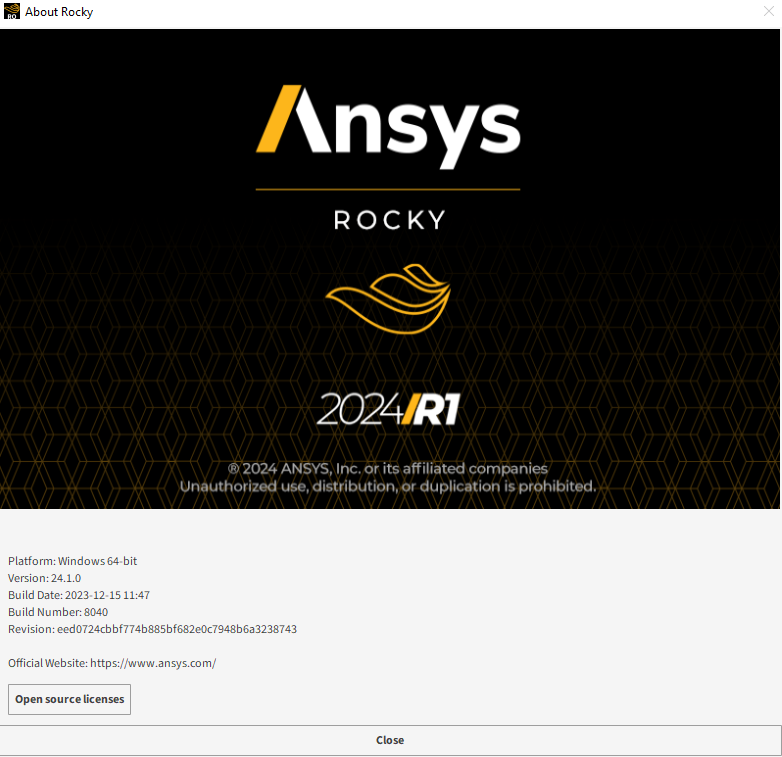
-
February 3, 2025 at 5:53 pmAnsys Employee
Dear Shyam, this means that you have 24.1.0 version, and not 24.1.1 - please install the correct version through customer portal.
-
February 3, 2025 at 5:54 pmSubscriber
I am using Rocky, which is provided by Ansys license at the university (North Carolina State University, NCSU).
-
February 3, 2025 at 5:55 pmAnsys Employee
Yes, but you're compiling for the 24.1.1 version and you have the 24.1.0 version installed. Please switch to the correct version in order to use the module.
-
February 3, 2025 at 6:00 pmSubscriber
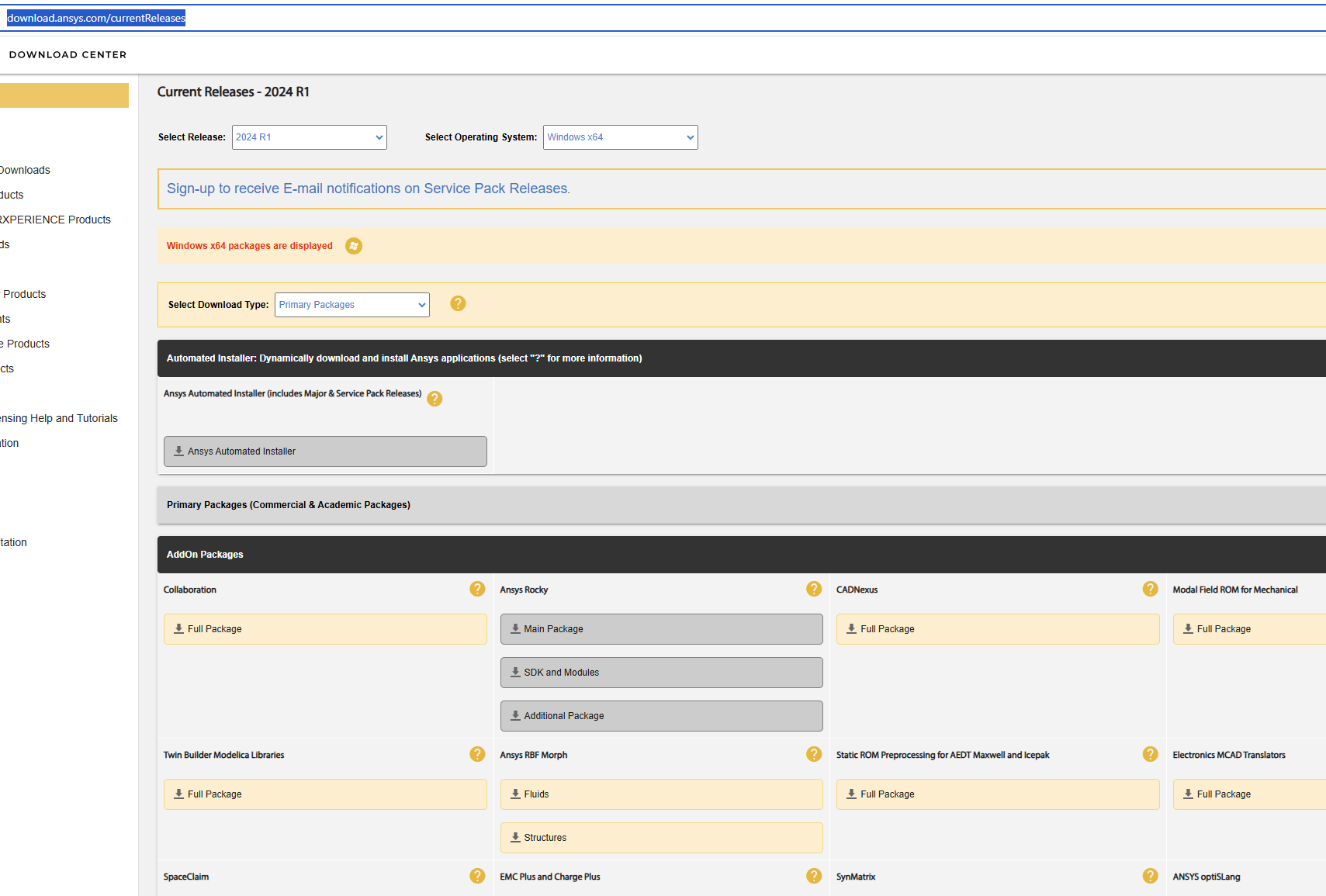
I do not see sdk version of 24.1.0 it only allows me to download SDK 24.1.1.
Pleas elt me know where I can find SDK 24.1.0 here
https://download.ansys.com/currentReleases
-
February 3, 2025 at 6:51 pmAnsys Employee
Dear Shyam, are you not able to upgrade to 24.1.1?
-
February 3, 2025 at 8:35 pmSubscriber
I have requested the university to install the new version on one computer. but it might take a day or two.
So I thought that if I could get 24.1.0, it would be great.
-
February 4, 2025 at 2:14 pmSubscriber
Hey I am trying to install rocky 25r1 but I am having issue downloading it on my personal computer. I am trying to install it with the student version download. I extracted the file installed it and restarted my computer. But I do not see any Ansys products. Please tell me if SDK works with student version?
-
February 4, 2025 at 2:15 pmSubscriber
And why am I not able to install it on my computer? I followed the instructions given on installation page
-
February 4, 2025 at 2:37 pmAnsys Employee
To download Ansys Student that includes Ansys Rocky as part of the bundle, visit here. It should be a 15.4 GB file, containing all Ansys Student applications.
-
February 4, 2025 at 2:42 pmForum Moderator
And make sure to read the text telling you to download some extra files for Rocky.
-
February 4, 2025 at 4:56 pmSubscriber
Hey I downloaded from the same link you provided but i keep getting this error
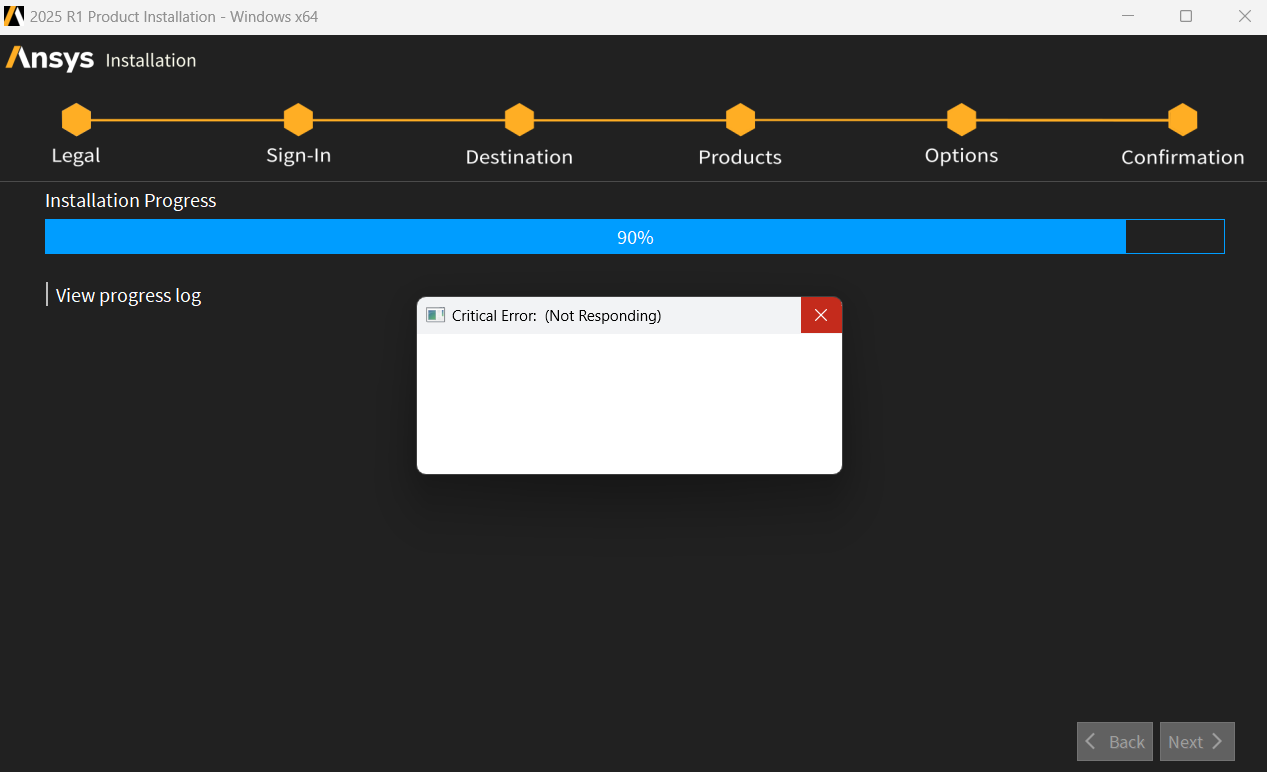
The worst part is it is not shwoing wha error it is generating
Also Now i dont see ansys in control pannel and i dont know how to uninstall it?
Please let me know how to uninstall it now
-
February 4, 2025 at 5:17 pmSubscriber
I am trying to run this
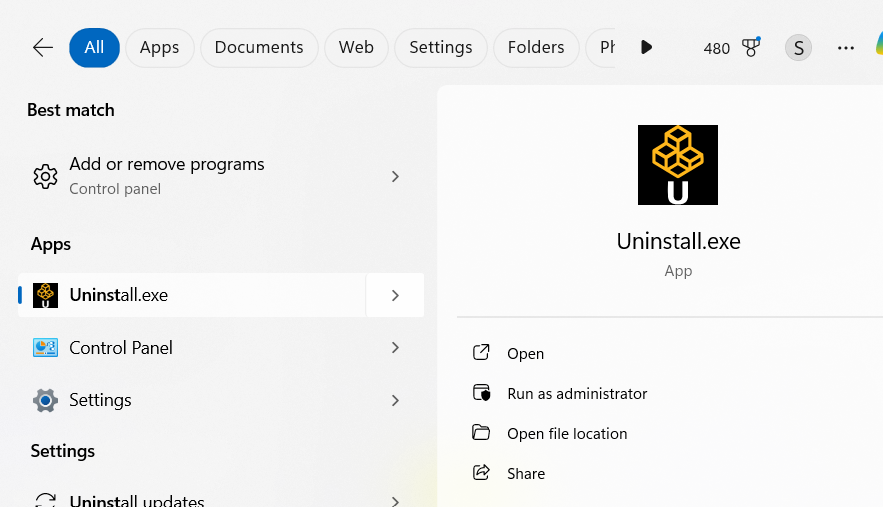
This doesent even open
Is there any other way to uninstall Ansys.
Or is it by any chance possible to get sdk version 24.1.0. I dont see it in your portal at all?
-
February 4, 2025 at 5:29 pmAnsys Employee
The sdk for the 24.1.0 version is not available in the customer portal. Please try to remove any Ansys related installation files from your machine and try to install the products again. Make sure you unzip the folder before installing everything.
-
February 4, 2025 at 5:35 pmSubscriber
Hey
I am not able to run the uninstaller program to uninstall ansys. Please let me know how to uninstall it without the uninstaller program.
This is where i have installed ansys.
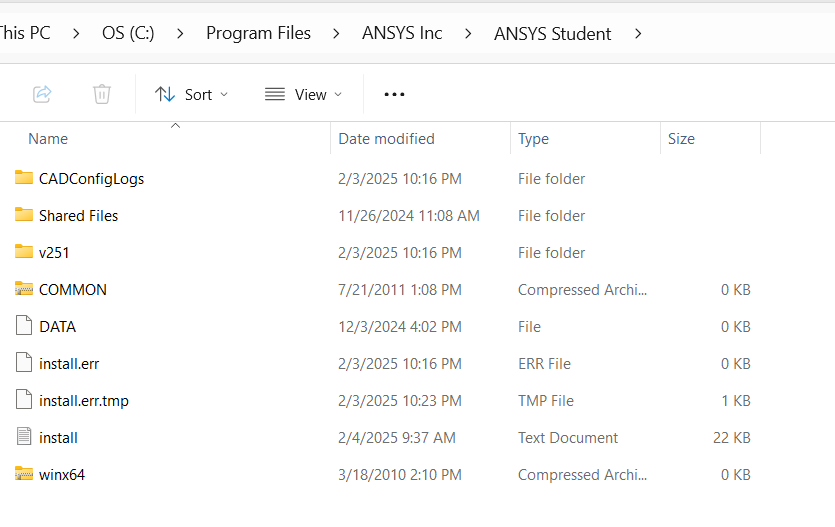
would deleting the entire folder uninstall it?
I have tried to install it twice
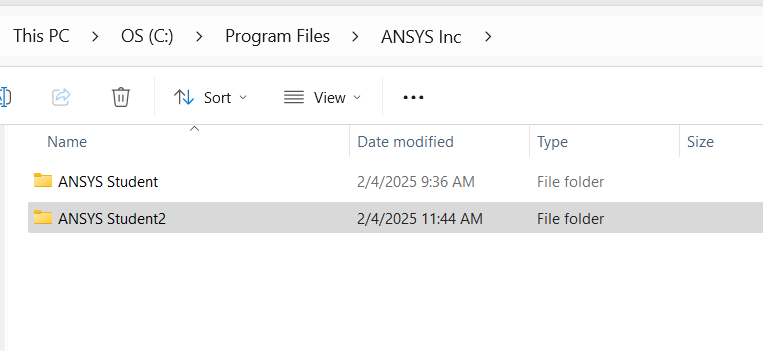
How to uninstall these?
-
February 4, 2025 at 5:41 pmSubscriber
I do not see ansys in this section too
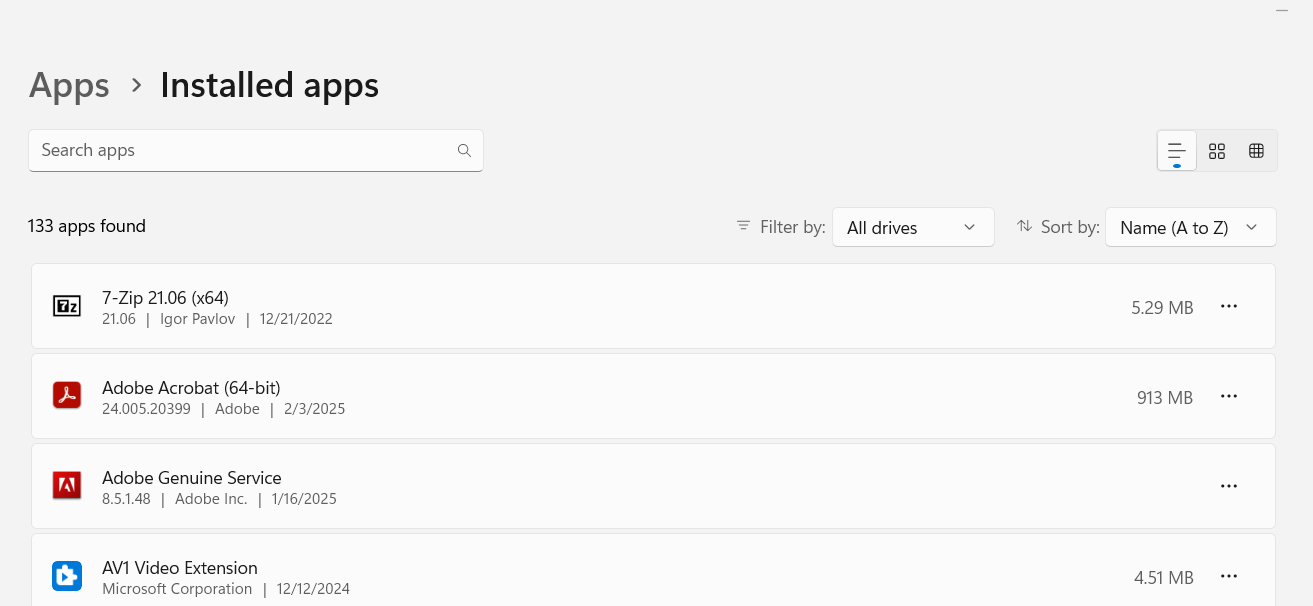
-
February 4, 2025 at 8:21 pmSubscriber
hey
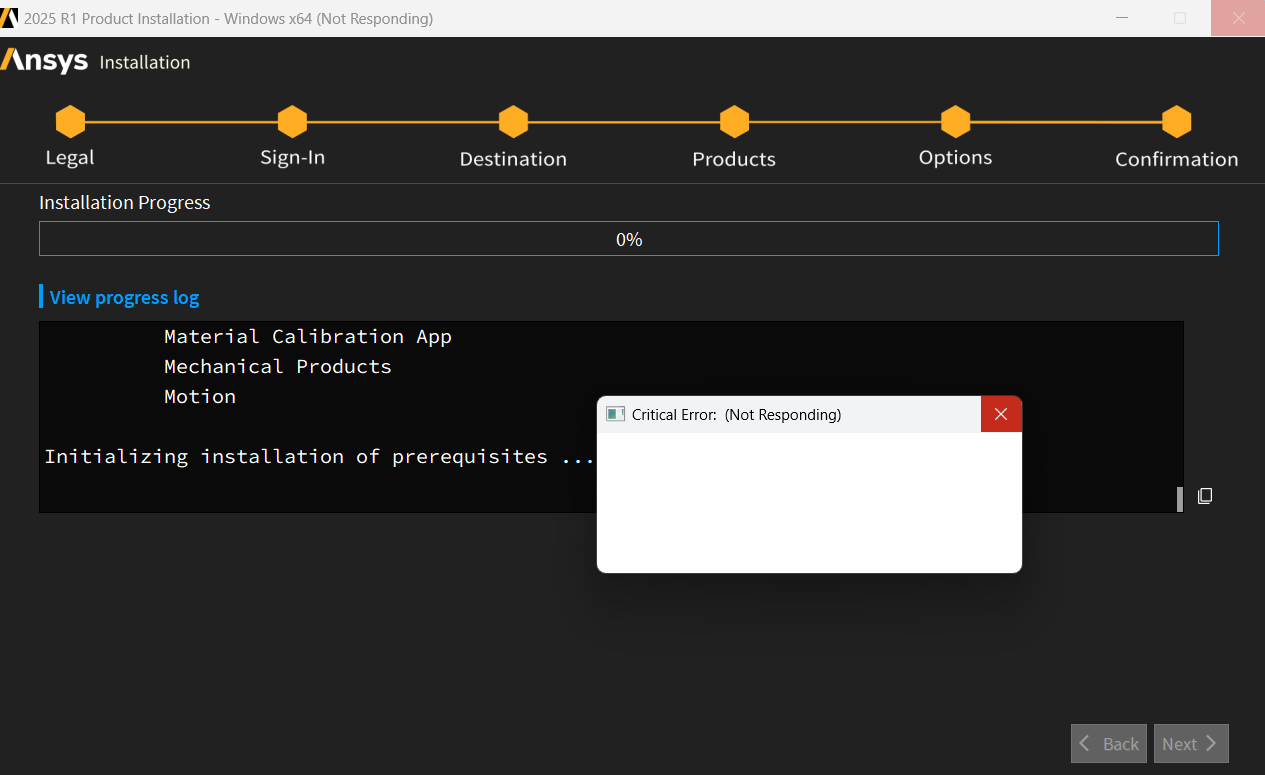
Now the installation gets stuck at this point and does not proceed.
Please let me know how I can install ansys. all the hardware req meet the required spec.
-
February 4, 2025 at 8:23 pmSubscriber
This is the installation log
>>>--------------------------------------->Start Installation: Tue Feb 04 14:09:53 2025Revision: 2025 R1Platform specifics:WindowsUsername of Installer: AAAAAAA\shyamUser Has Administrator PrivilegesC:\Users\shyam\AppData\Local\Temp\ans_install_tmp8660\instcore.exe -usetempdir C:\Users\shyam\AppData\Local\Temp\ans_install_tmp8660 -launchdir C:\Users\shyam\Downloads\ANSYSACADEMICSTUDENT_2025R1_WINX64 -adminInitial mount directory:C:\Users\shyam\Downloads\ANSYSACADEMICSTUDENT_2025R1_WINX64Installation Directory:C:\Program Files\ANSYS Inc\ANSYS StudentWindows x64DesignFluidsAnsys Dynamic ReportingCFX (includes CFD-Post)ChemkinEnSightFENSAP-ICEFluent (includes CFD-Post)Forte (includes EnSight)Model Fuel Library (Encrypted)Polyflow (includes CFD-Post)Reaction WorkbenchRockyTurboGridGeometry InterfacesDiscovery Geometry InterfaceOpticalSpeosSpeos RPCStructuresAqwaAutodynMaterial Calibration AppMechanical ProductsMotionInitializing installation of prerequisites ...The installation will copy the prerequisite setup files from the media in case you need to reconfigure later or if you need to configure client machines for products installed to a network share.This may take a while ...Successfully copied prerequisites from media.You don't need to install any prerequisites. -
February 4, 2025 at 8:24 pm
George Karnos
Ansys EmployeeHi,
What is meant by :
I am not able to run the uninstaller program to uninstall ansys.Are you receiving an error?
What happens if you right click on:
Start->Ansys 2025 R1->Uninstall Ansys 2025 R1
Then choose run as administratorYou can also run it by right->click on:
c:\Program Files\Ansys Inc\Ansys Student\v251\Uninstall.exe
Then choose run as administrator
If you rename the directory c:\Program Files\Ansys Inc\Ansys Student
to c:\Program Files\Ansys Inc\Ansys Student-safeThen delete the following environment variables:
AWP_LOCALE251=en-us
AWP_ROOT251=C:\Program Files\ANSYS Inc\ANSYS Student\v251
ANSYS251_DIR=C:\Program Files\ANSYS Inc\ANSYS Student\v251\ANSYS
CADOE_LIBDIR251=C:\Program Files\ANSYS Inc\ANSYS Student\v251\CommonFiles\Language\en-us
P_SCHEMA=C:\Program Files\ANSYS Inc\ANSYS Student\v251\AISOL\CADIntegration\Parasolid\PSchema
That should also allow you to perform a clean installation.
#IMPORTANT: Always right-click and choose run as administrator when running any uninstall or setup executable.
Ansys 2025 R1 will not be displayed in the APPS->Installed Apps Window. -
February 4, 2025 at 8:31 pmSubscriber
I got frustrated with this installation process, causing so many issues, and deleted the entire folder from C drive.
I was running in admin mode.
I don’t see any of the environment variables that you have listed.
Please let me know how I can proceed from here. I don’t have an uninstall option anymore in start menu.
-
February 4, 2025 at 11:30 pmSubscriber
Hello George,
I am still facing the issue. Can you please tell me how I can install ansys?
I deleted the old installation completely from C drive. Now I do not see any uninstall option. But I am not able to install it too. So I don't know what to do.
-
February 5, 2025 at 11:18 amForum Moderator
Moderator comment. Staff work in a range of timezones. Bumping a thread after 3 hours is not going to speed up a response if that person isn't at work. What it may do is annoy the moderators.
-
February 11, 2025 at 3:21 pmSubscriber
Hello Rob
Its been 6 days and my issue is still not resolved.
Please tell me what to do now.
I cant install ansys 2025 r1 on my laptop.
I don't know how to proceed
-
-
February 5, 2025 at 12:54 pmAnsys Employee
Hello Shyam,
Do you have any Virus protection that may be blocking installation?
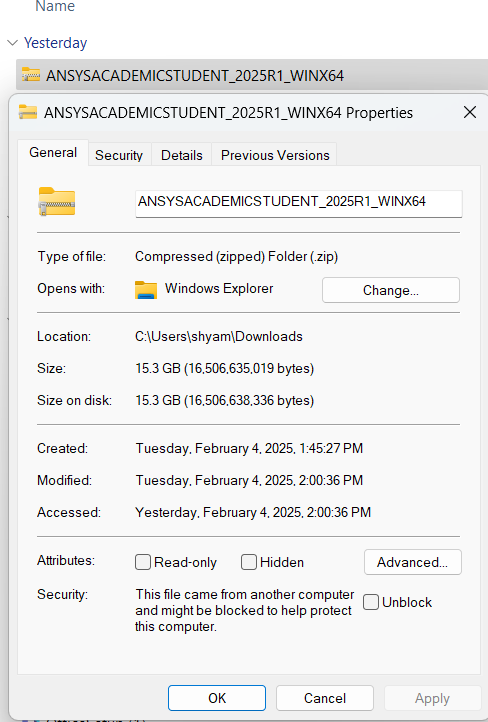
What is the size of the ANSYSACADEMICSTUDENT_2025R1_WINX64.zip file that you have downloaded?
16,119,761 KB
When you run the installation and look at Task Manager, do you see
instcore.exe using cpu/memory? Sort by CPU
Do you see any antivirus using cpu/memory as well? -
February 5, 2025 at 4:00 pmSubscriber
Hello Sure. I will wait.
So i have disabled the antivirus.
I have even disabled the firewall.
This is what I downloaded from Ansys website.
-
February 7, 2025 at 4:58 pmSubscriber
Hello
I am trying to follow up on this one. I am still not able to install ansys2025r1 student on my laptop. Please let me know how to fix this
-
- You must be logged in to reply to this topic.



-
peteroznewman
 5869
5869 -
scabo
 1906
1906 -
Dennis Chen
 1420
1420 -
javat33489
 1306
1306 -
Shyam Prasad V Atri
1021



© 2026 Copyright ANSYS, Inc. All rights reserved.

 You are navigating away from the AIS Discovery experience