Ansys Learning Forum › Forums › Installation and Licensing › Ansys Products › speed up the job in hpc (mpp) › Reply To: speed up the job in hpc (mpp)
 rajesh.pamarthi2711
Hi Reno,
When I executed the job only using -
srun mpp-dyna i=/home/pro/main.k memory=120000000, I can see the mes0000 - mes00031 files in my working directory. I think the SLURM manager automatically allots the ntasks to the lsdyna and its working.
And due to the new comaptitibility issue of modules, I have removed my OPEN MPI module. so currently i am only using -
module load GCC/13.2.0 intel-compilers/2023.2.1 impi/2021.10.0 Python/3.11.5 SciPy-bundle/2023.12 matplotlib/3.8.2 LS-DYNA/14.1.0
with the above modules and with the lsdyna execution command (please look at the mpirun path and lsrun path)
/software/rapids/r24.04/impi/2021.10.0-intel-compilers-2023.2.1/mpi/2021.10.0/bin/mpirun -genv I_MPI_PIN_DOMAIN=core -np 24 ls-dyna_mpp_d_R14_1_0_x64_centos79_ifort190_avx2_intelmpi-2018_sharelib i={new_file_path} memory=200M'
I have run some jobs with options.
1) np32, memory=20m, binding cores disabled - 185 hrs (status.out file)
2) np32, memory=20m, binding cores enabled - 168 hrs (status.out file)
3) np32, memory=200m, binding cores enabled - 168 hrs (status.out file)
4) np24, memory=200m, binding cores enabled - 190 hrs (status.out file)
I am using IMPI here as you can see in the loaded modules. and i have given the path to the lsrun executable, can you once look at the path. I have tried many different settings (changing nodes, cores, memory in sbatch, memory option in lsdyna command), but i am not able to optimize. The simulation kinda consists of running the electromagnetic solver execution
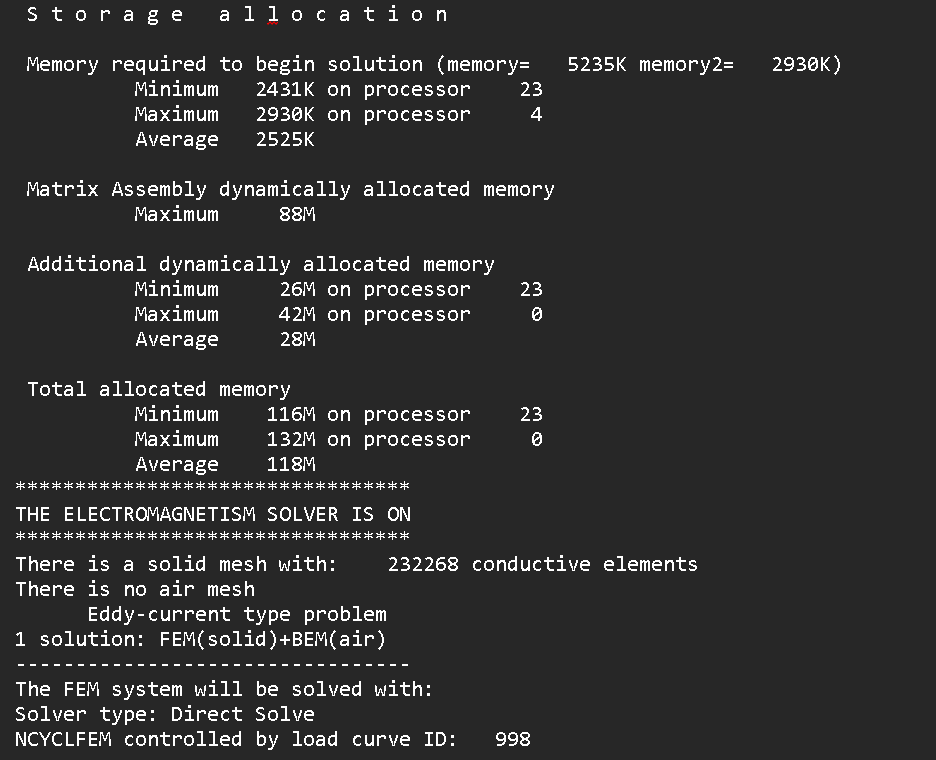
can you let me know where I am going wrong

 You are navigating away from the AIS Discovery experience