Ansys Learning Forum › Forums › Installation and Licensing › Ansys Products › Unexpected issues with SCCM deployment of Ansys Fluids and Structures 2024 R1 › Reply To: Unexpected issues with SCCM deployment of Ansys Fluids and Structures 2024 R1
October 18, 2024 at 6:45 pm
 MangeshANSYS
Ansys Employee
a few different suggestions:
- Try setting a different TEMP folder in case the service account is unable to write to C:\Windows\Temp When a user logs in for interactive install the TEMP folder is under userprofile and not under the syetem temp (Windows\TEMP) in my experience Windows\Temp has additional restrictions. I do no have experience working with UAC slider set to highest and how that might affect things.
In your script that installs Ansys, can you try setting TEMP to something like C:\TEMP which has write permissions for all users ?
so script will look something like
set TEMP=C:\TEMP
cd C:\Windows\ccmcache\your Ansys installation files folder
setup.exe -silent ........ your installation flags here - One other thing is try this on one test machine - first manually install the prerequisites for Ansys 2024 R1
The prereqs should be either in installation_media\prereqs folder sa individual executable files or as a zip file which needs to be extracted first.
Here is a list of the ones I am suggesting installing first
What I am expecting to identify from this one time exercise on one machine is if setup is failing in prerequisites check or prerequisites installation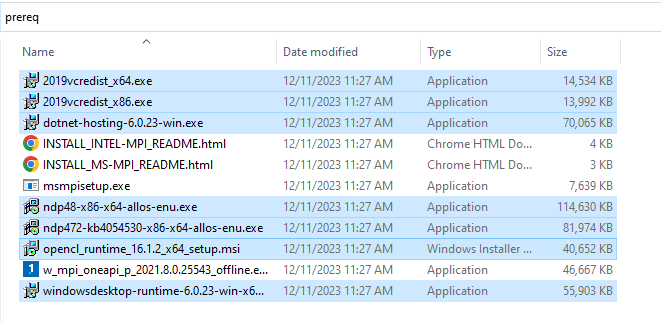
- A third thing to try a script (maybe a vbscript) which elevates the command prompt and runs setup in that elevated prompt I realize you just reported that adding runas was not successful yet, but I see that as a key to resolution if the 2 things above do not help

 You are navigating away from the AIS Discovery experience