Ansys Assistant will be unavailable on the Learning Forum starting January 30. An upgraded version is coming soon. We apologize for any inconvenience and appreciate your patience. Stay tuned for updates.
General Mechanical

General Mechanical

Topics related to Mechanical Enterprise, Motion, Additive Print and more.

Arclength method-Tabular Error

    • venugopal4048
      Subscriber

      Hello all!


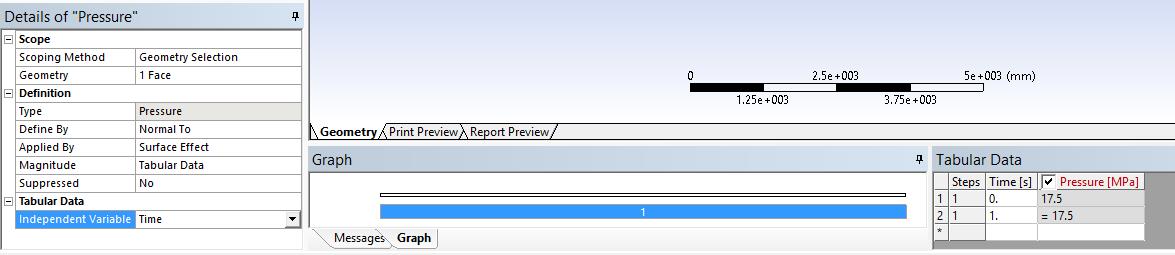
      I am doing nonlinear buckling analysis in ansys workbench. To capture the nonlinear post-buckling behavior of the structure, i am using Arclength method. But when using it, workbench always shows the error "Arclength method does not allow tabular loads". I don't know why it happens?


      I applied a pressure of 17.5 MPa , but it is converted into tabular form. how to rectify it?


      I have attched the error msg.


      Thanking You



    • jj77
      Subscriber

      I is funny this one. I would make sure you delete it and redefine it, 


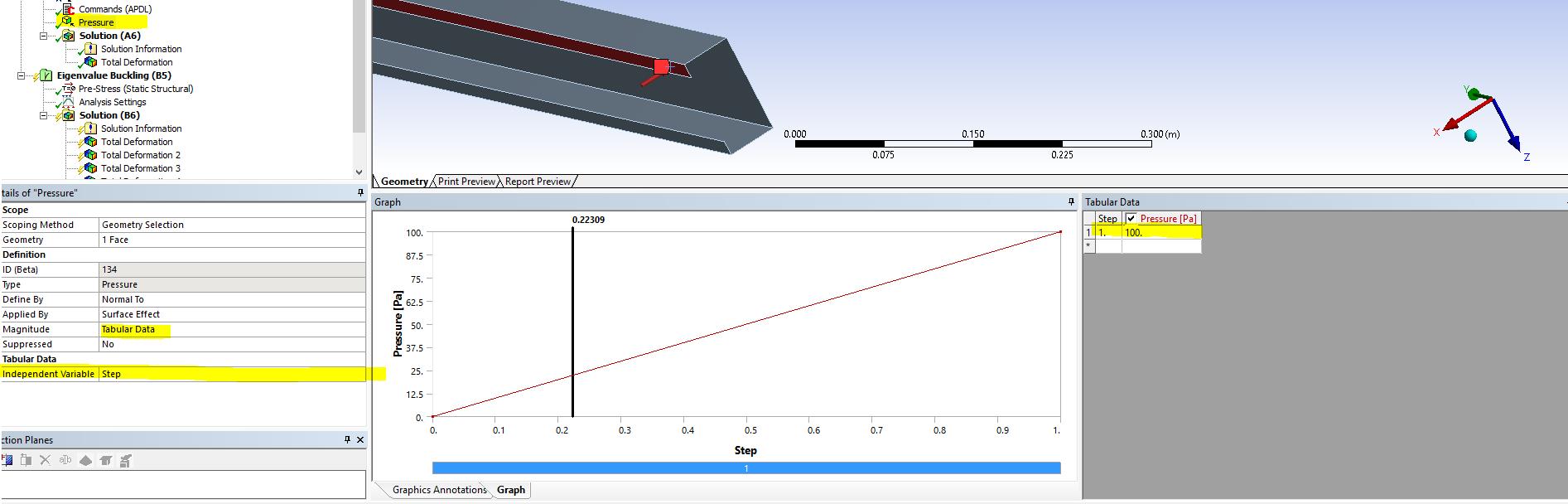
      This will help to define it:

      https://www.eng-tips.com/viewthread.cfm?qid=448149

      (The above approach in the link, works, see below)


      Alternatively I would use stabilisation if you have some complicated buckling (say snap through), which works much better, and is available in WB by deafult (no need for commands)

    • Sandeep Medikonda
      Ansys Employee


      Tabular loads can't have negative time, so they aren't suitable for the arclength method. Starting from Release 16.0, the use of tabular loads has been blocked when using the arc-length method. 

      One alternate way would be to specify a command snippet and define a direct load for that load step. For example use force on a node, or pressure on face(s)  and since it is a single value you can ramp it up and down with time. Something like:

      kbc,0

      f,rp1,fy,-10000

      arclen,on,1,1e-7

    • venugopal4048
      Subscriber

      `first of all thank u for your response.

      But, the picture that u posted shows the Step in Independent variable. But in my model it Shows time instead of Step. Why?


    • jj77
      Subscriber

      Well just change it from the drop list next to it ??

    • venugopal4048
      Subscriber

      No sir.

      It Shows only 4 options. They are 1.Time, 2. X 3. Y 4. Z

      There is no Step option.

      I am using ansys version 18.0

    • venugopal4048
      Subscriber

      Hello sir !

      You are talking about the snippet command. But the example you posted here, did not have any command Snippet. Also in that commands you are applying force in Y direction, But in my case i need to apply pressure on the top surface of an ellipsoidal dome normal to that surface. Is this command is suitable to apply pressure normal to all direction? (Because structure is in curved shape).

      Thanking you!

    • jj77
      Subscriber


      I am talking about my post see image where I have chosen step. If you do not have it is likely due to the old version you have. I used 19.2 student version which you can upgrade to. (As for the command snippet that is from someone else not me - So I can not comment)


      As I said if you do not want to upgrade just use stabilisation instead it is much better than arclength which I must say is not really great.

    • venugopal4048
      Subscriber

      Ok sir.

      I try with the upgraded version. Then come back here.

      Thanking you.

    • venugopal4048
      Subscriber

      You are talking about the snippet command. But the example you posted here, did not have any command Snippet. Also in that commands you are applying force in Y direction, But in my case i need to apply pressure on the top surface of an ellipsoidal dome normal to that surface. Is this command is suitable to apply pressure normal to all direction? (Because structure is in curved shape).

      Thanking you!

    • J.Orooji
      Subscriber

      Hello dear Venugopalb

      I have the same problem, how did you solve it finally? Was the upgraded version usefull?

    • venugopal4048
      Subscriber

      J.Orooji!

      Yes i solved the problem. I used ansys 18 version, where you select Tabular load, then select independent variable as step. Arc-length method works very well with this.

      Regards

      Venugopalb

    • J.Orooji
      Subscriber
      Dear Venugopalb Thank you for your answer. But unfortunately i can't find step option in version 18. As you said before, It Shows only 4 options. They are 1.Time, 2. X 3. Y 4. Z Did you mean a higher version?
    • venugopal4048
      Subscriber

      Dear J.Orooji

      Currently, I am using Ansys 18.1 version. Due to improper installation, I did not find the step option earlier. After proper reinstallation, I found the step option. I think it might be available in the 18 version itself. Please ensure the proper installation. If it is not, then go for 18.1 version

      Regards 

      Venugopalb

    • J.Orooji
      Subscriber

      Dear Venugopalb

      As you said I reinstalled the software and my problem was fixed. 

      Thank you for your time  and for your help.

      Best Regards

    • KailashR
      Subscriber
      .

      Dear Venugopalb

      I am also using ArcLength method in ANSYS Workbench 18.1. Even after selecting "independent variable" as "Step". ANSYS throws an error "Arclength method does not allow tabular loads". I also cannot proceed without using the ArcLength method because I am trying to do a snap-through problem. Can you please help me? Thanks in advance!

      .
Viewing 15 reply threads
  • The topic ‘Arclength method-Tabular Error’ is closed to new replies.
[bingo_chatbox]