Ansys Assistant will be unavailable on the Learning Forum starting January 30. An upgraded version is coming soon. We apologize for any inconvenience and appreciate your patience. Stay tuned for updates.
Fluids

Fluids

Topics related to Fluent, CFX, Turbogrid and more.

    • abd fs
      Subscriber

      Hello everyone,


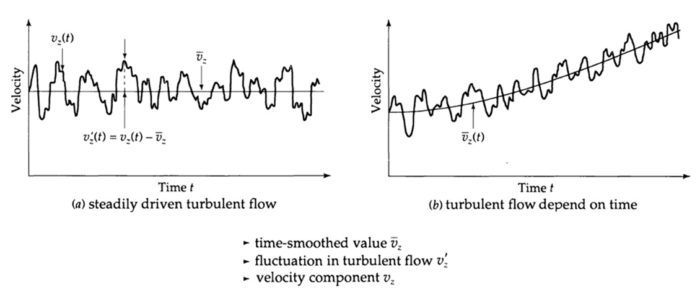
      In the case of a turbulent flow, is it possible to follow the velocity variation as a function of time with fluent, as indicated in the appendix?


      If yes, how?


      Best regards, 


      SER

    • Kalyan Goparaju
      Ansys Employee

      Hello SER, 


      If I understand, you want to track velocity as a function of time at a specified location, is that correct? If so, the procedure is as follows


      1. Create a "Point" from Domain->Surface->Point


      2. Create a "Report Definition" based on "Vertex Average" of the required variable (velocity magnitude in your case) and select the point created in Step-1 as the surface.


      3. Create a "Report Plots" under Solution->Monitors->Report Plots and select the report definition created in Step-2. 


      If the above steps are performed correctly, you will see the plot of time vs velocity magnitude at the chosen point once the simulation starts running. 


      Thank you, 


      Kalyan Goparaju

    • abd fs
      Subscriber

      Dear Kgoparaj,


      Thank you very much, I will try to apply it.


      Best regards,


      SER

    • Abubakar
      Subscriber
      Hi Kalyan sir, nJust to ask you one question from your answer why to choose vertex average plot only why not a surface weighted average plot.nnThank you,nAbu Bakar khann
    • Rob
      Forum Moderator
      If you use a surface you may smooth out fluctuations. That's not always a problem, but could be if you want to see the fluctuations! n
Viewing 4 reply threads
  • The topic ‘velocity’ is closed to new replies.
[bingo_chatbox]