-
-
January 2, 2024 at 2:02 am
Ma Mas
SubscriberHello everyone!
Can you help me export the mesh of the ANSYS mechanical to the abaqus format? I want a mesh file contain the node location and connectivity of the mesh.
-
January 2, 2024 at 9:01 am
Sampat Kumar
Ansys EmployeeHi Ma Mas,
We’re unable to view your question. Could you please upload it again? It appears there was an issue with the initial upload.
Are you attempting to export a mesh from ANSYS Mechanical to ABAQUS? If so, please describe any errors you encounter during the export process. Could you please outline the steps you took to export the mesh?
Regards,
Sampat-
January 2, 2024 at 4:57 pm
Ma Mas
SubscriberHello
Thank you very much for your reply. I aim to create a file for my mesh that includes the locations of the nodes and the connectivity of the elements. I would greatly appreciate your assistance with this.
-
January 3, 2024 at 1:44 pm
Sampat Kumar
Ansys EmployeeHi Ma Mas,
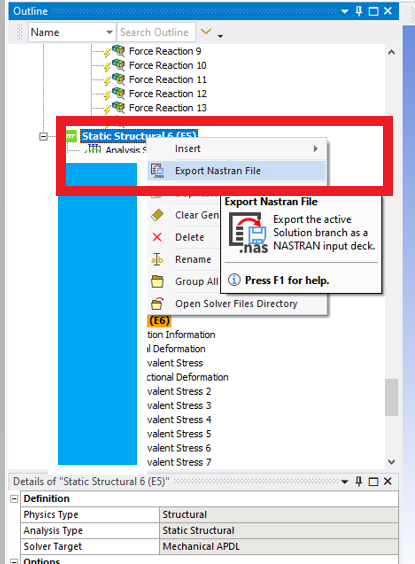
You can follow the process as peteroznewman mentioned. Right-click on the static structural or Model, and then you can export it as a Nastran file.
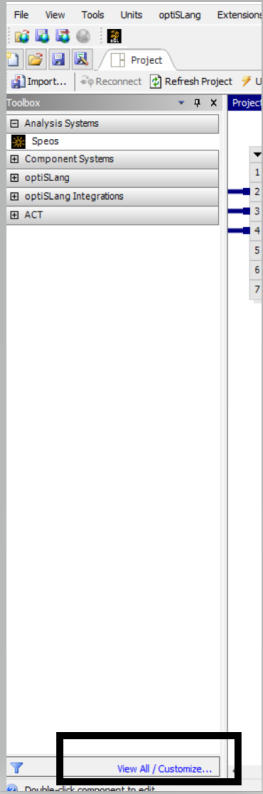
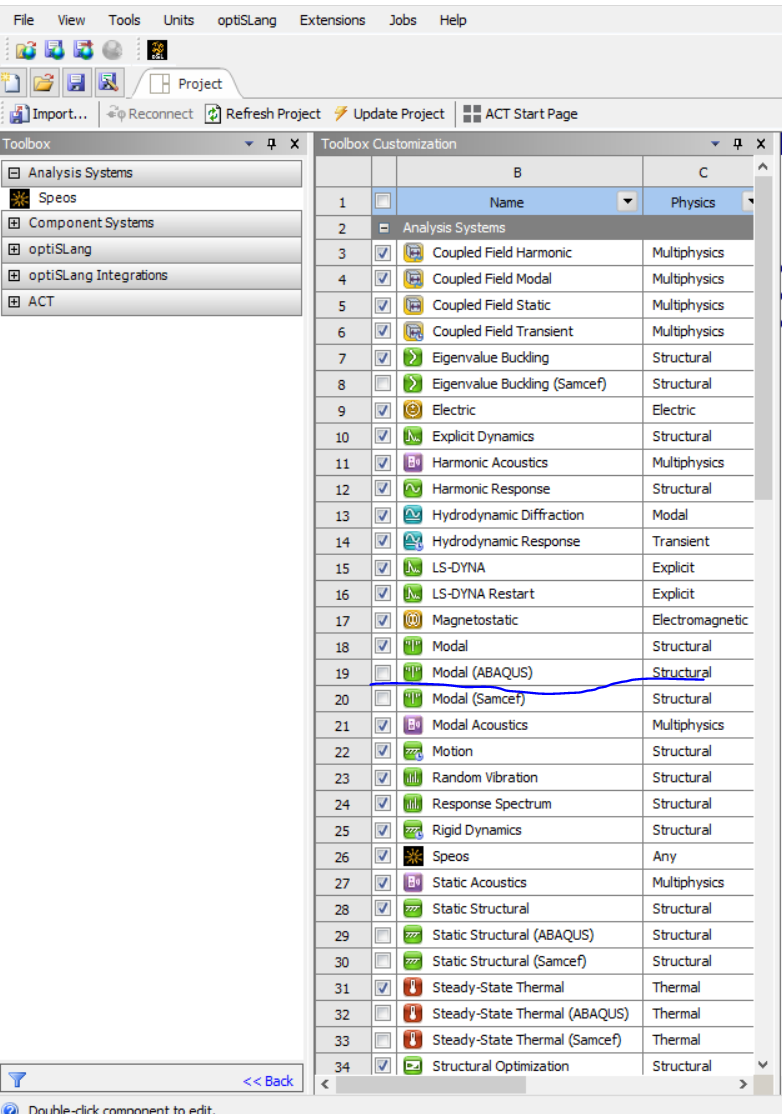
To check whether the Model( Abaqus) available in the student version or not, you can Go to WB and click on “View All/ Customize” and see if the model(Abaqus) static structural ( Abaqus) is marked or not.


-
-
January 2, 2024 at 2:05 pm
peteroznewman
SubscriberThis discussion has a screen image of the popup menu to export the Nastran file from a Workbench Static Structrual or Modal analysis.
-
January 3, 2024 at 2:26 am
peteroznewman
SubscriberAfter you export a Nastran file from Ansys, import that into ABAQUS.
-
January 4, 2024 at 11:38 am
dave
SubscriberIf you are struggling with license, I'm not 100% sure this will work, but you could try getting the student version of Altair Hypermesh, that might be able to read in ansys .cdb mesh files and export abaqus deck.
-
January 2, 2024 at 4:54 pm
Ma Mas
SubscriberHello
Thank you very much for your reply. I cannot find Modal (ABAQUS) in my ANSYS student version. Additionally, I am attempting to right-click on the solution and export NASTRAN. However, when I click on that option, nothing happens. What should I do to export using that option?
Furthermore, can I have a file named **.dat in the working directory? I want to use that to find the connectivity of the tetrahedral elements. There is a line like this:
/wb,elem,start ! set before creation of elements
/com,*********** Elements for Body 1 "SYS-5\WW" ***********
et,1,187
eblock,19,solid,,10617
(19i9)
1 1 1 1 0 0 0 0 10 0 1 1782 1797 1798 2925 15576 15669 15577 15578
15673 156791 1 1 1 0 0 0 0 10 0 2 1796 1799 1797 2925 15661 15670 15660 15666
15684 15673....
I want to know which ones represent the connectivity. For each tetrahedron, there should be only 4 numbers indicating connectivity. I cannot understand this file. Can you help me comprehend it? my goal is to create a file for my mesh contains the location of the nodes and connectivity of the elemnts. I want to use it in CCX solver.
-
- The topic ‘Export Mesh in ANSYS mechanical to ABAQUS’ is closed to new replies.
-
6024
-
1906
-
1425
-
1308
-
1021
© 2026 Copyright ANSYS, Inc. All rights reserved.